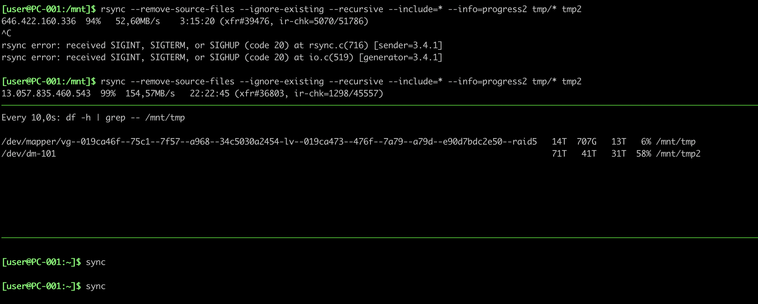
I really don't get this interaction between "sync" and "rsync". Tried it a few more times and it doesn't happen always but sometimes the "sync" gets stuck until rsync is finished completely. Even if it has yet to touch e.g. 3TB of data.

WTF?!?

Anyone seeing similar things or is there something else at play here too?

#gnu #Linux #coreutils #rsync #NixOS

@agowa338 You're likely hitting the kernel's dirty page writeback limit. With 4x HDDs in RAID 5 plus LUKS and Btrfs compression, your I/O wait is going to be massive.

When you run sync, the kernel tries to flush everything at once. On HDDs, that RAID 5 parity calculation + encryption is probably saturating your bus.

Have you checked iostat -x  or your  vm.dirty_ratio  settings? Might be worth lowering the ratio so the flush happens in smaller, more frequent chunks rather than one massive hang.

@unknownuniverse

Maybe I'm misunderstanding things, but doesn't "sync" normally only cause everything that is pending to be written right now but not things that enter the queue afterwards?

@unknownuniverse (also my iostat doesn't have a "-x" option)

@agowa338 Technically yes, but with Btrfs CoW on HDD RAID 5, that "current" list is massive. The metadata updates and parity for the flush likely lock the transaction log. New writes aren't in the sync, but they're stuck in the jam behind it.

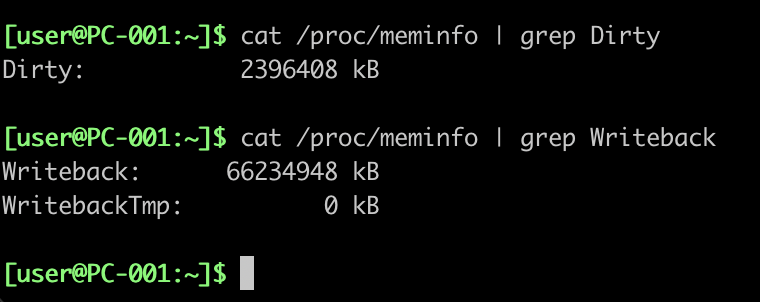
If iostat is stripped, check  /proc/meminfo  for "Dirty" and "Writeback" values. If Writeback stays high, your HDDs are the bottleneck.

@unknownuniverse

well the strange thing is if I'd Ctrl+C the rsync it will cause the sync to return almost immediately afterwards.

The thing that is confusing me is not that it takes extremely long (that's kinda expected with slow drives and this setup) but that it gets blocked until rsync has finished. Including the files it didn't even touch at the time when sync was ran.

@agowa338 That  Ctrl+C  behavior is the "smoking gun." By killing  rsync , you're stopping the flood of new dirty pages, allowing the kernel to finally clear the backlog.

On Btrfs RAID 5, the metadata overhead is so high that  sync  can't finish until the current transaction is committed. Even "untouched" files are stuck because the entire filesystem's I/O queue is saturated.

Check  cat /proc/meminfo | grep -E "Dirty|Writeback" . If Writeback is high, your HDDs just can't keep up.

@unknownuniverse

well if that was the case then rsync was stuck too. But it is still going and copying files.

The sync is stuck since about 2TB of data transferred.

@agowa338 That 66GB Writeback is insane. Your HDDs are physically drowning.

 rsync  keeps "going" because it's just filling RAM (Dirty), but  sync  is stuck because it's waiting for that 66GB mountain to actually hit the platters. RAID 5 parity on HDDs is the bottleneck.

You're essentially outrunning your hardware. Lower  vm.dirty_ratio  to force the kernel to flush more often so you don't hit this massive wall.

@unknownuniverse

Can't be, because it copied way more than the 66GB since I started the "sync" command.

Why is it waiting for stuff that wasn't even in the queue yet when I started it.

Am I missing something here?

(vm.dirty_ratio is 20 btw)

@agowa338 sync flushes the dirty pages at the moment it starts, but on Btrfs with RAID 5 and encryption, the metadata and parity updates cause ongoing writeback activity that blocks completion. So even new writes after sync started get delayed because the filesystem’s transaction log can’t advance until all related data is flushed.

In other words, it’s not just the original dirty data—it’s the cascade of dependent writes triggered by that flush that causes the hang.

@unknownuniverse

well but even then it would have to have finished by now. It somehow must cause a deadlock that causes it to also wait on any data that enters the queue afterwards too.

It can't just be the btrfs generated one for the data that was in the cache at that pint in time.

I still feel like I'm missing something here.

@agowa338 It's a Btrfs Transaction Lock.

Because of CoW,  sync  triggers a "Transaction Commit." On RAID 5, this can't finish until metadata/parity are consistent. If  rsync  keeps pouring in data, it prevents the transaction from closing, deadlocking  sync  until the stream pauses.

Try  sudo pkill -STOP rsync . If  sync  returns instantly, that's your proof.

@unknownuniverse can't do the pkill, I just CTRL+C-ed the rsync to wait on the writeback to flush.

It really appears to block until it hits zero for whatever reason. (It's down to 40GB pending right now)

@agowa338 That confirms it. You're seeing "Synchronous Writeback."

On Btrfs RAID 5,  sync  doesn't just snapshot; it forces the entire filesystem into a consistent state. Because of the RAID 5 parity and LUKS overhead, the kernel is effectively "locking" the  sync  command until the Writeback hits zero to ensure data integrity.

It's a hardware bottleneck disguised as a software deadlock. Your HDDs are the limit.

@unknownuniverse

I don't follow. (Also the RAID 5 is dm_raid not btrfs raid 5 btw).

And why does it not snapshot here, or force a consistant state with the data that is pending right now, but also wait until no new data is being added to the queue? That kinda makes "sync" quite unpleasant to use...

@agowa338 Since it's dm-raid5, you're hitting Kernel Writeback Throttling.

 sync doesn't just snapshot; it calls fsync on the entire block device. Because  rsync  is flooding the queue, the kernel won't return the  sync  call until the "Dirty" pages hit a safe threshold. On slow HDDs, that threshold is effectively zero because the parity calculation can't keep up with the stream.

It’s not a deadlock, just a very long "stop-the-world" flush. Try  sysctl vm.dirty_ratio  to see your current limit

@unknownuniverse

vm.dirty_ratio was 20 as I wrote before. I just now set it to 0 and restarted the rsync.

Also I don't see anything about this in the docs for sync.

I'll leave it at it is counter intuitive and kinda also against what people say about "sync" as well as what I got from reading the docs for it.

#gnu #coreutils

@agowa338 Setting dirty_ratio=0 is the nuclear option. Now your rsync will crawl because it has to wait for the HDDs on every single write, but sync will return instantly because there's no cache left to flush.

It’s counter-intuitive because the kernel is basically "stopping the world" to make sure your RAID 5 parity is actually on the platters. You've basically turned off the "speed" of Linux caching to get an honest sync command.

@unknownuniverse

Well yea, that was the goal. I just did this to test and see if now it would return instantly. I feel like the 20 was a quite sane value after all.

But "stopping the world" in my eyes still should not be blocking on new data that comes flooding in, but that may just be me...

@agowa338 20 is definitely the sane default for most workloads. Setting it to 0 just proves the cache was the "jam" in the first place.

The "stop the world" behaviour is frustrating, but on RAID 5, the kernel is likely refusing to close the current transaction until the parity is consistent. If new data keeps coming, it just keeps the transaction open. It’s a data integrity safety net that feels like a deadlock.

@unknownuniverse

Well that isn't a contradiction in my eyes. It should just be writing the parity for all of the data that is currently pending but not block for all of the new data that is pooring in too.

I feel like there is some race condition at play here...

E.g. If I copy 14TB, have a writeback of 66GB and do a sync when the rsync is at 13TB left to be copied then it shouldn't block the "sync" until the rsync is entirely done with all 13TB as well...

#Linux #sync

@agowa338 It definitely feels like a race condition, but it's likely just the kernel merging new writes into the active transaction to keep the RAID 5 parity consistent. It won't close the "flush" until the dependencies are clear, which is why it keeps moving the goalposts.

It’s a frustrating quirk of the Linux I/O stack on slow arrays. Good luck getting the rest of that data moved—hope the HDDs hold up!