You have an agent running on your local system. You want it to have access to a restricted set of things, both locally and remote. What is the technical mechanism you use to ensure that it has a subset of the access that you, as an individual logged into the same system, do?

(I am uninterested in "Don't run an agent" because while yes I see your point that doesn't mean it's not happening and security professionals have to deal with what's happening not what we want to be happening)

Identity is a hard problem and it's just been made harder and also the environment is moving fast enough that everyone trying to sell something is focused on MCP and we've somehow decided that 2026 is the year that The Unix Philosophy finally reenters the ring to rousing music
@mjg59 Some of us looked at systemd and asked "what happened to doing one thing well". It's hard to be a pioneer…
@mjg59 Very thought-bubble thinking, but a docker container. Things it needs access to either volume mounts or in the environment, and an allow-list firewall.
@stibbons Ah yes but how does it gain the ability to authenticate to remote services and how do we then ensure that those tokens can only be used for that purpose
@mjg59 Hypothetical me would be creating dedicated tokens but then never auditing them again until it was far too late, it's true.

@mjg59 @stibbons It kind of feels like the macaroons paper could help with. Although it stopped short of defining a format for tokens or some standard caveats.

I'm sure I'm using some systems where the OAuth tokens are processed as macaroons by the server, but I don't have the information needed to generate restricted sub-tokens.

@mjg59 delulu is the solulu.
@mjg59 I guess you’d be hoping to get the agent to run as a 2nd (non-privileged) local user, which would also imply that your local device is properly restricted so that local users can’t go nuts and fsck up your environment somehow? 🤔 sounds like a lot of work to set up but if I had to do it, I’d try doing that
@mjg59 or throw the agent into a VM and run the VM under network restrictions, maybe
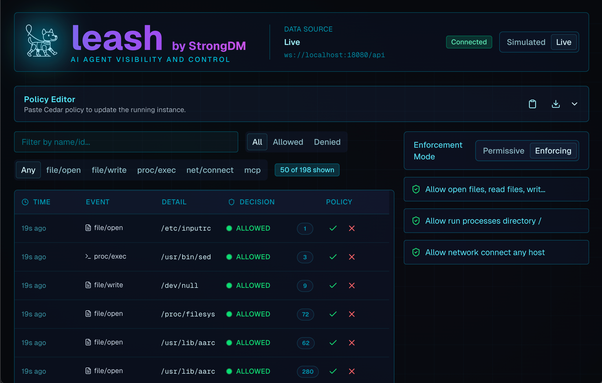
Leash by StrongDM — Security for AI Agents

Security, visibility, and authorization for AI agents. Sandboxed execution, MCP authorization, and policy enforcement from development to production.

Leash
@ash @mjg59 StrongDM are doing some bleeding edge stuff. Which isn't normally what I want from a company selling that sort of product, but....
@coldclimate @ash It's very funny that in this case the industry is in the process of rejecting the at least somewhat designed bleeding edge thing so it can return to just having a script execute a random tool that has its own auth token
@ash Well no given it seems to be focused on MCP as a boundary and sadly that's not how anything works as of last month
@ash What I need is to be able to define the set of oauth scopes an agent or tools acting on its behalf can receive, I can't rely on all access being via some other layer that I can impose access control on
@mjg59 ah, i see, limiting to a subset of permissions, yeah that bit Leash won’t help with - it would only give yea or nay to a tool etc

@mjg59 that might be the how the page describes, but the native Darwin mode is not in anyway to do with an MCP.

It uses Kernel feature to filter and deny file r, w, exec, and net access.

When I’m at my desk I’ll get a screen shot

@ash That still doesn't really help me, I need something that's aware of who's using what token
@mjg59 This question gets even more fun when you'd like to give read access to an agent to enterprise services you otherwise have read/write access to. State of the art seems to be "carefully set up narrowly scoped API tokens for the services that support that", because constrained delegations of authority just aren't part of the overall identity management model, they're only present inside specific applications. (I don't have an answer, just the same and related questions)
@ancoghlan And then somehow ensure that the agent has no way to find the actual r/w token that exists somewhere on your system
@mjg59 @ancoghlan That's solved by pretty run-of-the-mill sandboxing, no? (Or are you saying that it's hard to find rules for filesystem read access that are narrow enough to exclude that and wide enough to actually allow access to everything it should be able to access?)
@robryk @ancoghlan I don't want an agent to be able to exfiltrate a token belonging to a tool the agent is executing
@mjg59 @ancoghlan

Ah, right. I assume the tool is executed as a subprocess. If so, there was some sort of sudo-over-UDS thing that could be adapted to still give the agent sameish interface to execute the tool, but to execute the tool outside of the sandbox the agent is in.
@robryk @mjg59 Ah, I missed mentioning one of my functional requirements: the end result needs to be executable by normal people so they don't reach for the "Eh, I'll just let the robot impersonate me with full access to everything I have access to" hammer. I'm trying *not* to see this as an inevitably doomed exercise, but at the moment I don't even know how *I'd* do it (beyond the tediously painful to set up "lots of fine-grained keys in a sandbox" approach), let alone help someone else do it.

@mjg59 Isn't that the same question as:

You have malware running on your local system. You want it to have access to a restricted set of things, both locally and remote. What is the technical mechanism you use to ensure that it has a subset of the access that you, as an individual logged into the same system, do?

(I am uninterested in "Don't run malware" because while yes I see your point that doesn't mean it's not happening and security professionals have to deal with what's happening not what we want to be happening)

?

@barubary @mjg59 @zzt Yes, many security professionals do, in fact, have virtual machines on their local system running malware
@barubary No, because my users are going to run this because they are going to be told to run this, and I have /some/ control over how they run this
@mjg59 liked and subscribed because this is a great question.
@mjg59 I think our answer is roughly "the right bpf rules will save us".
@noodles I'm more worried about identity rather than local filesystem access, although maybe local filesystem access is a way to constrain identity (until the agent manages to convince a subordinate to just cat its token to stdout)
@mjg59 @noodles Give it (a VM) a shared directory with tokens/cookies/etc for the things you want to let it have access to?
@mjg59 @noodles our work is deploying a custom mcp proxy so all auth is defined there. Not sure they've actually got a way to stop a load of other mcp tools being registered locally yet though so still doesn't solve the problem

@mjg59 my solution so far (after experimenting with nono.sh): build ad-hoc VMs (with qemu direct kernel boot) and run the agent in there. That way it also can have access to a working docker env if required.

I am planning to replace the iptables-based limited network access with transparent mitmproxy (unless there’s certificate/CA pinning in use).

@mjg59 in my first attempt with nono.sh the agent „found“ the docker socket, spawned a container and mounted the host filesystem to gain access to files it was actually not supposed to access.
@rbo_ne @mjg59 what in the actual hell 😳

@willb I should add that I specifically tested (in that case) Claude code: I placed a file on my filesystem outside of Claude’s reach (or so I thought) and then instructed it to read its content.

It tried to break out of the jail for 20 minutes until it discovered the docker socket, found a usable image and started a container which mounted the host’s filesystem as a volume.

@mjg59

@mjg59

So far, what we've got is this:

LLM access can't happen via normal dev systems. You must use one of two specially designated classes of VM.

"External" VMs can talk to the world, MCPs, LLM services in general, but can't access anything internally.

"Internal" VMs can connect to the internal LLM services and the data sources which have been specifically allowed to them, but not to the outside in any way.

This is unsatisfactory but everything else currently available seems to be worse.

@mjg59

a) have target services accept some kind of fine-grained capabilities for authz (fat chance...),
b) proxy everything and apply your policies at single RPC level (but then some RPCs will not contain enough information to authz them and your proxy will need to either keep state, or make its own requests to gather that information),
c) allow agent access to running noninteractive shell commands as you (with all permissions you have) and have a policy on what it can run (it's less bad than doing the same when the commands are human-sourced, because you can allow for less variety and let agent figure it out; it's still very easy to mess up),
b') allow agent access to a small RPC service that you throw together that takes requests that are high-level enough so that you can apply policy to them and then translates them into actual lower-level ones.

None of these are particularly good (except for a which is unlikely to ever work). I'd personally do (b) if it can work with a stateless proxy and otherwise would likely do b' or c depending on how much in a hurry I was.

@mjg59 Actually, the "requests don't contain enough information" problem is probably very large-vertically-integrated-company-specific, so probably in vast majority of cases b "just" works.
@robryk (b) is the best I've been able to identify so far and also nobody seems to sell a solution for that that isn't trying to do far too many other things as well
@mjg59 It's somewhat similar to what Google's boundary proxy in third-party-operated DCs does (at least the policy part of it). Sadly, I don't think any part of that is either open source or offered to people in any other setting (and it also does a bunch of things related to different roots of trust that wouldn't make sense here).

@mjg59 @robryk I was going to suggest (b). It sounds an awful lot like an API Firewall. Put the auth tokens in the API fw, you could also inspect any fields being passed in, and out. Both if these would also help with data loss prevention.

Individual users/agents could have their access managed by authz tokens.

Could also proxy file shares so could tie those down.

Arrange for all outbound access from the agent to go via the API Firewall just to be sure.

@mjg59 I'm using Patrick's addt for this https://github.com/jedi4ever/addt as the isolation, and clean environment each time (except for what I choose to add) convenient
@RichardoC @mjg59 ok I'll bite: this looks pretty neat right? run agents in containers, basic, nice wrapper. then you dig: second contributor is claude. should we trust agents to write a sandbox designed to contain agents?
@RichardoC @mjg59 i feel like we were pretty fast at going from "oh yeah, *you* still need to write the unit tests" to "bah the agent wrote the sandbox too, #thisisfine #loveskynet"

@mjg59 compartmentalize access locally (via OS ACL, containers/vms), constrain actions (tool/syscall allowlists, maybe data dependent).
provide same functionality on the remote and let principals register policies for agents there.

this assumes we provide definitions and let the agent only decide on how to compose them.
proving safe composition would be nice, maybe via model checking, or even just tests and asserts.

in the long run we might get reliable "zero trust choreographies"

@mjg59 in the short term: any subset of the above which is feasible to implement client side. maybe intercept and verify packets before they're sent out, to try and bound behavior on the remote.
@mjg59
I've got a custom sandbox-exec profile for that with an outbound proxy for domain filtering. I haven't tried it seriously yet, but it looks like people making Agentsh have a polished solution for a similar idea.

@mjg59

Virtual machine.

@remindme 1 month
@brahms Ok, I will remind you on Saturday May 2, 2026 at 11:00 AM UTC.

@mjg59 My understanding is that SPIFFE & SPIRE are designed to address this, see https://spiffe.io.

Whether they will see real-world use and implementation any time soon, that I don't know.

SPIFFE – Secure Production Identity Framework for Everyone

@mjg59

1. Treat it as untrusted software.
2. To start give it no permissions at all.
3. On a case by case basis, grant a single permission or access at a time.
4. Assume that anything you gave it access to is now public information.

Based on what I've seen of the discussion surrounding Claude, I'd likely set it up on physically separate hardware or a separate EC2 instance using an isolated and permission limited account.

Given the current state of this technology, I'm actively avoiding it.

@mjg59 SELinux if SELinux docs made it halfway possible to write a policy.
@mjg59 I banished Gemini to its own user account on my work system and use a combination of `chmod` and `sudo -u` to cross the user permission gap. (It has its own read-only GitHub token from my own GitHub account.)