unnick
 alice pellerin
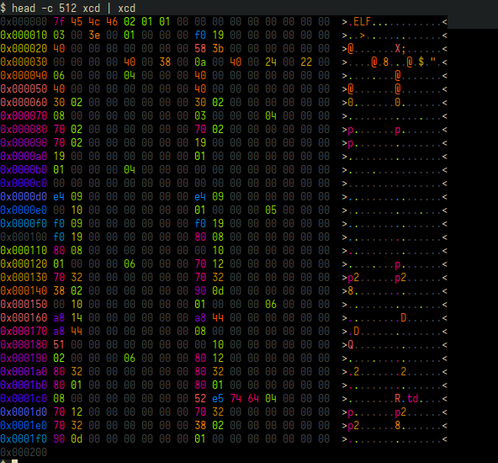
i don't see enough people with one of the best tool improvements i've ever made for reverse engineering, so i had to write a blog post about it!

 Simon Rolfmore
 Consensus Tullyality
@simonomi by sheer chance my eyes locked onto the single C0 in the monochrome example
did I win?
 fops
fops Nelbium:menheramusic::uplink::polyamory_pride_potion:
@simonomi Seeing this preview image makes me want the improvement of alphabetizing my hex editor.
But seriously this is incredible, thank you!
 raptor
 Phil Stevens
@simonomi I'm already thinking about how to apply this to log files, a la grep.
@phil_stevens ouuuu if you come up with anything cool make sure to @ me !!
 Tim Ward ⭐🇪🇺🔶 #FBPE
@simonomi That reminds me of debugging Sinclair QL code.
The screen could be mapped to the next bank up of RAM, where code and data live. Instead of a colour coded hex dump, the screen was then a colour coded bit dump - each pixel was one of four colours indicating its two bit value.
So two bits per pixel, sixteen pixels per thirty-two bit pointer. With a bit of practice we could follow pointer chains around the screen, really helpful for debugging complex data structures.
 Cameron Hayne
@TimWardCam. Back in the day, I wrote a BASIC compiler for the Sinclair Spectrum. To have more available memory, the compiler put the floating-point stack and the call stack in display memory. So you could watch the stacks grow during the compile.
 d@nny disc@ mc²
@simonomi i'm curious about the statement here:
the bitstream is much more colorful and chaotic because good compression algorithms output data that looks visually random.
not disputing its correctness but this is a very nontrivial claim described in visual terms that are somewhat removed from the discussion just above regarding prefix codes. i'm curious about how you arrived at this and in particular if your reverse engineering work motivated this intuitive description
@simonomi i think prefix trees are supposed to be pretty standard nowadays but i'm particularly under the impression that older formats employed hand-rolled heuristics and i'm wondering if this is what you're speaking to with the discussion of visual randomness here
@simonomi very much not a reverse engineering expert but have done some binary parsing and been frustrated with the expressiveness of languages for this task. scheme has some interesting work in this area but rust is my experience and could stand to do better
@hipsterelectron it mostly came from the intuition of having look at so many different types of binary. stuff with really high information density (compressed, executable, media, etc) tends to look very busy, because there's simply more information squished into fewer bytes
i've ended up writing my own whole fancy binary parsing system for my tool carbonizer. it's pretty specialized to the patterns used in the game files for Fossil Fighters, but i'm reasonably happy with it overall
@hipsterelectron i linked to some examples in the article, specifically https://github.com/simonomi/carbonizer/blob/6c311b6a2801576033cd42a8ba95461cee2ac6d1/Sources/Carbonizer/files/ff1/KPS.swift#L4-L25 and https://github.com/simonomi/carbonizer/blob/6c311b6a2801576033cd42a8ba95461cee2ac6d1/Sources/Carbonizer/files/ff1/DAL.swift#L20-L107 and https://github.com/simonomi/carbonizer/blob/6c311b6a2801576033cd42a8ba95461cee2ac6d1/Sources/Carbonizer/models/Texture.swift#L5-L28

@simonomi oooh swift!! this totally looks like the patterns i've arrived at. i do feel reflection is super helpful here it's the one point rust makes super difficult
@simonomi also glad to see this precise use of preconditions
@simonomi thx so much super cool stuff. i don't do too much hex reading but if i impl something similar for emacs i'll def link to this piece. great argument
@hipsterelectron i actually don't use any reflection at all >.< 100% macro magic
@simonomi i also can't rly say much about reflection but it's just a subject of some yearning. rly wish rust could have seen this take life https://soasis.org/posts/a-mirror-for-rust-a-plan-for-generic-compile-time-introspection-in-rust/

@simonomi we developed a similar framework for the
zip crate which was initially just to avoid multiple reads for data of known size but also supports safe and very performant SIMD searching for magic bytes (every single impl i've seen for zips works byte-by-byte and has trouble with the file comment). took some more work to use the same specification for writes@simonomi i totally support bespoke parsing code and did similarly for zstd, which in particular has some data-dependent variable-length bit arithmetic that's especially hard to encode. i think it's useful to separate fetching blocks of input from parsing but the parsing itself seems easier to maintain without trying to genericize format specifics
 🗦new🗧 FireFly
@simonomi yes very good. I wrote my own hexdump tool for similar reasons (and some other bits and bobs I wanted), and would encourage regular hexdump users to write their own too and tune it to their preferences
the main other feature I added is an `-r`to specify a byte range, and I use something like `hexd -r 0-0x40 *.foo` way too often to compare headers of a bunch of files quickly (e.g.)
 endrift 🏳️⚧️
 Jeffrey Haas
@simonomi Very nice. I can see similar use cases for PDU parsing.
A caveat I'll throw out is these sort of things need a bit of palette diversity to cover color blindness. I've worked with a statistically unusual number of such folk over the years in software development.
@jhaas i really struggled to pick 16 colors that look distinct to my non-colorblind eyes, so that's definitely a concern. i don't think you lose _that_ much depending on how many colors blend together, but i'd love to see good colorblind-friendly palette options
@simonomi I haven’t done web dev in ages but sites and apps exist.
No endorsement but here is an example.

 Joshua Barretto
@simonomi really enjoyed reading this, very fun. Thanks for writing it. Makes me want to add hex editing support to my editor!
 mrkite
@simonomi related: hex editors should use lowercase hex characters. That helps differentiate B and 8 and C and 0.
@mrkite interesting!!! i'll definitely have to give it a shot
 Peter Hosey
@simonomi I did something similar for hashes/digests: https://github.com/boredzo/hashvis
Uses both color and shape to make hashes easily visually comparable.
 Lucas Werkmeister
@simonomi I don’t work much with hex but I just want to commend how NoScript-friendly this post is!! the double-<details> for the color / no color toggles is a really good trick
@LucasWerkmeister thank you so much!! i spent a long time on my pure html/css tabs, i'm glad it's appreciated :D
 Shafik Yaghmour
 Adam Katz
@simonomi @b0rk this is great! As you noted, there are lots (infinite) ways to choose your coloring scheme and I really like how you use so many colors in yours.
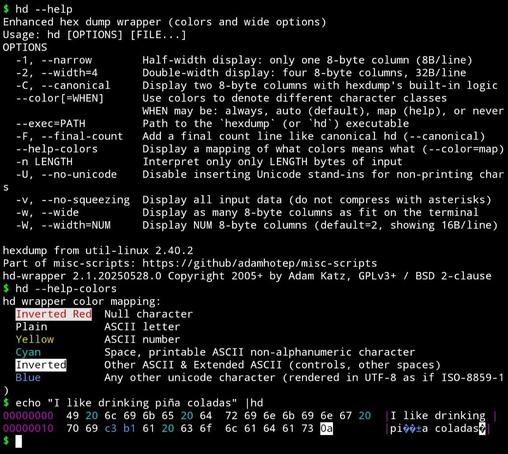
My own such tool uses a far smaller pallette for text/Unicode purposes (and also supports wider displays and a few other tweaks): https://github.com/adamhotep/misc-scripts/blob/main/hd
(Edit: that screenshot isn't great since I took it on my phone with Termux and its Unicode support isn't great.)
 Christian Tietze
@simonomi dang, I can't discern the colors from the "this is much better" screenshot, but I still love the idea :)
 Arnau
Arnau@simonomi Nice post!  You might be interested in "hevi", my own project. It colors the output based on the binary format and its semantics. Right now, I'm (slowly) working on greatly improving the way to define formats.
It's on codeberg:
https://codeberg.org/arnauc/hevi
Also previously on github:
https://github.com/Arnau478/hevi
You might be interested in "hevi", my own project. It colors the output based on the binary format and its semantics. Right now, I'm (slowly) working on greatly improving the way to define formats.It's on codeberg:
https://codeberg.org/arnauc/hevi
Also previously on github:
https://github.com/Arnau478/hevi

 Daniel Collins
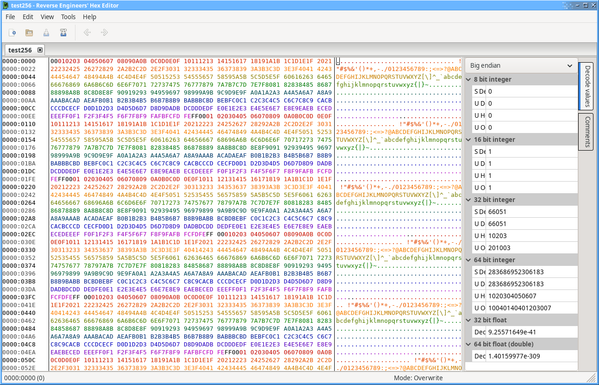
@simonomi REHex supports this (off by default), although I think your colour schemes are better than the ones I currently ship with, so I might steal them (they're user-configurable too).
@simonomi quick pass at your scheme using the gradient functionality to reproduce it from the limited default palette in both light and dark mode... suggestions for a name besides "Alice's scheme"? :D
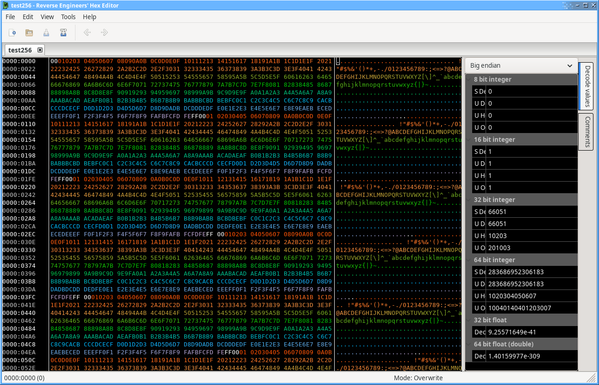
 moralrecordings
@simonomi Interesting! I'll have to try doing hexdumps with a full colour spectrum.
I did find it was a lot easier to scrub through unknown files after making a hexdump tool with defaults that worked for me (colours for 00/FF + ASCII range + everything else, symbol column using CP437). I also made a tool for byte histograms, which provides pretty good results for discerning compressed files from encrypted
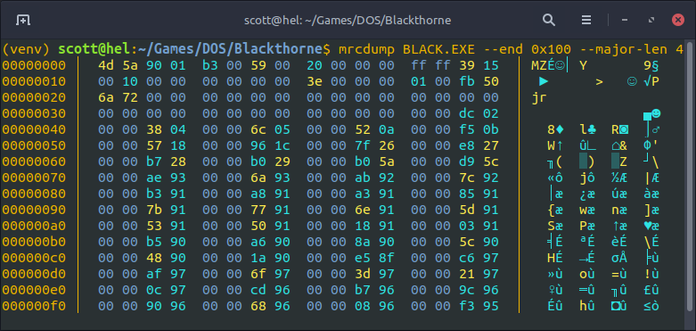
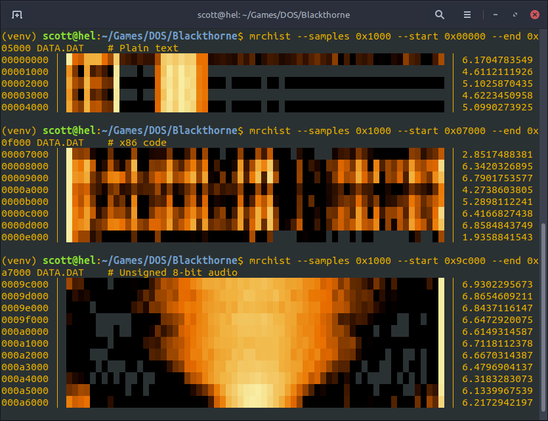
 Haelwenn /элвэн/
@simonomi I made a similar one some years ago https://hacktivis.me/projects/xcd-rgb (true-color, hence RGB in the name) after discovering https://www.muppetlabs.com/~breadbox/software/xcd.html (256-colors).
It's nice to see other people writing similar tools. ^^
xcd-rgb screenshot
It's nice to see other people writing similar tools. ^^
xcd-rgb screenshot