 ZiggyTheZygote
Not sure if this is the right place to ask, but does anyone know if I put a wifi extender in the shed (according to the drawing) will the signal reach the office? Thanks for any help.
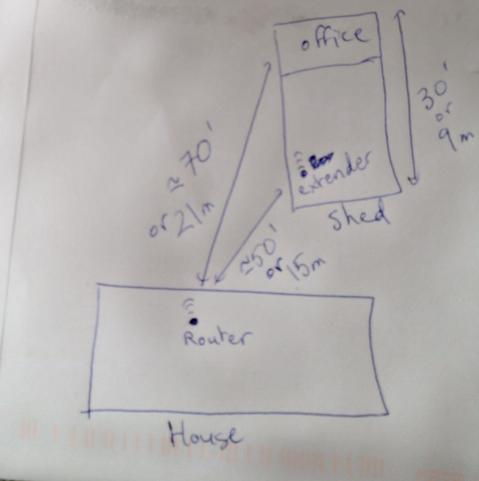
Not sure if this is the right place to ask, but does anyone know if I put a wifi extender in the shed (according to the drawing) will the signal reach the office? Thanks for any help.
Go stand with your phone where you’d expect to place the extender.
If it gets a strong signal, you are probably fine.
Probably a bit better than your phone, depending on models (phone, extender, router), of course. At least in theory repeaters can have better antennas and more power to spare.
If you can put a network cable though at least one of the walls you might as well just put an outdoor AP (main building) or WiFi bridge (shed) there. That way the signals only have to go through one wall.
The biggest problem you’re going to run into is impedance. This can be walls, studs, concrete, etc.
Is there any way you can run a cable between the two buildings? You can then hook up your repeater and it would be guaranteed to work; with more effort.
Do yourself a favour and don’t buy the TP-Link ones though. I have TP-Link powerline adapters too, and they kept losing the connection over time. I later switched to FRITZ! and those have been working perfectly fine for years.
That said, the powerline solution only works well if both devices are on the same phase.
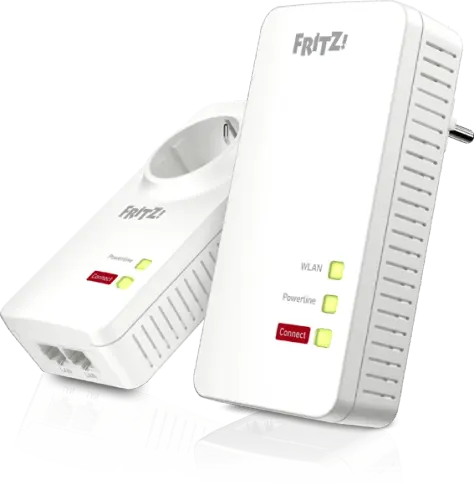
✔ Preisvergleich für FRITZ! FRITZ!Powerline 1260 / 1260E ✔ Bewertungen ✔ Produktinfo ⇒ Set bestehend aus: 1x Powerline/WLAN-Access Point (FRITZ!Powerline 1260E, Steckdosen-Adapter) 1x Powerlin… ✔ Access Points ✔ Testberichte ✔ Günstig kaufen
I have something similar to a small cabin, build with unifi in mesh mode. Works just fine, but i only need connectivity, not much more but one video stream is possible.
Depends very much on the repeater and on what you gonna do in the office. Stay away from one-radio repeaters. You get better bandwith and stability with :
A) an outdoor ap in wifi client mode. You run a cable from that to a switch in the office and cables from there to pc, printers etc. That’s how I connected a remote ip camera. Works flawless.
B) multi radio repeater (one radio talks to the router, the other radio is an ap on another chanel)
C) two one-radio ap’s with utp between them and the same as above
Not really any way to determine this on paper, really. Other than ‘it depends’.
Depends on what materials the walls are made of, the model of your wifi router, the orientation of your router’s antenna(s), the orientation of your laptop or phone or whatever’s antenna, what obstacles or vegetation might be between the two buildings, what other devices nearby might be producing interference, whether or not Mercury is in retrograde, etc. In an edge case, even the daily humidity or precipitation may make the difference between a usable or unusable signal.
As others have said, the best way to test would be to just stand with your phone at the location where you’d put the repeater and see if your phone gets a strong wifi signal there. If it does, a repeater will probably work.
However, a repeater isn’t the only solution that could work here. Other potentially good solutions:
Run an ethernet cable from the house to the office. (Faster, more reliable, but would require running wires.)
Use a network over power lines setup, to have wired network without needing to run any new wires. (Still faster than wifi; might not be quite as reliable as other setups, though.)
Use a directional wifi antenna to extend the range of your router. If you point it at the office, that will probably extend the range more than enough to reach it. (A directional antenna will be more reliable than a repeater, and for a comparable price. Also will save a little electricity, since you don’t have to power the repeater.)
Have you tried simply using it without any upgrades? It’s only 70ft away, and wifi can definitely reach that far if conditions are good. Maybe try moving your wifi router closer to a window or exterior wall. If your router has movable antennas, make sure they’re positioned vertically for best signal distance. If you have a lot of neighbors, go into your router’s configuration and experiment with changing the wifi channel. If I remember right, there are 11 different channels, and if you’re on the same channel as a different nearby network, the two will interfere with each other and have greatly reduced range … but if you have it on a different channel, that will avoid interference and improve range.
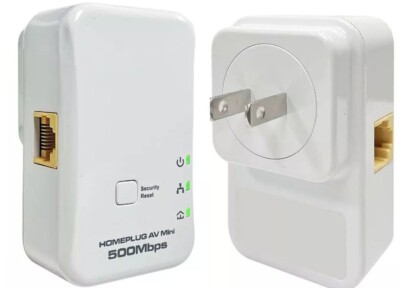
High Speed Ethernet Over AC Powerline Network Adapter Kit. No internet dead zones and weak signals. Transmission Range: 300m or 980 feet over powerline. 2 powerline network adapters. Compared with traditional wired networking, this adapter kit is convenient without running high and low for hard wire installation.
Seriously, though, maybe try this solution first:
As stupid as that looks, it’s very possible that it would be more than enough to get your wifi signal where it needs to go, at basically zero cost and zero energy usage.
 wizzor
 Anivia
 dohpaz42
 soulsource
 redlemace
 rapchee