
Just built a home security gateway using a #RaspberryPi and #WireGuard (via ProtonVPN) 🛡️

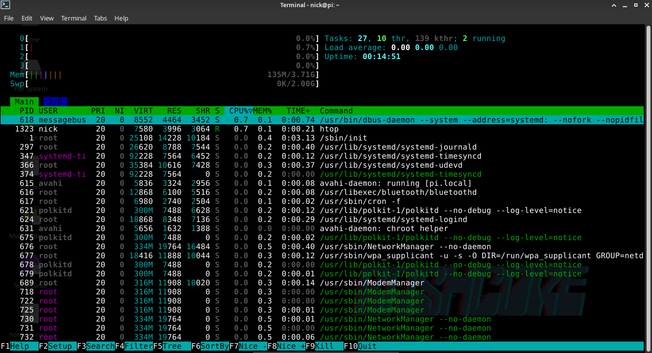
It provides a secure tunnel for all my devices, especially #IoT ones that can't run a VPN. Best part? Efficiency! As you can see in the #htop shot, it’s barely sipping power: only ~135MB of RAM and near 0% CPU. 🚀

I can toggle the VPN to manage remote IoT access while keeping a solid layer of protection. Small, silent, and rock solid.

#SelfHosted #Privacy #CyberSecurity #Linux #OpenSource #VPN

@nickbearded could you try again with btop instead? It would give a better idea of the resources. Zero% seems unlikely
@GuillaumeRossolini I get why 0.00 load seems 'unlikely', but that’s just a well-optimized headless RPi4.
​WireGuard runs in kernel space: it's invisible to the scheduler unless there's heavy traffic.
​Load measures the queue: on 4 cores with no tasks waiting, 0.00 is a perfect score.
​Irony: btop uses more CPU just to draw its UI than the VPN itself! I'd rather save those cycles for my data than for eye-candy 😆
​#RaspberryPi #WireGuard #SelfHosted #Linux #Networking
@nickbearded fair enough for the UI, and thanks for the details of why the tools show no activity
@nickbearded by the way all your messages show up as Italian, so it may confuse people trying to translate them 😅