Just built a home security gateway using a #RaspberryPi and #WireGuard (via ProtonVPN) 🛡️

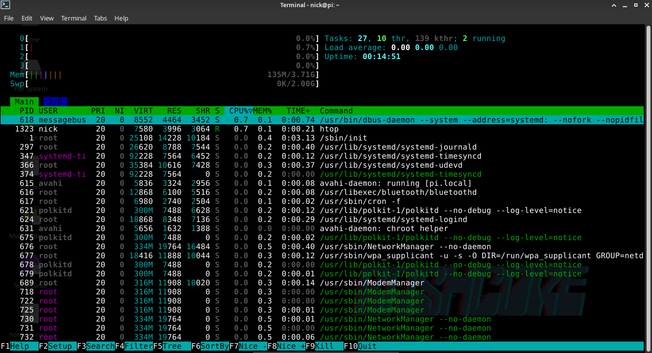
It provides a secure tunnel for all my devices, especially #IoT ones that can't run a VPN. Best part? Efficiency! As you can see in the #htop shot, it’s barely sipping power: only ~135MB of RAM and near 0% CPU. 🚀

I can toggle the VPN to manage remote IoT access while keeping a solid layer of protection. Small, silent, and rock solid.
#SelfHosted #Privacy #CyberSecurity #Linux #OpenSource #VPN

@nickbearded Barely using CPU, but how much power is it sipping? I know it’s not much but always looking for quantifiable data. You’ll need a kill-a-watt or energy monitoring plug.
@dhry my Raspberry Pi 4 sips 5V DC via USB-C connector.
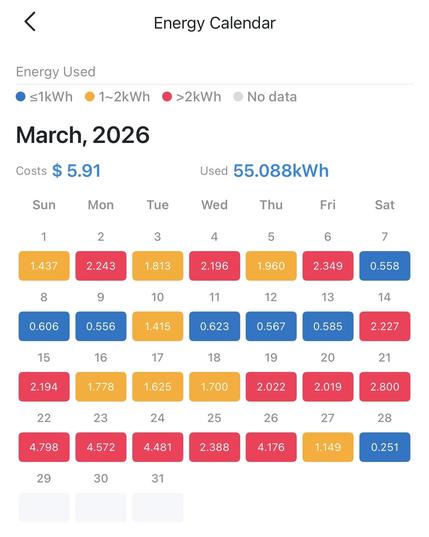
@nickbearded I have three (gathering dust for years) and know that part - but how much energy does it use? kWh. Question might be unclear so attaching a screenshot showing energy usage for the month for my windows machines. Tapo P110M used. Hint - you can’t get this from htop.
@dhry Fair point! While htop doesn't show kWh, the physics of a Pi 4 are well-documented. At the idle state shown (near 0% CPU), it draws ~3W.
​Doing the math: 3W * 24h * 30 days = 2.16 kWh per month.
​Comparing that to your 55 kWh Windows setup? My gateway uses about 25 times less energy to do the same job 24/7. That’s the beauty of ARM vs x86 for simple networking tasks 😃
@nickbearded Ok I’ll retract the question. Not after theoreticals.
@dhry Fair enough! Real-world data is king. Though at these power levels, buying a $20 energy monitor to measure a ~$10/year electricity bill feels like overkill.