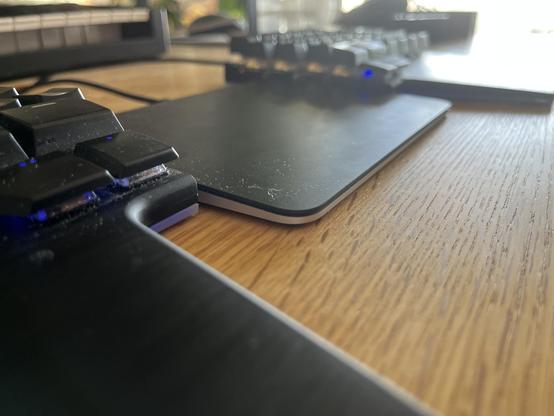
What I wish I'd known before getting into split keyboards: definitely results in better keyboard ergonomics, but worse pointing device ergonomics.

If your keyboard halves are perfectly aligned with your arms, your pointing device won't be. If you move it in the middle of the halves or to the side, it hurts.

Gotta move one half in a bit to make room for it, which makes you want to ease the other half in too. So both halves end up very close to each other… like in a normal keyboard.

@jonikorpi do you use a mouse? I think it's not so bad with touchpads and trackballs. I use a touchpad myself with a split keyboard, it's ok. In theory, I can even alternate hands when touchpading, in reality I rarely do...
@bouncepaw Trackpad right now, and yeah I guess mouse suffers most due to needing more space. I've been trying to keep the trackpad in the middle recently, Macbook style. The alternating is nice, but I keep ending up with wrist pains.
@jonikorpi damn. How flat is your split keyboard? This might be a factor too
@bouncepaw There’s definitely a height difference. I can feel the trackpad should be a bit higher, or at least there should be a thin wrist support in front of it.
@jonikorpi oh wow! Is that a low profile second thumb row!?

@bouncepaw Heh yeah it's the first version of this. https://dygma.com/pages/dygma-raise-2

I regret getting it because I'm too old to unlearn arrow keys, but otherwise it's pretty good for what it is.

The Best Wireless Split Keyboard - Dygma Raise 2

The Dygma Raise 2 is a mechanical wireless split keyboard that elevates your productivity and boosts your comfort like no other. Raise your game with Dygma. Explore now!

Dygma

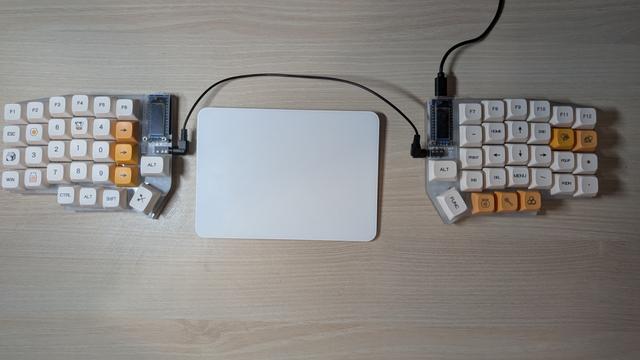
@jonikorpi my setup is like this. A high-profile keyboard. Rather than raising the touchpad, I want a low-profile keyboard. Also not the offset between the right half and the touchpad: it's there so it's easier to reach with the right hand (I'm rightie).

I used to have a keyboard with mixed-profile thumbs (made by yours truly from foamboard), the was awesome

@bouncepaw I love that it looks like some kind of near-future-scifi lab equipment. :D

Low-profile would be super nice. Oddly rare in the prebuilt mechanical keyboard market, or at in least the part intended for non-tinkerers like me.

@jonikorpi i like having a trackball in my right split, but I haven't yet found the perfect keyboard for me

there are no orthogonal 2x4x6 keyboards with a trackball, and most built-in trackballs are not very good

that said, Keyball gets pretty close to optimal, i even played action RPGs on an aliexpress clone after swapping the bearings for zirconia

@jonikorpi left-field suggestion https://www.homerow.app
Homerow | Keyboard shortcuts for every button in macOS

Homerow lets you navigate macOS with more keyboard and less mouse.

@jonikorpi Are your arms parallel?

I have the top corners of my keyboard almost touching and angle my halves outward to match the angle of my arms coming in. My trackball is on the right.

I've used this setup for years with Kinesis Freestyle keyboards and it's greatly resolved my issues that other "natural" keyboards didn't. But it's the only true split I've ever used.

@idbrii Yeah, with a flat keyboard my arms only really feel comfortable when as parallel as possible. Some kind of forearm pressure appears if they're angled. Seems to go away if the keyboard halves are "tented”, but I don't have the equipment for that.

@jonikorpi Oh, yeah. Mine has risers to lift the middle to tent it like that. I guess you need to find something that can give it that lift!

I've used a Magic Bag (full of beans or rice or whatever) to give similar lift to my trackball. Not very professional looking, but doubles as a wrist cushion.