
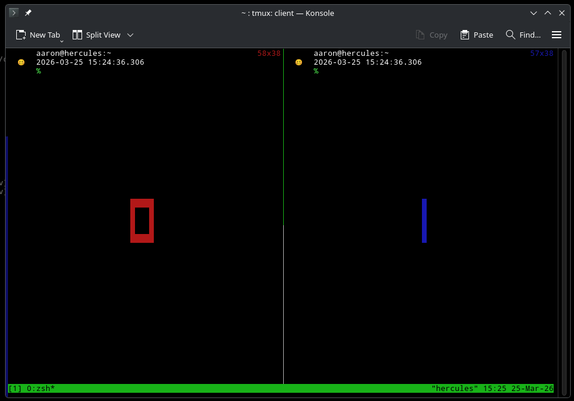
In #tmux, a "horizontal split" pane window places the panes side-by-side via "Ctrl+b %" or ":split-window -h".

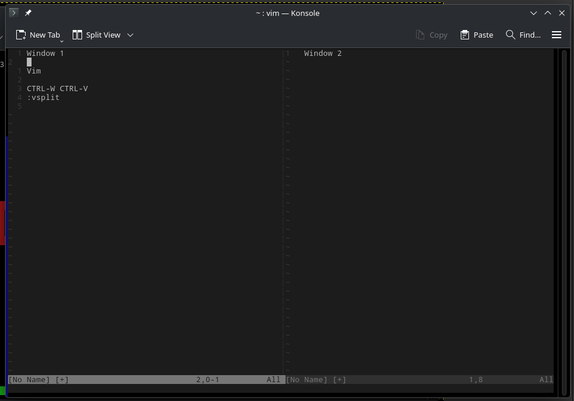
In #Vim, it's a "vertical split" by executing either "Ctrl+w Ctrl+v" or ":vsplit".

No wonder I'm always confused.

Is it a horizontal split because the windows/panes or horizontally placed, or a vertical split because there is a vertical line separating the windows/panes?
#Linux

@atoponce In Vim it's a `:vsplit` because the split between the panes is vertical.

I tmux it's a `:split-window -h` because the “new” pane is placed horizontally next to the “old” one.

It took me a solid year of my early nerd career to isolate those notions in my brain.

@atoponce I’m pretty sure I have comments in both my .vimrc and my .tmuxrc to make sure I remember.

@atoponce i think vim is wrong about this.

i have the tmux splits mapped to "-" and "|", so i don't have to think about that.

and because i use tmux, i rarely need or want vim's :vsplit. i almost always use :split.

@atoponce I solved this by keeping `:sp` and `:vsp` which make sense to me in #vim and by using `<prefix>-` and `<prefix>|` in #tmux. `-` and `|` are visually explicit. See my config if it helps : https://gitlab.com/pcoves/tmux/-/blob/master/tmux.conf?ref_type=heads#L11-12
tmux.conf · master · Pablo COVES / tmux · GitLab

Yet another tmux configuration

GitLab
@atoponce the #kate editor also thinks in the direction of the cut, so split h means one panel on top of another an split v is two side by side.
@atoponce I remapped the tmux commands and bindings about 20 years ago to match VIM and never looked back!