 commander
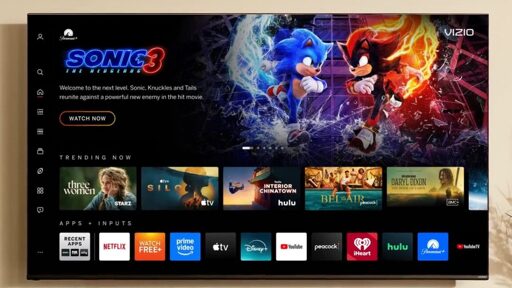
Newly purchased Vizio TVs now require Walmart accounts to use smart features
Nearly every electronic device sold at Walmart is a unique SKU sold nowhere else.
They have their own internal logistics and manufacturing specialist team that works with manufacturers to hit specific wholesale price targets that they demand to even consider carrying their products in store. They reduce the number of ports, features, included accessories, quality of materials, etc. to get the that specific price.
The manufacturers take a huge hit on their own profits from these… but in theory will make up for that with sheer sales quantity.
Requiring a Walmart account probably means some sort of kickback to Vizio, or other wholesale arrangement. And since these devices are usually unique SKUs that can’t be sold elsewhere, they can receive differentiated software, have no risk of any sort of price matching, etc.
Did not know that. Definitely explains the integration now. Although the rest still applies to other brands.
Doesn’t Walmart already have onn?
You would have known that if you had read the article.
Probably, but even getting waterboarded would be a better use of my time than reading an article about Walmart accounts now being required on TVs.
And yet you’re commenting on it… ;)
Had some time before the waterboarding appointment.
 ImperialATAT
 inari
inariIts crazy how shitty they’ve gotten. I got one on black Friday probably 10 years ago and it didnt have and built in apps just casting from your phone. A few years later they updated it and suddenly it had apps and demanded you agree to their TOS and all that (possibly also download their Vizio app?). I didnt keep it for long after that (mostly because it was a budget ass TV with 4K but not HDR) and replaced it with an LG C3 AMOLED from Costco, which I couldn’t be happier with. In our bedroom we have a TCL and I think that’s where the sweet spot is with budget TVs
Sounds like the trash taking itself out, no? If I don’t want smart features in the first place, then I see this as an absolute win. Nobody should be connecting their TV the Internet in the first place. Always make sure to use things like android TV boxes, fire sticks ect… over using the built in “smart” features as those TVs will be phoning home all day and serving you ads the minute you connect it to the Internet lol
 teft
teft renegadespork
As soon as RAM isn’t more expensive than the TV.
 nathan
I just wish there was a way to control the PC as easy as a tv remote. I would totally do this except my wife and kids just want to hit a button on the remote instead of fiddling with keyboard or a track pad or controller of some kind
FLIRC is your friend! It’s a USB IR receiver that you can train with literally any IR remote you have. Once you set it up (and it does take a little elbow grease to train it), it just works.
I use LibreELEC on a mini-PC for my home TV. LibreELEC is a Linux distribution thst runs Kodi and is pretty good for a media centre straight out of the box. I use a Rii Mini K25 remote (with a dongle) to control it: www.amazon.com.au/dp/B06XHF7DNQ
The downside is I can’t control the TV itself with this, but this can be sorted out with a USB IR receiver (like this: amzn.asia/d/0hvzkP93) and LIRC (lirc.org) or something similar. On my to-do list lol
I have a DHCP reservation for the TV itself and it’s blackholed on my network. The only reason it’s connected at all is so I can monitor what it tries to do.
 UniversalBasicJustice
Keep an eye out for the new Steam controller. It can interact via gyro, touchpad, and traditional controller input methods.
My HTPC is running Bazzite and boots into Steam big picture mode. I watch media using Kodi and control everything using a Sofabatton remote.
This setup is almost as seemless as when I was using an Nvidia Shield and a Logitech Harmony remote.
The keyboard and controller are not needed, except for gaming.
The only negative I’ve found, is that I’ve not yet worked out a way to power on the PC from the remote.
My family stayed at my house and “the TV wasn’t working,” because it doesn’t have network access and I use an Nvidia Shield instead, so they connected it to the Wi-Fi and ad overlays showed up in the menus! I’m still mad about it years later.
Luckily I dodged a bullet and it didn’t brick it or anything, and the ads went away when the internet access did. I just disconnected it from the network and manually banned the MAC address in case anyone else tries it again.
 dan1101
 Independent_Owl_7139
You should suggest this as an article on the Consumer Rights Wiki
Walmart acquired Vizio with the express purpose of using TV’s to serve ads. In fact, that is exactly what they said they were going to do.
No surprises here.
 TwinTitans
Do not connect your tv to the internet. Period.
This is the way.
HTPC for life!
If you don’t have the technical know how to physically lobotomize the TV’s wifi chip, simply blocking its mac address would suffice.
Or you would just not connect it to the wifi. It’s not like it’s going to guess your WPA key.
 Anivia
No, but in the near future it might connect to your neighbors wifi if he has IoT devices connected to his wifi

Wow, what a horrible idea. But assuming you have a compatible device and didn’t disable this feature, blacklisting it in your router wouldn’t help much.
Blacklisting it on your router would at least prevent it from trying to connect to an open WiFi network like your own guest network which some people just don’t turn off or password protect.
If you are one of those people and you’re reading this turn that off. You can share your wifi via QR code these days from just about any smart phone. Turn it off.
No, it’s not an Apple TV.
Do you think that only apple TVs have wifi chips?
It was a bad joke. ‘Mac’ address.
I did not understand. I’ll see myself out.
I’m suffering for that right now. Sony Bravia.
Firstly, I didn’t want to buy a smart TV, but that’s pretty much all that’s sold anymore. I also didn’t intend to connect it to the internet, but a well-meaning guest wanted to watch TV at night, and thought he was troubleshooting, not realizing he was in the TV menu and not the streaming box.
The TV updated, and IMMEDIATELY got worse. Formerly, if I turned it on, it would go straight to the streaming box. Great! As shitty updates do, it changed the settings, and would instead open to the TV’s menu, so it could advertise streaming services. It also forgot that the TV input is HDMI 1. It became strictly worse, in the rare edge case of every fucking time you turn it on.
I don’t trust it to not automatically connect, or to forget my login credentials, so I go to do a factory reset. It’s literally an option in a menu. The TV gets stuck in a boot loop. Talking to support, they think it broke the mainboard. A factory reset bricked the TV.
It’s under warranty, but this is fucking crazy. NEVER connect your TV directly to the internet.
If you have a firewall then make yourself a new network and block it from accessing the internet. Then you can use the smart features that your TV might have, such as powering it on/off, controlling it with Home Assistant, etc and also feel safe knowing that can’t happen again. Hope your replacement TV comes with the older firmware and you get another go at it.
Thanks for the tip! In the short term, I’m content to just not connect it, but I definitely want to look into blocking it just to prevent a repeat with guests. It’s also super handy to know that I can connect it to the local network without connecting it to the broader internet, in case I decide to do some (self-hosted) home automation.
While i would generally agree I’ve fiddle with htpc and stuff for solo long. Then I broke down a few years ago and bought a cheap TV with GoogleTV (version 10 or something) on it. I removed some bloat via ADB but it still is GoogleTV do I get some ads on the home screen. However I installed SmartTube, Kodi, Jellyfin but also Netflix and Amazon Prime since those are the two services I still subscribed to. And I have to admit I’m a happy camper. I got used to ignoring the ads on the home screen and being able to directly play Netflix/YouTube … whatever without setting up a browser or something on top of Kodi or whatever is just such a breeze.
 cole
cole BurgerBaron
Welcome to Earth where using Smart features is Dumb.
My first two questions when buying a tv is
How many HDMIs does it have? Where are they located?
Last question, How to disable most features?
I really only need 1 HDMI port on my TV- to connect my AV receiver to, everything else gets plugged into that receiver, it’s got about 8 HDMI ports.
Right now there’s 3 consoles, a pc, and a Chromecast hooked up to it, so I have ports to spare, and I haven’t had to use anything on my tv since I initially set it up and set the input to HDMI 1
It’s not necessarily feasible for everyone, it does take up a little more space in your entertainment center that not everyone has, but I also think it’s 100% worth it to at least have a decent set of speakers hooked up to your TV if you can find the space and budget to do so.
So Vizio is offering dumb TVs without Walmart accounts? I am actually kind of interested.
Vizio is likely offering unusually large paperweights without Walmart accounts.
now require a Walmart account for setup and accessing smart TV features
it’ll still be listening and spying.
Some devices connect to any open wifi to send analytics. Some devices even have their own modem to always be connected.
Not sure about the “modem” thing, always has worried me though. You mean like an LTE chip?
Guess I don’t think about the open network thing because:
Nobody, not even router makers, deliver open network by default anymore
I don’t have any other wifi signals in my area other than my own