 iuvi
iuviHello!
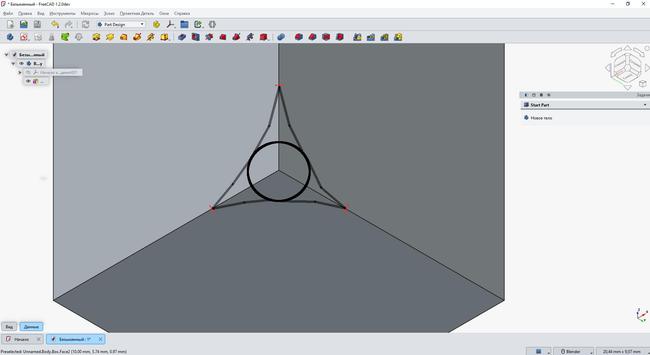
Is there a way in FreeCAD to round off the corners of shapes specifically like this? Without rounding the edges themselves (i.e., the rounded corner tapering off to “zero” at the edges).
Thank you
Hello!
Is there a way in FreeCAD to round off the corners of shapes specifically like this? Without rounding the edges themselves (i.e., the rounded corner tapering off to “zero” at the edges).
Thank you
@iuvi make small cube in the corner that lies inside the big cube. Then place a sphare toucing the faces of the smaller cube. Then do a Boolean to remove the small sphare from the small cube.
Then spilt it into a 8 pieces. Then remove the piece that is in the corner of the big cube from it.
So you just got to modell it manually.
@chrishuck I want corner to be rounded and 3 edges that's formes it are not completely rounded (just until red marks on picture)
My English not perfect but hope you get a point
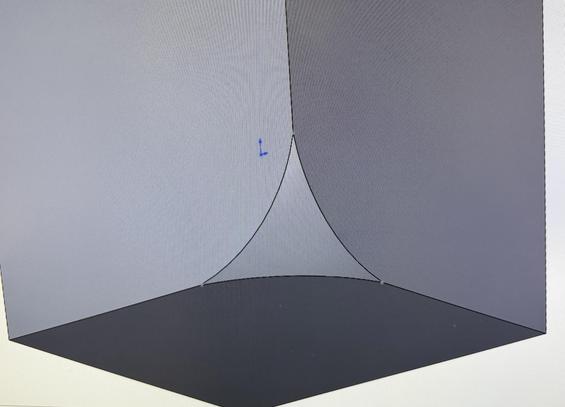
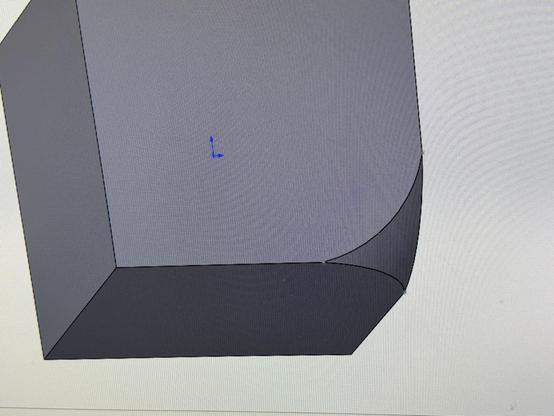
@iuvi I presume this is what you’re after:
(It’s done using a revolved cut. There isn’t a one-click tool to achieve it. You have to create some datum planes and sketches to define the geometry you want before performing the revolve.)
@chrishuck thanks! it's very close what i meant yeah
As far as i could get, to implement something like that (for automatisation) i need to consider writing sort of "macros" as add'on right? To do fastly for Pyramyd's and such other sharp edges
3 red points can be moved accordingly
 André
André Chris Huck