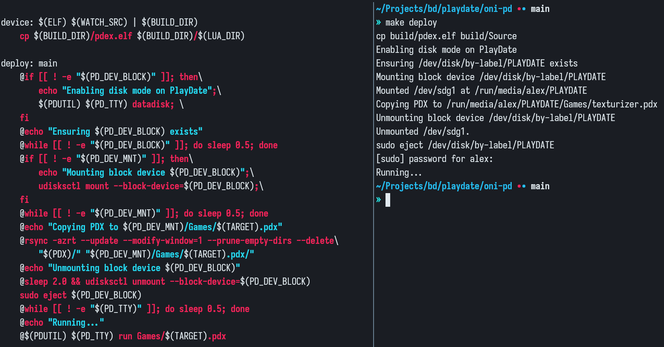
Got annoyed testing things directly on the PlayDate via simulator and made a small make command for automating the pdx deployment with `make deploy`.

Unfortunately it seems udiskctl power-off doesn't send the eject signal to the device so I have to resort to using `sudo eject` instead, but other than that this should be much faster to iterate on device now.

Once again, this is partly based on @mario_afk bash script from this article:

https://amano.games/devlog/making-a-pinball-game-for-the-playdate-part-12-the-bug-hunt
#PlayDate

@bd I had the same issue with ejecting and sudo and that’s why I’m using udiskie. It would be good to know how the simulator does it

https://devforum.play.date/t/add-command-to-install-pdx-on-device/5645/19

Add command to install PDX on device

If you have udiskie installed you can use: udiskie-umount --eject /dev/yourdevice It doesn’t required sudo

Playdate Developer Forum
@mario_afk unfortunately udiskie is not working for me, but I'm fine with using sudo for now, still much faster to test than on the sim -> send to device -> nautilus mount/unmount the playdate partition lol
@bd haha it gets painful really fast, if you ever find a way to do it without udiskie and without side let me know !

@bd
I was starting to think about doing something like that! Thanks!

Do you really need to eject from the computer side though? When I ctrl-U I see notifications for udiskie mounting the PD and unmounting it after the copying is done.
Then I press A on the device to eject and restart.

OTOH, what I'd really like would be for the simulator to automatically reload when I compile a new PDX (I guess I could kill it and restart but it doesn't feel efficient)
@mario_afk

@maxx @bd I have this for force closing the sim hehe

#! /bin/bash
SIM_PID=$(pgrep -f 'PlaydateSimulator')

echo "$SIM_PID" | xargs -r kill -9