
I’ve been trying #crosspipe as a replacement for #helvum for a while now. Feature-wise, they’re pretty similar, but in my experience Crosspipe has been less glitchy than helvum and overall felt a bit more stable.
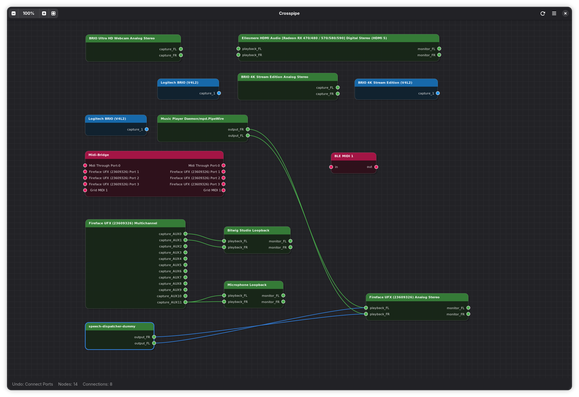
https://github.com/dp0sk/crosspipe

#pipewire #linuxaudio

@amadeus How does it compare to qpwgraph?
@keithduthie qpwgraph has much more features. I think Crosspipe is primarily interesting for those looking for a more stable GNOME PipeWire app.
@amadeus @keithduthie What I always missed in helvum and qpwgraph is #RaySession's abilty to (un)plug connections without letting go the virtual cable (by using the right mouse button) This simple feature saves so much clickwork.
Plus, you can connect two channels (stereo) in one go.
@tm @keithduthie That would be cool indeed. I am dreaming of something like this:
https://amadeuspaulussen.com/blog/2026/a-new-pipewire-and-wireplumber-app
A (new?) PipeWire & WirePlumber app… – Amadeus Paulussen

PipeWire and WirePlumber deserve better. 😝

@amadeus @keithduthie I would like to add visual indication to your list. The coolest variant would of course be showing the waveforms like #BespokeSynth does.
In Geoffrey Bennett's fantastic Alsa Scarlett GUI it's also done beautifully:

@tm @keithduthie That is an awesome input, thank you! 🙌

I added "Real-time signal flow visualization on connections" to the list.

@amadeus oh, that looks quite clean. So far i have either been using cable (https://github.com/magillos/Cable) or coppwr (https://github.com/dimtpap/coppwr) - those aren't native GTK/Gnome apps though.

@pulsar Yes, there are quite a few tools available now. Pretty cool to have so many options. 😎

That said, so far, none of the options has been perfect for me. 🫣

@amadeus Thanks for the tip. I hope there will be some customization options in the settings in the future.

#PeaceLoveMusic

@NUND Yes, the app seems solid, but it’s still in a relatively early stage, I'd say. We’ll have to see how it develops from here, I guess. 🤓