OK techy friends, I have a mystery.

I have an Ipad that I use to watch TV and I connect it to an external monitor using an HDMI cable with an adaptor to whatever the ipad uses (I can't keep track of connector names).

ANYWAY. It only works for some streaming services and not others. Like why does it connect perfectly for apple TV and Hulu but for HBO it will play two minutes or so and then act like it's not connected to the monitor. Even weirder, Netflix used to work fine and now it doesn't. I can play Netflix on my ipad but if I hook it to the monitor, it gives up. But if I switch it immediately to Hulu, it plays on the monitor.

What is happening? Shouldn't the monitor just mirror the ipad?

oh yeah and sometimes it does exactly mirror the ipad and sometimes it doesn't show on the ipad and plays on the monitor only.

@Bronwyn

> Shouldn't the monitor just mirror the ipad?

To my memory as a developer: not necessarily. It does by default, but it's up to apps to decide what to show on a second screen. (For example, in the Photos app, the second screen displays the current photo without the interface.)

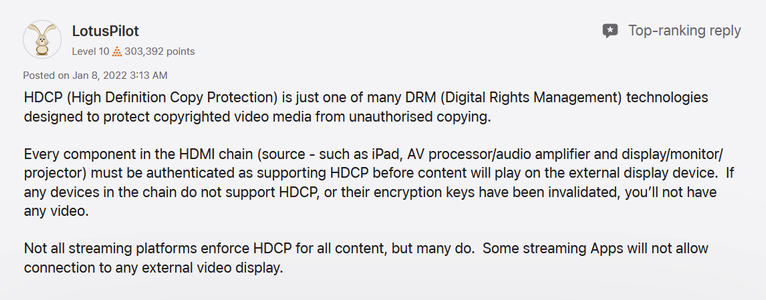
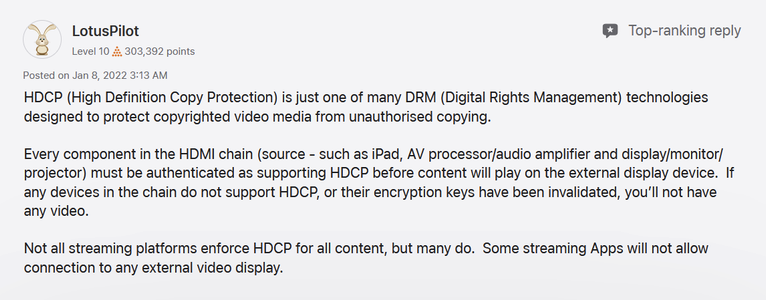
That could be what's happening with some streaming apps – perhaps they deliberately display nothing on the second display – but your description also sounds like perhaps a glitch or an HDCP thing.

@Starfia @Bronwyn I do first-line tech support for Berkeley English (= flailing around a lot until something works) and I recently discovered a campus-licensed streaming service would not go from the prof's laptop to our projector, so I too have seen that situation where the service blocks it.
@jmccyoung @Starfia ok so I’m not hallucinating. It’s weird though- why wouldn’t they want me to be able to send it to a monitor? It looks better on the monitor!

@Bronwyn

I think that gets a little mired in history and technical hoops, but I agree no streaming service should aim for that. HDCP is what prevents you from taking screen shots of DVDs and stuff – really not pleasant for anyone, but it took hold around 2000 and survived to some extent.

Netflix supposedly supports connecting with cables, but goes into detail about how to check for a "supported adaptor":

https://help.netflix.com/en/node/49

How to Cast or Mirror Netflix from Your Mobile Device

Learn which devices are compatible and how to cast or mirror Netflix from Android or Apple mobile devices using Chromecast, Nest Hub, or HDMI cables. Error:Casting isn't working as expected.

Help Center

@Bronwyn @jmccyoung @Starfia It may have something to do with how the various services implement High-bandwidth Copy Protection (HDCP), which causes plenty of headaches for people who aren't trying to pirate anything

https://www.howtogeek.com/208917/htg-explains-how-hdcp-breaks-your-hdtv-and-how-to-fix-it

@gneilyo @jmccyoung @Starfia ugh it’s so annoying. I don’t have a TV so this is how I watch things and I see no reason for them to block me since I’m paying for streaming!
@Bronwyn Out of curiosity, what's the make/model of the monitor?
@Bronwyn And is the HDMI dongle thingy made by Apple or a 3rd party?
@gneilyo Samsung and third party. Think that’s the problem?

@Bronwyn I asked about the dongle because of this thread. One respondent said their inability to display on an external monitor was fixed when they switched to the official Apple connector.

I wouldn't say go spend money on a new dongle on a hunch, but it could be a factor https://discussions.apple.com/thread/256078806

Unable to extend display from iPad Air to… - Apple Community

@Bronwyn If you can share the model # of your Samsung we can look to see if there's an arcane setting we can try turning on (or off), or possibly there's new firmware available that might help
@gneilyo I’ll look after work!
@gneilyo Samsung S24R65OFDN monitor

@Bronwyn Thanks! I don’t see any firmware updates for that monitor on Samsung’s website. Also, since it is not an ancient monitor I doubt it’s a matter of it not supporting that HDCP protocol.

I’m leaning toward this theory https://mastodon.online/@gneilyo/116281279635849752

Neil (@[email protected])

Attached: 1 image @[email protected] Hmm it may be that Netflix and HBO are just being jerks about your setup https://discussions.apple.com/thread/253546877?sortBy=rank

Mastodon
@gneilyo yeah seems like it which is a bummer. Thanks for looking into it!
@gneilyo interesting. The weird thing is that, for example, it’s 100% functional for Hulu. So it makes me think a new one wouldn’t help, that it’s the particular streaming service.
@Bronwyn I had always thought the copy protection stuff was handled at the hardware/OS level and would be transparent to apps that run on top of it but who knows
@Bronwyn Hmm it may be that Netflix and HBO are just being jerks about your setup https://discussions.apple.com/thread/253546877?sortBy=rank

@gneilyo @Bronwyn @jmccyoung @Starfia Thanks. This finally explains why I can't see any movies streamed to laptop on my 15 yr old Vivio widescreen TV connected via HDMI.

"Want to turn that old monitor with integrated speakers into a cheap little video box with a Chromecast? Sorry, there's a very good chance that old monitor (despite having an HDMI port) is not HDCP compliant."

@Bronwyn @jmccyoung @Starfia Why: because iPads don't really "send" to monitors.
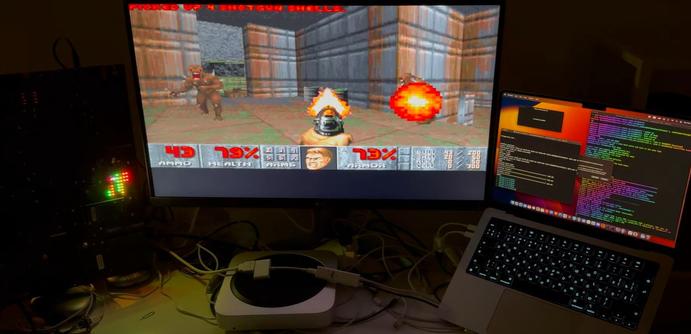
afair, there's no video out on Apple's Lightning connector. So HDMI dongles instead run a very stripped down AppleTV-like mini iOS, and the iPad streams compressed video to it, similar to Air Play but over a USB2 wire.

See: doom on an Apple HDMI donlge - https://hackaday.com/2025/02/06/running-doom-on-an-apple-lightning-to-hdmi-adapter/

...

Running Doom On An Apple Lightning To HDMI Adapter

As a general rule of thumb, anything that has some kind of display output and a processor more beefy than an early 90s budget PC can run Doom just fine. As [John] AKA [Nyan Satan] demonstrates in a…

Hackaday

@Bronwyn @jmccyoung @Starfia ...

It possible that to video apps like Netflix this could look like screen recording (as used for piracy) and be blocked by default, unless the app recognize it's just a HDMI dongle?

If your HDMI adapter is 3rd party there's a higher chance that it accidentally trips the "no screen rips" protection of Netflix?

@dryak @jmccyoung @Starfia oh that might be. Sadly I can’t afford an Apple monitor
@Bronwyn @jmccyoung @Starfia Maybe try plugging different HDMI adapters into your iPad if you have (or can borrow) some, until you find one which doesn't trip the "anti-screen-rip" protection of NetFlix?
@dryak @jmccyoung @Starfia don’t have any extra believe it or not. And I don’t really want to buy some if it’s not going to necessarily make a difference. So I’ll probably just live with it as is and be annoyed.