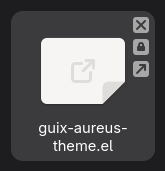
What are the meanings of these icons that are displayed at the top-right corner of a file in GNOME Files (v48.5)? I can't seem to find their meaning in the manual...

It seems that the arrow pointing southeast means it is a symbolic link, but I'm not sure about the other two.
#gnome #nautilus

@lxfx In GNOME Files (Nautilus), those tiny overlay icons actually reflect file state: ❌ = no access, 🔒 = read-only/restricted, ↗️ = symbolic link or external reference.

They aren’t documented in one place because GNOME splits this logic across UI guidelines (HIG), icon themes, and the underlying Linux permissions model—so you have to piece it together.

@muhaaliss thanks.

The whole thing is kinda confusing though. I can click on a file that has the X icon and access it normally. Also, checking in Nautilus the properties of a file that has the lock icon, it says that I have read and write permissions, but clicking on the permissions button then says that the permissions are unknown...

I guess I'll resort to CLI for file information.

Read-only vs unreadable (inaccessible / broken symlink) automatic emblem icons have reversed meaning (X vs padlock) (#3799) · Issues · GNOME / Files · GitLab

Affected Version Version: 47.2 Distribution: Fedora 41 Also happens with development version: Yes ...

GitLab