 Viss
Viss@Vivaldi hi! i just installed vivaldi and imported everything from firefox. There's one thing I cant figure out though - it looks like horizontal scrolling with a trackpad doesnt work for tabs. It's one thing firefox seems to do that vivaldi doesnt. I can scroll sideways physically on the trackpad and its way faster/easier to get to either side of my embarassingly large number of tabs. is there a way to enable that in vivaldi?
 Tyler
Tyler@Viss @Vivaldi Is this what you mean? Enable this setting and hold shift then scroll. I just tested it to scroll tabs horizontally and it worked for me using either a mouse or trackpad.
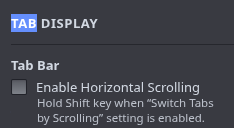
@tiydude @Vivaldi no, that option just allows you to do the scrolling, and you have to hold shift, and its very slow and doesnt scroll kinetically. if you dont hold shift, you have to put the cursor over the tabs and scroll up and down, and its also very slow and awkward. try opening like 30 tabs in firefox and scroll sideways and you'll see what i mean
@Viss @Vivaldi I tested with around 40 tabs without rubberbanding, but you must have many, many more. I'd recommend incorporating Workspaces+Stacks into your workflow if possible; those helped me a lot. Or heavily customizing Tiling may be more appropriate. Now, if you happen to know the tab or content you are looking for, there is a down arrow to the left of Minimize/Exit Window where you can search tabs. It is super useful. Hopefully it is for you as well.
 Jens N
 eddy berthier
@Viss @aserraric @tiydude @Vivaldi absolutely, workspaces -> tabstacks -> tiling, these definitely changed my workflows and reduced the need for scrolling and time spent looking for tabs