📣Important clarifications on the new advanced flow for sideloading on Android!

1) It is a one-time process. Once you go through it, you can choose to allow installing unregistered apps indefinitely.

2) ADB installs are not affected. The waiting period does not apply to app installs via ADB.

3) It's my understanding that you don't have to keep developer options enabled after you enable the advanced flow. Once you make the change on your device, it's enabled...
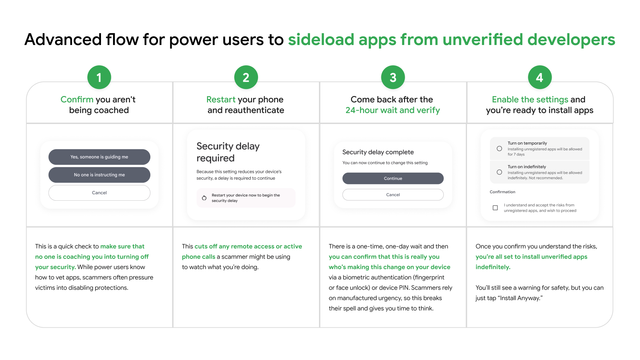

...If you turn off developer options, then to turn off the advanced flow, you would first have to turn developer options back on.
@MishaalRahman Haha i'm not going to tirn that off, and if i get a new device, it will probably be the first thing i enable lol.

@Aryan Wait till they make this option available to "trusted" apps on play store via a API and they force you to turn this off becoz sEcuRiTty

I am honestly already annoyed by a lot of bank apps doing this, to the point that I have got rid of all of those crap and now I do most of my banking via my browser

@CodingThunder Urm, can this even be an Api?

@Aryan Might be not sure, I haven't looked into it. But there are bank apps that refuse to open if certain apps are installed. I am not getting the link to the Reddit thread someone posted about it a few months ago. But Google already allows apps to query for installed apps, as well as look for developer options flag for apps, so won't be surprised if they allowed apps to also query if sideloading is enabled.

(Take this as a mountain of salt)

@Aryan Also AOSP code isn't now maintained publicaly or else could have confirmed before it hit the release channels
@CodingThunder yeah, but we do still sea the code updated once in a while still?

@Aryan Yep they release the code once in a while after Android releases, the AOSP code is always lagging behind though. GrapheneOS devs were complaining about it last year or something. Also, I don't have to look at AOSP that much.

Mostly I do look at bionic (the cursed child made by forced mating of FreeBSD libc and glibc, aka the libc used in Android), and so I don't care much about the unreleased versions, and just the stable releases that actually ships on devices

@CodingThunder + on top of that brands like realme and oppo do their own fuckery, like makeing termux crash or whatever.
@CodingThunder Also, not to mention completely break the stoc android accessibility stac and try to implement their own which breaks the experience for users who are blind and just want to use their screenreader normaly.

@Aryan Software accessibility is a difficult topic. Requires quite a bit of planning and engineering to ensure that things are accessible.

But yeah even as someone with eyes, I absolutely hate these brands trying to redo the UI just to make it look like a cheap Apple iOS clone while performing like shit.

@Aryan Even Samsung's OneUI is something which my brain can't get around because of weird "swipe down from left" is notifications and "swipe down from right" is the control panel. I can do nothing but wonder how hard it is for folks with limited/no vision.
@CodingThunder That shit e can do using the gestures, But samsung uses its own version of talkback which makes samsung users miss out on nice features that google talkback gets.
@CodingThunder Yeah, it definitely does. But when your userbase is complaining for the last 2 years and you don't listen, then its definitly your negligence.
@CodingThunder so lets wait for that time
@Aryan The added benefit is that I can hack these banking sites to allow me to paste my password from my password manager thanks to 2 lines of uBlock origin rules
@CodingThunder Yeah that could be it, + the fact that root dectetion mite also not work?
@Aryan Yep root detection doesn't work on the web for obvious reasons that the web is quite open standards

@CodingThunder @Aryan

My bank app already forces me to turn off developer options 🫠

@bacteriostat Mine too that's why I just went full on nuclear with internet banking :)

Anyways try installing Geto from F-Droid, should do the trick of hiding Dev options. Occassionally it used to bug out and reset the dev options so make sure you remember the tweaks you did just in case

@CodingThunder Yeah, I have used that app.

But on my new phone, I haven't needed developer options and it was nice because banking apps won't complain. Good that this android flow shitfuckery won't require the dev options to be permanently enabled.

@MishaalRahman

Once you go through it, you can choose to allow installing unregistered apps indefinitely.

So, the user enables installing unregistered apps just for a single app. Then they forget about it and can easily install malware as before. What's even the point of these safeguards?

@kttrickster In our blog post/video, we mentioned that, once you've gone through the advanced flow and allowed installing unregistered apps, "for safety, you’ll still see a warning that the app is from an unverified developer..." whenever you go to install one.

I don't have any additional information to share on what this warning looks like, but there will be one!

@MishaalRahman Currently this looks like just a warning message that could be easily skipped... The whole point of that "advanced flow" was to avoid malicious actors to guide through installing malware unconsciously. But after that it becomes useless, as only simple warning messages will appear. Ok, we'll see how it's going to look at the end.
@MishaalRahman does it still break banking apps on purpose?
@MishaalRahman so would this be the process one needs to follow before installating apps from an alternative store like @fdroidorg ?
The one true issue in this stuff is the 24 hours wait.
Rebooting after enabling dev options is not great but it's a decent way to keep people from acting without thinking on push from others(as it also breaks communication with the scammer)

Can you confirm this workflow, from what you have gathered?

1. enable Dev Options
2. reboot
2.1 24 hours wait where you have no true access to your own phone because somebody else decided you aren't an adult.
3. activate Unverified Install
4. disable Dev Options
4.1 reboot again?
5. I can keep installing unverified apps even with dev options disabled