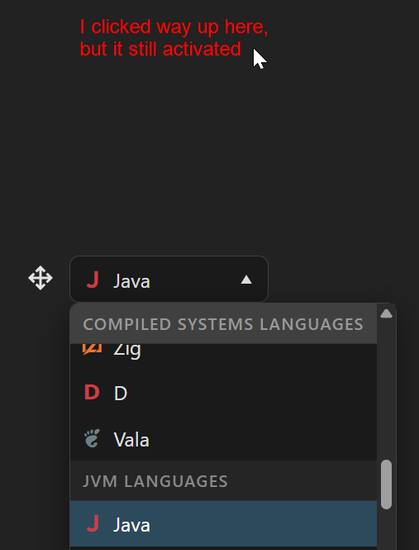
Another customisable <select> demo to add to the pile. I had a lot of fun with anchor position, anchor containers, scroll containers, calc-size etc etc https://random-stuff.jakearchibald.com/fancy-select/

Chrome only… for now, but it falls back nicely.

Fancy Select

@jaffathecake Hi Jake, kind of an off topic here but are you aware of a proposal where you start typing inside an input field and the select option values are filtered? Maybe am I missing something obvious.

Have a nice day.

<datalist>: The HTML Data List element - HTML | MDN

The <datalist> HTML element contains a set of <option> elements that represent the permissible or recommended options available to choose from within other controls.

MDN Web Docs
@jaffathecake That's it! I forget about this one and I remember why I didn't use it. Because of this bug https://bugzilla.mozilla.org/show_bug.cgi?id=1535985
1535985 - [Android] `<datalist>` HTML element should display autocompletion drop-down UI

NEW (m_kato) in GeckoView - General. Last updated 2026-01-15.

@simounet @jaffathecake https://open-ui.org/components/combobox.explainer/#making-your-own-picker-for-a-filterable-select - I believe this is what you're looking for, assuming you want to filter a select.

Alternative the input+datalist approach mentioned in the same explainer does the alternative type of combobox.

Combobox (Explainer) | Open UI

Open UI

@jaffathecake Nice - although it seems to respond when you click anywhere in its vicinity (outside where you'd expect)
@duncan ohhhhh that's interesting! I wonder if it's my fault or a Chrome bug
@duncan wait… this might be my fault. Will take a look when I'm at my laptop
@duncan yep - this was my fault for making the picker display:grid, even when it wasn't 'open'. This gotcha has caught me out a couple of times. Fixed.
@duncan @jaffathecake It does not do that for me, it just closes..
@jaffathecake Oooh, I did not know about the upcoming <selectedcontent>. Cheers.
@jaffathecake that seems very broken in chrome canary on android at least. The select picker never opens but the values randomly change.
@Lukew huh, it works fine here. How weird. Do you have any flags enabled?
@jaffathecake yes, experimental web platform features. Disabiling that fixes it.
@Lukew @jaffathecake I ran into a problem with customisable selects on Android where if the popup appears over the top of the select box, it was registering the tap to summon the popup as also being a tap ON the popup, which then selected something. I thought that was fixed but it might be related? (Or might be completely unrelated.) https://issues.chromium.org/issues/452084008 has the details
Chromium