My iPhone silently stopped auto-updating for security months ago, with no notification or indication, despite running a recent version on a recent device.

Apple nagged once for iOS 26 months ago. For anyone who declined at the time, Apple effectively ignores the security auto-update setting, with no way to apply those updates.

(1/2)
So Apple is simultaneously aggressive (withhold updates until you choose iOS 26), yet also weak and ineffective (Apple doesn't re-prompt for individual iOS 18.x/26.x updates because 18.x is withheld from "too new" devices and each 26.x silently folds onto the low-prio once-only already-declined major-version iOS 26 nag).

https://www.theverge.com/tech/896841/iphone-ios-18-attack-darksword via @rgadellaa

https://sixcolors.com/post/2025/12/apple-is-forcing-iphones-to-update-to-ios-26-to-patch-security-holes/ via @jsnell

(2/2)

PSA: Hackers can raid iOS 18 with an infected link

Security researchers have discovered a vulnerability impacting iOS 18.4 to 18.6.2, which can allow hackers to steal text messages, credentials, cryptocurrency wallets, and more from a victim’s iPhone.

The Verge

@krinkle @jsnell Wait... If you decline the iOS 26 update once, you don't get notifications for 18.x.x security patches? 😬

Do you get any of the 26.x updates when they become available? (E.g., you decline 26.0, but then 26.1 ships - do you get a notification?)

And does iOS tell you you're no longer receiving 18.x security patches?

@krinkle @jsnell So many questions, sorry 😅🫣

@rgadellaa @jsnell

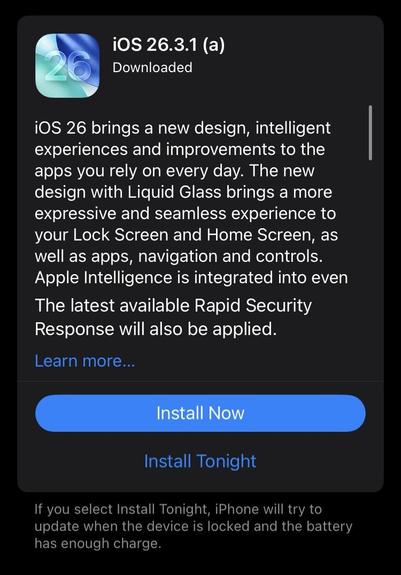
No notifs or nudges for later 26.x updates indeed. When I go to settings, it says I'm on 18.3, and and I have one singular offer there for manual installation: "iOS 26.3.1(a)".

It says that the 26.3.1(a) update includes a "Rapid Security Response".

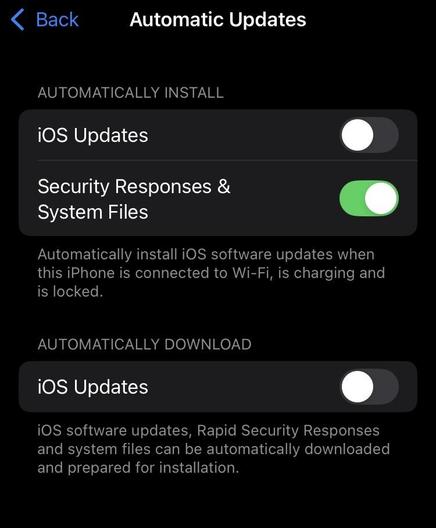
Not so "rapid", however, despite having security responses enabled under automatic update settings.