 Rockwell Schrock
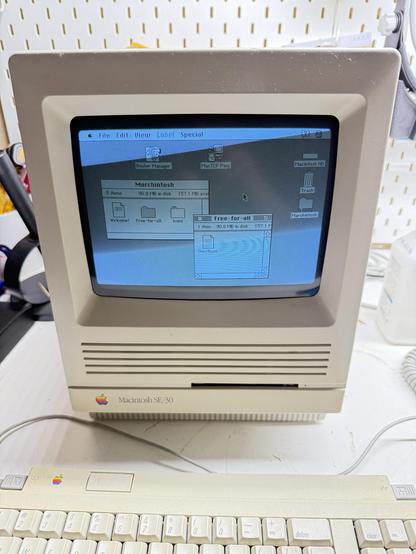
Stop on by my fully-restored SE/30 via #GlobalTalk for #marchintosh 2026. Sign the guestbook, leave a cute cat picture - whatever. Host ID globaltalk.schrockwell.com
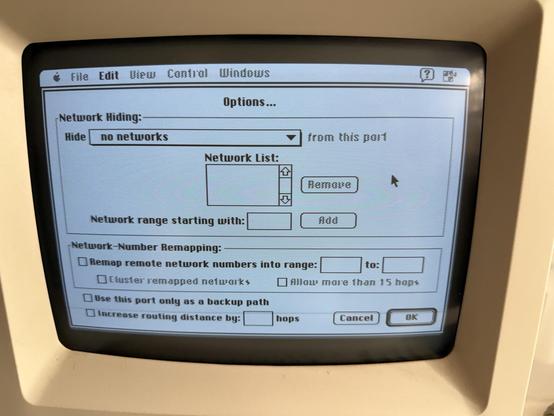
@schrockwell - did you set the option in AIR's IP tunnel to hide "no networks?"
If it's set to the default — only allowing connections on the list of addresses — newly-added members would not be able to connect to your network until you updated your router node list and restarted AIR.
@schrockwell : yes. You're using a nested CNAME (vanity domain > synology.me) which causes issues with Apple Internet Router, but some people are getting around this with fully resolved IP addresses. However, I still can't reach your network because of ICMP Error 1: host unreachable. This *usually* indicates that a firewall somewhere is blocking all communication from the outside. Do you have ICMP / Ping blocked on your router at the WAN (Internet) side?
A traceroute shows that you and I are both Frontier customers, and you're approximately near Middletown, Connecticut. (I've already gone full CSI and written a GUI in Visual Basic to get your current location...) :-D

So... I think it may be both our faults. I have been using a chained CNAME in the spreadsheet, and so have you.
Anyone who is using Apple Internet Router (AIR) would not be able to connect to me or you because MacTCP cannot resolve chained DNS aliases.
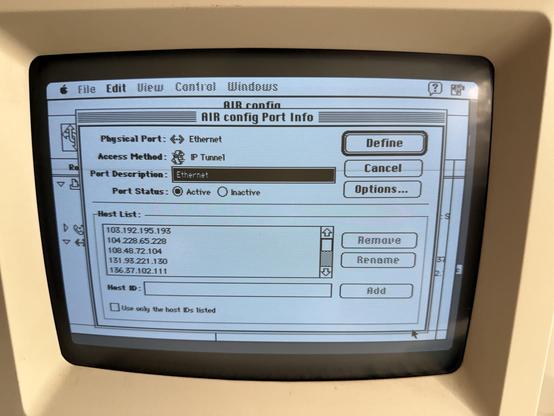
It might still be the case that you have the box checked in IP tunnel: "only connect to known host IDs," so please check that, save your router file, and restart it.
Either way, I've updated my DNS hostname in the master spreadsheet and @mroach 's Globaltalk Registry. You should consider doing the same. That will fix your connection for anyone running AIR with hostnames from kalleboo's default AIRConfig setting (jrouter is still in the minority).
@theirongiant Good sleuthing. Yes, my router blocks ICMP requests (first time I've seen someone ping via Wireshark). And TIL about the MacTCP DNS limitation.
I've updated the DNS to a plain A record. The previous TTL was very long so it may take several hours to propagate.
The two AIR settings screens are attached, to confirm I've got everything correct. ENHANCE!
 theirongiant