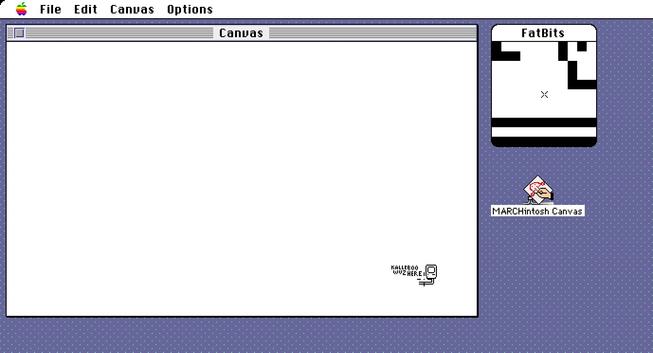
Announcing my third #MARCHintosh 2026 project - the MARCHintosh Canvas!

If you're familiar with Reddit's /r/place, pxls space, or Wplace, you’ll know what this is - a shared canvas anyone can place pixels onto in real-time.

Only this time, it's over the venerable AppleTalk protocol, with the public server accessible to anyone on #GlobalTalk :)

Feel free to drop by and leave your mark - available in the usual places (landisk, Blackbird) on BaroNet

#VintageApple #RetroComputing #mb

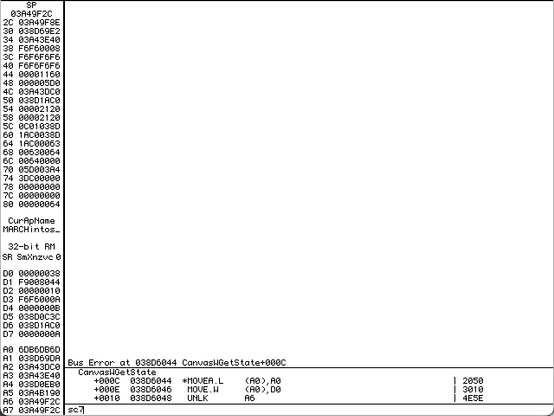
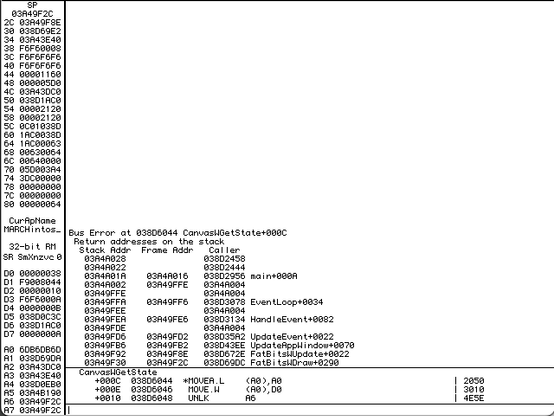
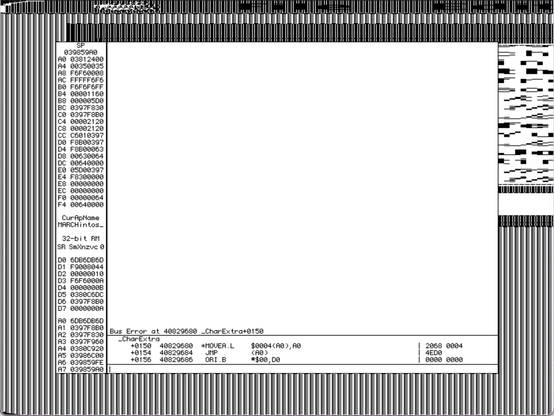
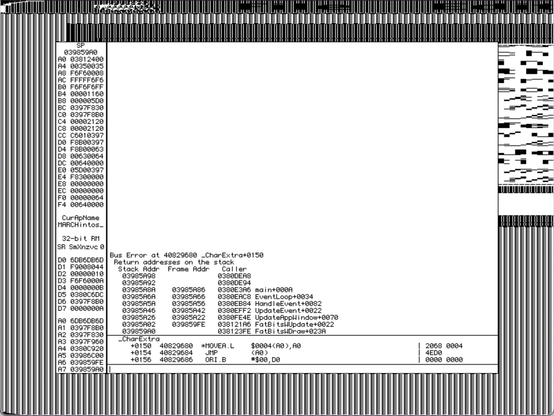
@kalleboo - I got those screenshots you asked for about the Type 1 crash. I have WindowShade capability installed on this System 7 Mac. With the FatBits canvas open, if I double-click the window title bar to collapse the canvas, then double-clicking to expand the canvas will cause the crash. This is occurring 100% of the time. Notably, it does not happen if FatBits window is closed, or if I press the dedicated WindowShade button. Only double-clicking seems to trigger it.

@theirongiant Thanks!

Really strange crash, getting the status shouldn’t fail unless the window has been closed…

@theirongiant @kalleboo Based on that screenshot, it looks like the crash occurs because something in CanvasWGetState attempts to access a field of the canvas window, and is dereferencing a nil handle. Doesn't WindowShade work by setting the visRgn to nil or something along those lines? What status is it accessing?

@_the_cloud @theirongiant CanvasWGetState doesn’t touch anything related to the actual Mac WindowPtr, just my internal window information structure with the status of if we’re connected, waiting to place a pixel, etc.

That structure is only released when you’ve actually closed the window (click in goAway or File>Close)

@_the_cloud @theirongiant And even if the window closed itself for some reason, the close handler clears out the reference to itself in the fatbits window for this very reason (dealing with closing the main window closes the fatbits window automatically) (1/2)
The only thing that may be hanky is my hacked in support for a “floating palette” with the FatBits window, but that should not come into play when the fatbits window isn’t in the front which it isn’t after clicking the title bar of another window…. (2/2)
@_the_cloud @theirongiant
@_the_cloud @theirongiant Could WindowShade be messing with RefCon? I think that’s where I’m stashing my pointer
@kalleboo @theirongiant That could be it. My really, really dim memory is that the WindowShade INIT sets some region of the window to nil (or an empty region) and it would make sense that they stash the old region somewhere else while it's collapsed.
@_the_cloud @kalleboo - still crashes on 1.0.1 D2. See video.
@theirongiant @_the_cloud Such a weird crash! Thanks for testing
@kalleboo @_the_cloud - so, uh, I was able to reproduce the crash again this morning by doing the WindowShade double-click thing on the FatBits window, not just the main window.
@kalleboo @_the_cloud - Here's what I've been discovering: if I double-click too quickly on the FatBits window, it crashes. If I double-click slower, it doesn't. WindowShade reacts to two clicks that are <500ms apart. Any slower, and it's just two separate clicks. Between 500-333ms, the FatBits window behaves normally and the program does not crash. If I double-click faster than around 333ms (around 1/3 second), the app crashes consistently.
@theirongiant Chat and TalkCrawler Lite also use the same windowing code, does it happen in those programs too? Especially TalkCrawler also has related child windows like Canvas does
@kalleboo I don't believe so. I think it was just the Marchintosh Canvas with the FatBits window.