 Miguel Arroz
All right folks, ImageWriter is up on the "Eat the path" zone! 😃🖨️ Print on it! #MARCHintosh
 Ken McLeod
@arroz 🖨️ but it's taking a long time.
@_the_cloud I don’t know if it’s because the 145 is slow of because the BlueSCSI wifi inside it has trouble going through the shielding. But this is the speed it’s getting packets at. I really need an Ethernet Mac to do this!
 fergycool
@arroz @_the_cloud I tried but it lost the connection. Did it arrive or shall i try again?
@fergycool @_the_cloud I’m receiving something! I think there's a traffic jam with too many people trying to print at the same time. 😃
@arroz @_the_cloud That's not me. I was going to, but thought I should ask first :-)
@fergycool @_the_cloud it’s idle now! Go ahead, one of you!
@arroz @fergycool Spooler seems gone now. Hopefully not a crash?
@_the_cloud @fergycool Nah, I turned it off, time to go to sleep here. :) I'll bring it up again tomorrow!
Whoever is printing, your document is arriving. Very very slowly! 😅 #MARCHintosh
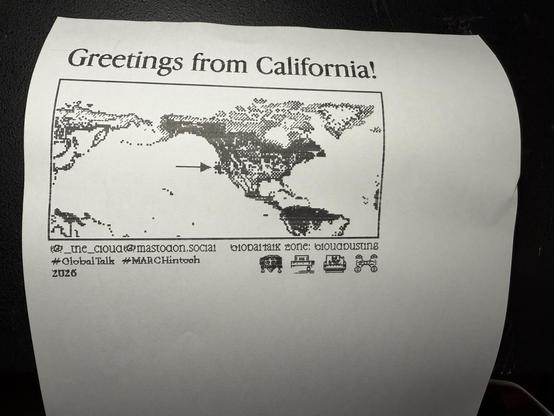
And we have the first one! Thank you @_the_cloud, your spooler is awesome! 😁 Who’s next? #MARCHintosh
Someone printed the cat interview! 😁 Thank you! unfortunately the paper jammed a bit but most of it printed out well! @_the_cloud is there a way to repeat a print job? Like reloading the spooler file.
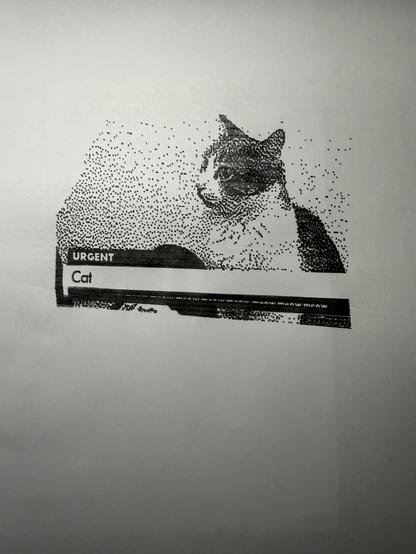
One more! That’s it for the night, as I assume people in the building might want to sleep. 😅 I’ll try to turn it on again tomorrow but using jrouter to see if it speeds things up. Thank you all for the awesome documents! Long live #MARCHintosh!

 Retro Tech or Die
@arroz glad it printed ok!!
@arroz What I normally do is keep the "Enabled" checkbox off and just let the spooler run and accumulate spool files. When I'm ready to print them, I copy them first to a saved folder. Then I can re-run the spooler with "Enabled" turned on. At that point, I can copy spool files back into the spool folder and wait a few seconds for them to be noticed.
 Daniel Tufvesson
@_the_cloud @arroz That is exactly what I've ended up doing as well. I thought I would leave it online but there has been way to many paper and ribbon jams lately. I wonder why so many jobs start by pulling the paper back and then up again! It just causes trouble
 Karl Baron
@danieltufvesson I have to leave my paper spooled through a few cm extra for that reason. Full-page jobs overflow a bit onto a second page but 90% of jobs still fit fine
@danieltufvesson @_the_cloud Yeah it’s weird. I remember from the times I used this printer it would pull the paper back just slightly. Yesterday I rolled the paper up about an inch after the first failure and it still managed to roll back enough to fall off two of the 3 front rollers. I was able to quickly snap it back, but it’s weird why it’s doing that.
@arroz @danieltufvesson Reading through the IW manual, there is a concept of "reverse line feed" which is the command 1B72. (Forward line feed is the command 1B66.) So if there is some of that going on at the beginning of the print job, it might be possible to remove it.
@_the_cloud @arroz That sounds very plausible. In the job from @smallsco we talked about earlier there were quite a few of those as well as several 0D 0A in the beginning and that job caused a lot of trouble for me that way by moving the paper around quite a bit before anything was actually printed.
 dan 💾
dan 💾@danieltufvesson @_the_cloud @arroz @smallsco MacPalette especially seems to randomly make my printer spin its roller a lot
 Nigel Wadsworth
@arroz Sending one over!

@arroz Hmm, something broke.
@nygl What broke?
@arroz Print progress has frozen and my clock is now 19 minutes behind real time :)
@nygl I think I am still receivign it, at least the packet counter is going up. Don't stop it! My router is really, really slow.
@arroz Oops. Had frozen. Let the next person in :)
@nygl It's printing! Let's see if if the entire document is here.

@arroz Let's reboot and try again.
@_the_cloud @nygl I did! And that one pulled the paper back a whole lot, 1 inch or more!
@arroz @_the_cloud Spooled one to Ken, yours errors with -4099

 europlus
@_the_cloud is there an auto-start option for virtual-only setups?
@europlus Adding it to the feature list! I think I will need to decouple "setup" from "start" to make that happen.
@nygl I’ll try tomorrow or so to use jrouter as the router and see if it speeds things up. This is *really* slow with the Powerbook doing the routing!