Downloaded Tuta and Linux Mint asked if I wanna integrate it to my desktop environment. Sounded like a thing I should do so I clicked yes. I don’t remember being prompted about that before with other AppImages. But now I have two Tutas listed in my apps. What is going on here exactly? My internet search skills failed me with this. #AskFedi #LinuxMint
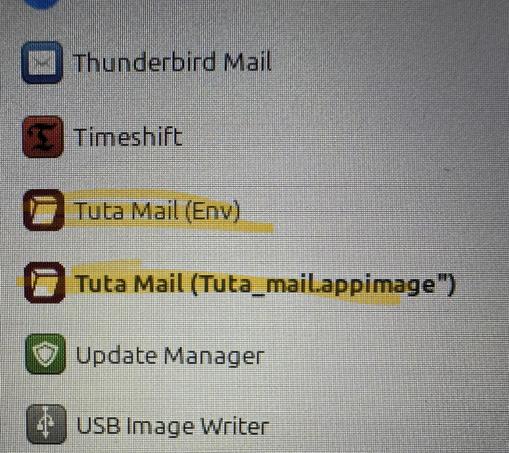
@mutteripannu sounds like you have multiple desktop shortcuts usually in /usr/share/applications and ~/.local/share/applications
@kayttaja I checked both and there were no shortcuts for Tuta. But some other applications had doubles in /usr/share/applications…
@mutteripannu That looks strange, it usually works fine on Fedora. You don't have any other integration tool like Gear Lever or AppimageLauncher active simultaneously?
@anonstork I have Gear Level which seems to open automatically when I click a downloaded AppImage.
@mutteripannu Okay yeah that probably explains it then. Personally I keep Tuta's built-in desktop integration off and let Gear Lever do it – having both on will likely create to entries 🙏
@anonstork Do I need to uninstall/install it again or can I just turn off Tuta’s own integration?

@mutteripannu
I don't know about Linux Mint specifically, but it most likely created a desktop file that you can edit or delete if you want to.

The desktop files are probably in
~/.local/share/applications/