 DJGummikuh
I reliably get between 100mb and 700mb of System updates PER DAY in my #Fedora installation, and paired with the default "Install updates during shutdown" - which gets fucked by my full disk encryption - it's really annoying and feels like a not very well thought-through feature.
 Paktosan
@DJGummikuh At one point I just decided to do classic 'dnf upgrade' as part of my weekly 'topgrade' run. I understand why offline upgrades can be beneficial but I had so little trouble with the "old" way recently that it is just not worth it.
 AliveDevil
@paktosan @DJGummikuh
Not even dnf up, you could use pkcon as well.
Also, it‘s just Gnome Software making this atrocious.
Not even dnf up, you could use pkcon as well.
Also, it‘s just Gnome Software making this atrocious.
@AliveDevil @DJGummikuh Oh, I haven't used Gnome in ages. Are they seriously unable to deal with their components being upgraded while running? KDE certainly has no issues with that (as far as I noticed).
https://tauri.earth/@AliveDevil/116040040897655605
There’s not much faith in the Gnome project for online updates.
@AliveDevil Forcing offline updates onto the user, thats such a Gnome thing to do... Kind of reminds me of the time when they decided that you no longer get to have tray icons by default.
@paktosan If I read this correctly, Gnome Software hasn’t had online updates for thirteen years now.
There’s a lot of tangential stuff in that thread, but the linked post contains a commit hash reference.
—
Quite happy with my decision not to run Gnome in any capacity.

Having a way to disable offline-updates in GNOME Software, for "immutable" OSes
Ok, FTR, I’m trying to work on this, although I don’t have anything functional yet. I can easily hack (for now) things in such a way that all apps are marked as GS_APP_STATE_UPDATEABLE_LIVE. But I’ve just learned that this is not enough, because PackageKit can’t handle such apps. In fact, as far as I am understanding things, support for updating apps live was dropped with 46eca30b6786b66af9c8eeac1f64f1ffdd6fbc0b, “Remove online-update functionality” (in 2013!!!). For that reason, even if all a...
@AliveDevil @paktosan to be fair, this whole discussion misses the entire point. I'm not against automatic updates, even if they're offline, just FUCKING GIVE ME THE OPTION to tag the updates for installation on the next startup AND THEN SHUT THE FUCK DOWN! Let me run the updates when I start my PC the next time. FDE is neither new nor exceedingly obscure today, so the fact that they pull a huge middlefinger to everybody that uses it frankly baffles my greatly
@DJGummikuh @paktosan
That's what KDE/Plasma allows you to do.
I've just enabled offline updates, and was presented with these options for shutting down the machine (using Ctrl-Alt-Delete).
I've decided to use "Shutdown" as an option, and on the next startup the machine started, applied all updates, and restarted again (because systemd soft-reboot isn't supported yet for updates).
You'd have to wait a day or two for updates to be available again, and I can check "Install, and shutdown".
That's what KDE/Plasma allows you to do.
I've just enabled offline updates, and was presented with these options for shutting down the machine (using Ctrl-Alt-Delete).
I've decided to use "Shutdown" as an option, and on the next startup the machine started, applied all updates, and restarted again (because systemd soft-reboot isn't supported yet for updates).
You'd have to wait a day or two for updates to be available again, and I can check "Install, and shutdown".
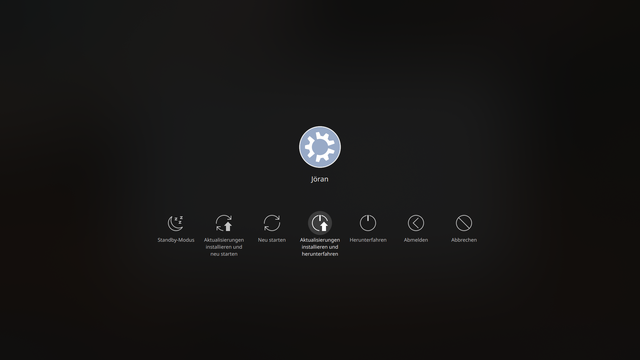
@AliveDevil @paktosan Thats also what Gnome offers. "Install updates and shutdown". What that MEANS however is, that it reboots, installs updates on the STARTUP hook, then shuts down again and turns off. Windows by the way does the same thing, so Fedora is in "good" company, I guess?
Unless you have FDE, this is perfectly fine and ensures there are no running processes still accessing files to be updated, however WITH FDE everything is essentially fucked
Unless you have FDE, this is perfectly fine and ensures there are no running processes still accessing files to be updated, however WITH FDE everything is essentially fucked
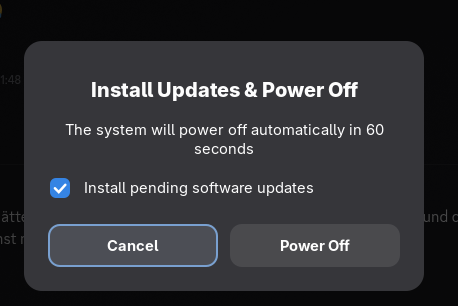
@DJGummikuh I see.
And deactivating the checkbox isn't sufficient for your usecase either, because you'd have to enter the FDE passphrase twice, but this time when the machine is started first, instead of turned off?
And deactivating the checkbox isn't sufficient for your usecase either, because you'd have to enter the FDE passphrase twice, but this time when the machine is started first, instead of turned off?
@AliveDevil if I disable the checkbox it shuts down without updating. My current process is that I pre-emptively run dnf update before shutting down my Laptop so that I have the updates available next time I start it
@DJGummikuh
Right, not installing the updates on shutdown, will install them on the next startup, which will trigger a reboot, so it won't stall the machine unattended.
However, there is discussion about using systemd soft-reboot to apply updates without really rebooting (when using install on shutdown).
https://github.com/PackageKit/PackageKit/issues/868
Use 'systemctl soft-reboot` for installing offline updates · Issue #868 · PackageKit/PackageKit
systemd v254 introduced a new reboot method: systemctl soft-reboot. A soft-reboot is similar to a regular reboot, except it affects user-space only. This would be really useful in the following cas...
 Leniwcowaty
@DJGummikuh not saying anything, but for the last year I had a total of 900 MB of updates on my LMDE 7 install... Just throwing that out there...