 rook
rookCheapest 16x4tb NAS
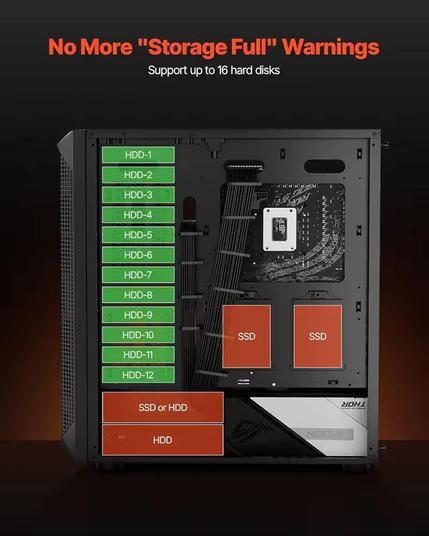
You say you are on a budget. Yet you talk about 128 Gigs of ram.
Maybe you should clarify what your budget is.
You’re talking a lot of storage - it might be worth investing in some low-end server hardware. A Dell tower or something, maybe one off eBay if you’re looking to cut costs.
I picked up a PowerEdge T110II a long time ago and it’s been… flawless. Just a simple server with a 4x4TB RAID5. No hardware problems (aside from occasional disk failures over the years), easy to manage. It costs a bit more - but server hardware is often just more reliable and for a NAS that’s job #1. This server just runs.
I just upgraded the memory in it to 32GB for ~$100USD. Before that it had 8GB. I needed more for restic doing backups. I probably could have gotten away with 16GB but I figured I’d max it out for that price.
Honestly, you might want to look into proper server hardware. There are many out there that support dozens of drives, assuming you’re willing to go with a blade. Even if you explicitly want a tower, server hardware is where you’re going to get the best support.
You’ll most likely also want to increase the size of your drives. Assuming you’re being smart and utilizing RAID, you’re going to be losing a bunch of that storage.
Brendan Gregg from Sun's Fishworks team makes an interesting discovery about inducing disk latency. For more details, see Brendan's blog entry: http://blogs...
Hey, you basically defined my system.
Truenas scale machine running 4x 16TB drives. I use a cheap rosewill 4u server rack case. It has hot swap drive bays in front. Big plus.
The brain is an amd 5950x running on an asrock x570 steel legend w/ 128GB of the cheapest crucial DDR4 ECC I could find. Also running an rtx 2080 for jellyfin transcoding.
My consumer mobo is the bottleneck. Given how my end goal is to have a 10gb nic and an LSI card for more sata ports, I’m going to have to get creative with m.2 ports. I might plug a 10gb nic into an m.2 port.
PSU was a 1kW fractal platinum rated. Way overkill, but the high efficiency is key.
You’ll notice my build uses a lot of gaming parts - i simply harvested my old parts when I upgraded my gaming PC. Despite this, it still idles under 200 watts. My point is not that you should seek out gaming parts, but if you happen to have any on hand, they could be effectively leveraged given price increases on new parts.
The biggest thing is: Use ECC. This is non negotiable for your setup. ECC saved me a couple weeks ago when my 5950x shot craps, randomly. So far no issues after increasing to a set voltage. ZFS and ECC go together like peas in a pod.
Acronyms, initialisms, abbreviations, contractions, and other phrases which expand to something larger, that I’ve seen in this thread:
Fewer Letters More Letters NAS Network-Attached Storage PSU Power Supply Unit RAID Redundant Array of Independent Disks for mass storage ZFS Solaris/Linux filesystem focusing on data integrity[Thread #156 for this comm, first seen 11th Mar 2026, 21:50] [FAQ] [Full list] [Contact] [Source code]
At these scales, I don’t think it’s measurable, if statistically significant at all.
In any case, you should always be ready to replace a drive that fails. I buy used because they’re significantly cheaper (or at least they used to be) and I’ve never had any major failures.
And while more drives means more failure opportunity, it also means when a failed drive is replaced, it’s likely of a different manufacture period.
I have a 5-drive NAS that I’ve been upgrading single drives every 6 months. This has the benefit of slowly increasing capacity while also ensuring drives are of different ages so less likely to fail simultaneously. (Now I’m waiting for prices to come back down, dammit).
You say you are on a budget, but there is no real clarification what that budget is. That said, I will assume that the budget is tight, and you are looking for the best bang for the buck.
The case looks like a good option, assuming that those are 3.5 inch bays.
It should give you plenty of space for expansion in the future if you want to do that
RAM prices are pretty nuts right now, so I would definitely not got balls to the wall with 128 GB of RAM. 16 GB of RAM should be more than plenty for a NAS server. Maybe you can even get away with 8GB? I’m using 16 GB of DDR3 RAM in my NAS server (which is also running Jellyfin and Nextcloud) and it’s running fine.
Speaking of DDR3… Have you considered buying your CPU, motherboard and RAM second hand? From what I hear the prices of DDR3 RAM are not nearly as elevated as those of DDR4 and DDR5 RAM, and DDR3 is plenty sufficient for a simple NAS.
Be sure not to skimp on the power supply. Most consumer power supplies are not built for only running HDDs. I’m running a Corsair RM550x in my server, which is capable of supplying 130W on the 5V rail.
Good luck with your server build!
ABSOLUTELY ECC memory, 32gb or higher if you can afford it these days as TrueNAS does benefit from a decent cache space, especially with so many drives to spread data slices across.
Realistically unless you expect multiple concurrent users, any 4 core or higher CPU from 2015-on will be plenty of power to manage the array. No need for dedicated server hardware unless the price is right
I have a Dell PowerEdge t3 SOHO/small business server tower that I gutted and turned into a 5x8tb config. It only has a middling 4 core Xeon 1225v5 and I never get above 50% CPU usage when maxing the drives out. More CPU is needed if you’re doing filesystem compression or need multiple concurrent users.
I’ve never run into issues running desktop hardware without ECC as servers - since the 90’s.
I just don’t think the extra cost is worthwhile - I’m not running systems/services that will have catastrophic failures without ECC (or have weird bitflips that would corrupt some transaction).
I’ve never ran into issues either, but generally in any situation where data integrity is somewhat important, ECC is a very good idea. Its never a problem until suddenly it is.
I don’t give a crap about my Minecraft server having ECC, but a storage server where cached data gets written to disk, I’d rather have ECC ensure nothing gets corrupted.
Where are people getting drives at $10/tb?
Where I live it’s $50/tb
In the past!
My 20TB drives cost me $17 per TB 2 years ago. The exact same model is now at $33 per TB :(
Others have mentioned power - you may want to do some math on drive cost vs power consumption. There’ll be a drive size point that is worth the cost because you’ll use fewer drives which consume less power than more drives.
Having built a number of systems, I’m a LOT more conscious of power draw today for things that will run 24/7. Like my ancient NAS draws about 15 watts at idle with 5 drives (It will spin down drives).
More drives will always mean more power, so maybe fewer but larger drives makes sense. You may pay more up front, but monthly power costs never go away.
I have never build a machine like that, so I guess I can’t help you much, but like another comment said, it seems like a pain to maintain, I usually have trouble with sata cables losing contact, with that setup there are many cables keen to lose contact.
As for ram I wouldn’t worry about it at all, unless you use zfs 4GB should be more than enough, even 2 or less. Ram is expensive now, so you may want to consider using as little as possible unless you already have it laying around. Does truenas use zfs? If so you may want to use other fs like btrfs or test how well zfs works with the ram you have. I’m not sure zfs is worth the trouble. I wouldn’t buy extra ram.
As for CPU I don’t think it matters much, but like I said, I have never tried your setup. But even an ancient sandy bridge should work fine if it’s just a personal has, with HDDs even with encryption. Works fine on my nas.
Also, if you have access to free old computers you can try a ghetto setup where each each computer only handles 4 drives and then you join them together on a master computer either via nbd or nvme other Ethernet (works on sata too). But that seems like an even bigger pain to maintain and increases your power consumption by a lot.
I wouldn’t use more than 4 or 6 disks in a home environment. Specially with mechanical drivers, power consumption 24/7 would get me very worried.
I run 4 x 8Tb SSDs, not cheap, but solid, low power AND low heat (even more important).
Consider also heat dissipation as most likely at home you don’t have a constant temperature and humidity, so many spinning disks can suffer from heat, and that will kill them faster
Longevity… With so much space I would expect to keep it running a decade or more… So factor in 10x365x24 hours of operation, energy consumed, heat dissipation and failure rate.
10x4tb = 40tb can be achieved with 4 12tb drives (actually 36tb in raid5) .
Doubtfully those 12tb uses much more power than the 4tb ones, each. So the 28€/m probably cut down to 14,€/m counted in excess.
Considering 120m (10y) of uptime, you should save enough to justify cutting down from 10 to 4 drives.
Yes, more redindancy is good and indeed worth having. Still 5 12tb drives are probably yet more energy and heat efficient than 10 4tb ones.
Even if I had 10 4tb for free I wouldn’t use them. Maybe a couple for backup reasons or cold storage, but not active 24/7 for a domestic raid environment.
I actually have 4 6tb hdds that I dismissed for the 4 8tb sdds, and I use two for local backup and keep two spares to replace them when they will fail.
4 8tb in raid5 provide 24tb total space that its far more than I need, and the risk of a double failure is mitogated by a proper 3,2,1 backup strategy in place.
Have a look at the guides in serverbuild.net forums such as forums.serverbuilds.net/t/guide-nas-killer-5-0/
The series of post that is Nas killer (4.0 5.0 6.0) etc. they list a bunch of CPUs and motherboards with approx eBay prices along with ram disks etc etc. I used it as a reference when building my cheap Nas for home, mainly the motherboard/CPU sections.

[NAS KILLER 5.0 BUILD GUIDE] [JOIN THE DISCORD] 1. Objective Update the NAS Killer line of builds to iteration 5.0. Moving on to socket 1150, we should be able to see better performance and power usage, with only a slight increase in cost compared to the NAS Killer 4.0. This guide will feature not only Xeon processors, but also consumer Core i3, Core i5, and Core i7 processors. Table of Contents (clickable links) Objective Table of Contents Motherboards Consumer Motherboards Server & W...
 blitzen
 Humanius
 Scrubbles
 BlackEco
 KairuByte
 ZeldaFreak
 Ferrous
 empireOfLove2
 philanthropicoctopus
 Q
Q Seefra 1
 Shimitar
 Something Burger 🍔
 Hiro8811