Daphne Preston-Kendal
I remember when I used Apple products because they didn’t shit in your head with random advertising everywhere
(I have never used Uber Eats, never had the app installed, and I have no idea where this has come from or how to turn it off)
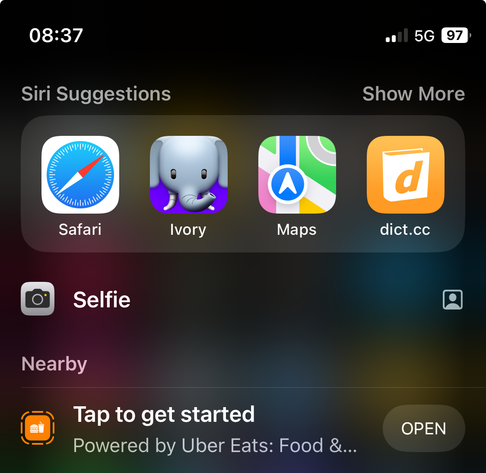
I remember when I used Apple products because they didn’t shit in your head with random advertising everywhere
(I have never used Uber Eats, never had the app installed, and I have no idea where this has come from or how to turn it off)
@dpk Go to Settings -> Apple Intelligence & Siri (or Siri & search) -> App Clips and you can disable “Show in search” and “Suggest App Clips”.
You can also go in Settings -> Privacy & Security -> Location Services and turn it off for App Clips.
(Yes this is annoying.)
 Thomas Beduneau
 Paul Barnfather
 Jess Robinson