Last week, while debugging a SwiftUI performance issue, I was running instruments and found that my profiles were plagued with noise.

Godot while idling was using so much CPU time that it was skipping entire frames while rendering.

I set out to fix those, 0.5% here, 0.5 there, and the Godot Editor (and Xogot) no longer skip frames.

People had been complaining that Godot would burn your battery in an hour if you left it idling, it no longer does.

Details:

https://github.com/godotengine/godot/issues/116845

As a sidebar, when I started porting Xogot to Mac, my first reaction was "SwiftUI is just not up to the task, it is too slow".

I decide to give Instruments a shot with the new SwiftUI instrument, and was able to track down the problems - it took a while (and Claude scanning my traces), but Xogot powered by the same SwiftUI code from iPad on AppKit is smooth as butter.

It was just not as noticeable on iPad, as the touch interface would distract from the slowdowns.

I have this bad habit in SwiftUI, where instead of using new Views for components, I have many properties that share state:

struct Foo: View {
@State var someSharedState
var title: some View { ... }
var buttons: some View { ... }
var body: some View {
HStack {. buttons title }
}

Turns out that SwiftUI uses the "View" as the boundary of change, so if anything on my model changed, it would have to re-evaluate the whole view, not just say, the title.

Split your views.

@Migueldeicaza The SwiftUI equivalent of “printf debugging” for unnecessary view updates is setting the background of every view to a random color. The flashing colors will show you which views are updating when you think they shouldn’t be.
@siracusa oh I should use that! Related my go-to hack to check quickly on layout is: .overlay(color.red.opacity(0.3))
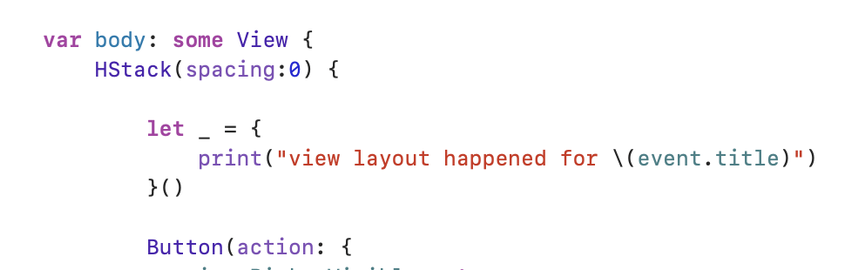
@Migueldeicaza @siracusa View flashing is useful! I also do a lot of this nasty-looking but useful trick:
@joethephish @siracusa I also like the printChanges() trick, cheap when you don’t want to do a big instruments run (SwiftUI tool in instruments is heavy)
@siracusa @Migueldeicaza There's an idea for an @atpfm member special - favorite macOS & iOS programming / #xcode / Apple tips and hacks! Maybe it would have to be a video...