This semester, I'm teaching my class on System Administration / Internet Operations once again.

The syllabus and all course materials are available here:

https://stevens.netmeister.org/615/

All videos for the lectures and exercises are public and available for free on YouTube:

https://www.youtube.com/c/cs615asa/videos

If you want to follow along, I'll be posting lecture videos and related links in this thread throughout the semester.

#sysadmin #devops #sre

CS615 -- System Administration

System Administration, Week 1: Introduction

In this video, we cover a number of administrative issues relating to our course: we discuss why and how System Administration is covered in an academic Computer Science curriculum and outline the course syllabus.

https://youtu.be/QJL5cNv9dJs

#sysadmin #devops #sre

CS615 System Administration, Week 01, Segment 01 - Introduction

YouTube

System Administration, Week 1: The Job of a System Administrator

In this video, we try to capture the job of a System Administrator. We show what things SysAdmins may encounter in their day to day routine, ranging from blade servers and routers to cable ties and power tools and everything in between. As we try to define the job, we find out it's not quite that easy...

It's duct tape and WD40 all the way down.

https://youtu.be/osIO9CbqHQo

#sysadmin #devops #sre

CS615 System Administration, Week 01, Segment 02 - The Job of a System Administrator

YouTube

System Administration, Week 1: Core Principles

In this video, we present a few core principles that will guide us throughout the semester: Scalability, Security, and Simplicity. We'll also get to know a few basic "laws", well known by any System Administrator. If you're wondering what all this has to do with Legos, please tune in...

https://youtu.be/bfqP6PlS6Og

#SysAdmin #devops #sre

CS615 System Administration, Week 01, Segment 03 - SysAdmin Core Principles and Rules

YouTube

System Administration, Week 1: UNIX History

We're borrowing this video from our "Advanced Programming in the UNIX Environment" class to give a brief summary of the history of the UNIX family of operating systems.

https://youtu.be/3H7SQWTR6Dw

#sysadmin #devops #sre #unix

Advanced Programming in the UNIX Environment: Week 01 - UNIX History

YouTube

System Administration, Week 1: Warming up to EC2

In this short video, we prepare for our first homework assignment and demonstrate how to launch a #NetBSD instance in AWS EC2.

https://www.youtube.com/watch?v=cA_pgRH0IDw

Note: the AMI in the video is outdated; I have up to date images listed here:
https://stevens.netmeister.org/615/netbsd-amis.html

Or you can create your own:
https://www.netmeister.org/blog/creating-netbsd-ec2-amis.html

#sysadmin #devops #sre

CS615 System Administration, Week 01, Segment 06 - Homework 1: Warming up to EC2

YouTube

System Administration, Week 1: AWS Aliases

System Administrators are notoriously lazy, and AWS commands a notoriously lengthy to type. In this video, we demonstrate the use of shell aliases and functions to save ourselves some typing whenever we run AWS EC2 commands.

https://youtu.be/fnWdB20_OoY

The aliases and shell functions we use are available here:
https://github.com/jschauma/cloud-functions/blob/main/awsfuncs

#sysadmin #devops #sre

CS615 System Administration, Warmup Exercise - AWS aliases

YouTube

System Administration, Week 1: Warmup Exercise 1 - No Space Left On Device

In this video, we try to find out what happens when we run out of disk space as well as how the system behaves when use up all inodes. This is intended as a warmup exercise for our week 2 topic, introducing the concept of disk storage and filesystem behavior.

https://youtu.be/eyRNL6fGDM8

#sysadmin #devops #sre

CS615 System Administration, Week 2, Warmup Exercise 1 - No Space Left On Device

YouTube

System Administration, Week 2: Storage Models and Disks

In this video, we'll introduce the larger topic of filesystems and storage. In particular, we'll discuss the conceptual storage models, such as Direct Attached Storage (DAS), Network Attached Storage (NAS), Storage Area Networks (SANs), and Cloud Storage.

https://youtu.be/w-wfCe7Yb68

#sysadmin #devops #sre

CS615 System Administration, Week 2, Segment 1 - Storage Models and Disks

YouTube

System Administration, Week 2: Devices and Interfaces

This segment discusses common storage device interfaces, including SCSI, ATA, SSD, Fibre Channel, and hinting at storage configurations like JBOD and RAID, which we'll get back to in the next video. At this point, it feels a bit dated, and I may skip it going forward and perhaps expand more on enterprise storage, but then again, it's only 10 minutes of your time.

https://youtu.be/C5PXWFFP31A

#sysadmin #devops #sre

CS615 System Administration, Week 02, Segment 2 - Device Interfaces

YouTube

System Administration, Week 2: Storage Virtualization

In this video, we cover the concept of storage virtualization -- combining individual disks into larger storage pools and utilizing resources from such a pool. This includes a discussion of RAID and some of the different supported levels as well as Logical Volume Management (LVM). We further illustrate some of these properties by example of ZFS.

https://youtu.be/tw-QTAoYU9w

#sysadmin #devops #sre

CS615 System Administration, Week 02, Segment 3 - Storage Virtualization

YouTube

System Administration, Week 2: Physical Disk Structure

We'll take a quick look at what a hard disk drive actually looks like. This helps us understand addressing schemes such as CHS and LBA, what physical aspects affect hard disk performance, as well as partitioning requirements. While a lot of this is tied to old magentic-spinning-platters drives, it explains a lot of assumptions partitions and file systems make even if using SSDs.

https://youtu.be/HqjxRrhspFo

#sysadmin #devops #sre

CS615 System Administration, Week 02, Segment 4 - Physical Disk Structure

YouTube

System Administration, Week 2: Partitions

In this video, we talk about how to divide a single disk -- physical or virtual -- and how the partitions relate to the physical structure of the disk. We show examples partitioning disks on NetBSD, OmniOS, and Linux using the disklabel, fdisk, and format tools.

https://youtu.be/vmL9ZUh_j2U

#sysadmin #devops #sre

CS615 System Administration, Week 02, Segment 5 - Partitions

YouTube

System Administration, Week 2: Moving EC2 Volumes

We've talked about EC2 Elastic Block Storage volumes, and how we can treat them as if they were hard drives plugged into an instance. In this video, we run through one of our recommended exercises for Week 2 and show how to move an EBS volume across instances and operating systems from a NetBSD EC2 instance to one running Ubuntu Linux.

https://youtu.be/FxzANp8Z1FA

#sysadmin #devops #sre

CS615 System Administration, Week 02, Warmup Exercise 2 - Moving an EBS Volume across OS

YouTube

System Administration, Week 3: The Boot Process & the MBR

In this video, we discuss the boot process on a high level as well as take a fairly detailed look at the MBR. We'll create a suitable NetBSD BIOS partition by hand, utilizing the dd(1) command because using fdisk(8) would be just too easy. In the process, we learn a fair bit about the structure of the boot sector.

https://youtu.be/VHMkg3wlOSM

#sysadmin #devops #sre

CS615 System Administration, Week 03, Segment 1 - The Boot Process & the MBR

YouTube

System Administration: Week 3: File systems

In this video, we pretend to be a file system, trying to store all our cat photos in a reasonable manner on a raw disk. By manually writing data and metadata, we begin to understand what a file system has to do. We also show how the tar(1) utility creates output that very much resembles a filesystem format.

https://youtu.be/9MWeiuw8WHU

#sysadmin #devops #sre

CS615 System Administration, Week 03, Segment 2 - Filesystems

YouTube

System Administration: Week 3: Files go hier(7)

In this video, we're wrapping up our discussion of filesystems and partitions with a look at file types and partitions and filesystems mounted by default on #NetBSD, #FreeBSD, #OmniOS, and Fedora Linux. We close with a look at the filesystem hierarchy as defined in the hier(7) manual page.

https://youtu.be/J0ontdqxpUg

#sysadmin #devops #sre

CS615 System Administration, Week 03, Segment 4 - Files go hier(7)

YouTube

System Administration: Week 3: Resizing a file system

In these two videos, we show how to resize an existing filesystem. First on #NetBSD using the resize_ffs(8) tool, where we first increase the size of a 512MB partition to 1GB, then shrink it down to 256MB. Next we repeat the same exercise on #Debian Linux, using the resize2fs(8) tool.

https://youtu.be/9l-g3keN48g

https://youtu.be/4V15y5Klo9Y

#sysadmin #devops #sre

CS615 System Administration, Week 3, Warmup Exercise 1 - Resizing a filesystem on NetBSD

YouTube

System Administration: Week 4: Types of Software

With this video, we begin our Week 04 topic of "software": what types of software there are, how they fit together, how to install software, and how to manage dependencies. We try to draw a terrible analogy to - what else - cars, and quickly realize that the distinctions between firmware, operating system, system software, add-on software are difficult to make.

https://youtu.be/48HmSsqOfuE

#sysadmin #devops #sre

CS615 System Administration, Week 04, Segment 1 - Types of Software

YouTube

System Administration: Week 4: OS Installation

In this video, we perform a step-by-step manual installation of #NetBSD onto a virtual machine to illustrate the details of the process, including partitioning, boot loader installation, OS set extraction etc.

We also discuss planning of the OS installation by looking at data classification into shareable/non-shareable and static/variable data and think about how to scale this process.

https://youtu.be/XRTDMgIpK68

#sysadmin #devops #sre

CS615 System Administration, Week 04, Segment 2 - OS Installation

YouTube

System Administration: Week 4: Package Management

In this video, we continue our discussion of the difference and relationship between the operating system and so-called "add-on software". We conclude that in order to install and maintain all such software, we want to use a package manager, and illustrate common features by example of the 'dpkg', 'rpm', and #NetBSD's #pkgsrc tools.

https://youtu.be/dU66_sPjnXg

#sysadmin #devops #sre

System Administration: Week 4: Package Management Pitfalls

In this video, we discuss some of the problems with package managers, native language packaging solutions, and the implications of their use on dependency resolution, package integrity, and trust. We revisit "left-pad" and "dependency confusion" to illustrate some of these problems.

https://youtu.be/R3zlbOND00Q

#sysadmin #devops #sre

CS615 System Administration, Week 04, Segment 4 - Package Manager Pitfalls

YouTube

System Administration: Week 5: Networking I: Layers

In this video, we begin our longer discussion on the topic of "networking". We're using tcpdump(8) to capture a single TCP SYN packet and start looking at the MAC and IP information, teasing out each individual byte. And don't worry, we dunk on the OSI stack model as needed and popular these days.

https://youtu.be/qYWkJ2KyRHU

#sysadmin #devops #sre

CS615 System Administration, Week 05, Segment 1 - Networking I: Layers

YouTube

System Administration: Week 5: Networking I: IPv4 Basics & CIDR subnetting

In this video, we cover the basics of the 32-bit IPv4 address and how we organize networks using Classless Inter-Domain Routing or CIDR subnetting. (Don't worry, we'll get to #IPv6 in the next video.)

https://youtu.be/CxdN-TcpSk8

#sysadmin #devops #sre

CS615 System Administration, Week 05, Segment 2 - Networking I, IPv4 Basics & CIDR subnetting

YouTube

System Administration: Week 5: Networking I: IPv6 Basics

In this video, we get familiar with our Big Hero IPv6, looking at the structure of the IPv6 header and IPv6 address representations.

Since we're using AWS #EC2, remember that we have instructions for how to set up a dual-stack VPC and subnet to launch your instances in:

https://www.netmeister.org/blog/ec2-ipv6.html

https://youtu.be/wZ5cmlIlP3I

#sysadmin #devops #sre

Creating AWS IPv4/IPv6 Dual Stack EC2 Instances

A quick summary of the AWS EC2 resources needed to create an IPv6-enabled or dualstack instance.

System Administration: Week 5: Networking I: IP Allocation & IPv4 Exhaustion

Mommy, where do IP addresses come from? In this video, we discuss how IANA allocates IP addresses to the Regional Internet Registries and try to illustrate just how large the #IPv6 address space is.

https://youtu.be/r2GXh8uUgWc

#sysadmin #devops #sre

CS615 System Administration, Week 05, Segment 4 - Networking I: IP Allocation and IPv4 Exhaustion

YouTube

System Administration: Week 5: Networking I:The Physical Internet

In this video, we look at the physical structure of the internet, with a focus on submarine internet communications cables. Jumping from the bottom of the OSI stack all the way to Layer 9 ("political"), we then discuss how different countries use their political power to enforce internet blocks on their citizens, leading us to warrantless wiretapping in AT&T's room 641A.

https://youtu.be/4YrHdD1uIxs

#sysadmin #devops #sre

CS615 System Administration, Week 05, Segment 5 - The Physical Internet

YouTube

System Administration: Week 5: Networking I: A Network of Networks

In this video, we look at how independent networks connect to one another, how Autonomous Systems numbers allow us to identify network operators, and how peering between independent ASs works.

https://youtu.be/OOq7jGlhBjY

#sysadmin #devops #sre

CS615 System Administration, Week 05, Segment 6 - Networking I: A Network of Networks

YouTube

System Administration: Week 6: Networking II: A Simple Request

In this video, we trace a simple HTTP request made via telnet to find out just how exactly our application knows how to connect to the remote server. In the process we learn about the ktrace(1) utility, as well as the nsswitch.conf(5), hosts(5), and resolv.conf(5) configuration files.

https://youtu.be/mw1YzFSYuwE

#sysadmin #devops #sre

CS615 System Administration, Week 06, Segment 1 - Networking II, A Simple Request

YouTube

System Administration: Week 6: Networking II: ARP and NDP

In this video, we illustrate the functionality of the Address Resolution Protocol (ARP) and it's IPv6 equivalent, the Neighbor Discovery Protocol (NDP).

https://youtu.be/1gtkpbF_h6M

#sysadmin #devops #sre

CS615 System Administration, Week 06, Segment 3 - Networking II: ARP and NDP

YouTube

System Administration: Week 6: Networking II: ICMP

In this video, we demonstrate the use of the Internet Control Message Protocol or ICMP by tracing and analyzing ping(1) and traceroute(1) invocations.

And in case you're wondering: http://shouldiblockicmp.com

https://youtu.be/JQn8PgfZ68M

#sysadmin #devops #sre

Should I block ICMP?

Should I block ICMP

System Administration: Week 7: DNS, Part I

In this video, we are beginning our discussion of the #DNS. We go back to the early days of the internet when copying /etc/hosts from system to system was the way to resolve hosts...

(Hosts file from 1983: https://rscott.org/OldInternetFiles/hosts.19831104.txt)

...and we cover the structure of the domain name space and the creation of the top-level domains.

(Second-level domain inventory from 1987: https://rscott.org/OldInternetFiles/domain-info.19871215.txt)

https://youtu.be/-bpIT7M9i00

#sysadmin #devops #sre

System Administration: Week 7: DNS, Part II

In this video, we dissect DNS lookups performed on our EC2 instance, then discuss just how a caching resolver performs the lookup, moving from "magic happens here" to the below visualization.

https://youtu.be/z55ULZcKP8A

#sysadmin #devops #sre #dns

System Administration: Week 7: DNS, Part III

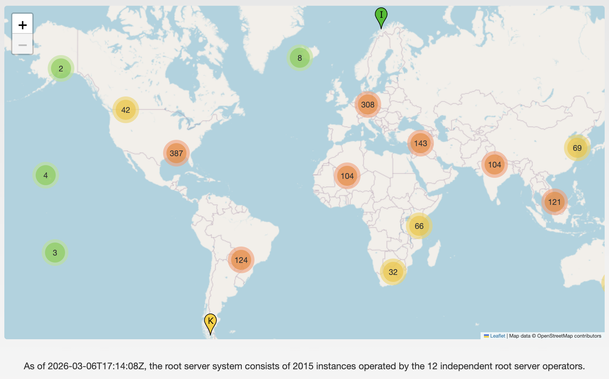
In this video, we try to wrap up our discussion of the Domain Name System by addressing the nature of the root nameservers, looking at various different resource record types, observing reverse lookups, and thinking about how we can have assurance of authenticity and integrity of the DNS results returned to us via DNSSEC.

https://youtu.be/XDJEJFVNoko

#sysadmin #devops #sre #dns

System Administration: Week 7: DNS & HTTP

We're moving from the DNS on to HTTP. Sorry, no videos for this subtopic, but here are the slides from our last class. We discuss how to get your domain registered and then move on to summarize briefly HTTP the protocol and look at what CDNs do.

https://stevens.netmeister.org/615/07-2026.pdf

#sysadmin #devops #sre #http

System Administration: Week 8: HTTPS

We sketched out the basics of HTTP in our last class, so necessarily we'll have to cover #TLS now. These slides illustrate the benefits (transport encryption, endpoint authentication) as well as some of the pitfalls (complexity, cert revocation, endpoint "authentication").

https://stevens.netmeister.org/615/08-https.pdf

#sysadmin #devops #sre

System Administration: Week 8: E-Mail, Part I

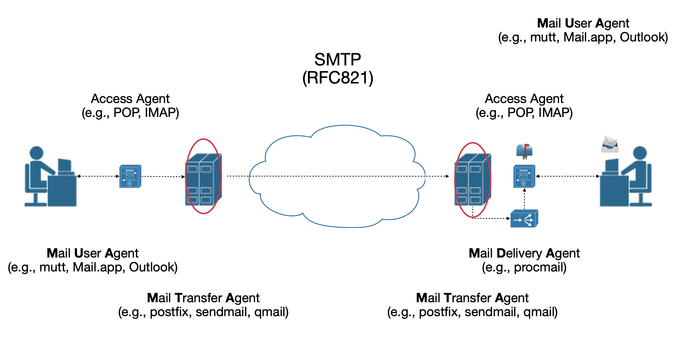
In this video, we begin our discussion of E-Mail by looking at the components of the larger mail system (the Mail User Agent, the Mail Transfer Agent, the Mail Delivery Agent, an Access Agent), observing the packets involved in a simple SMTP exchange, and track an email from one system to the other.

https://youtu.be/Ai8rjqelwsI

#sysadmin #devops #sre #smtp

System Administration: Week 8: E-Mail, Part II

In this video, we observe the incoming mail on our MTA, look at how STARTTLS can help protect information in transit, how MTA-STS can help defeat a MitM performing a STARTTLS-stripping attack, and how DANE can be used to verify the authenticity of the mail server's certificate.

https://youtu.be/RgEiAOKv640

#sysadmin #devops #sre #smtp

CS615 System Administration, Week 08, Segment 2 - E-Mail, Part II

YouTube

System Administration: Week 8: E-Mail, Part III

In this video, we look at ways to combat Spam. In the process, we learn about email headers, the Sender Policy Framework (SPF), DomainKeys Identified Mail (DKIM), and Domain-based Message Authentication, Reporting and Conformance (DMARC). SMTP doesn't seem quite so simple any more...

https://youtu.be/KwCmv3GHGfc

#sysadmin #devops #sre #smtp

CS615 System Administration, Week 08, Segment 3 - E-Mail, Part III

YouTube

@jschauma

yeah. the sad thing is also that the *most* likely to be "correct" for SPF/DKIM/DMARC/rDNS are the bigger spammers. SMB are least likely.

then you get into choices in RBLs, having to have logins established to get blocks removed for the biggies like google/outlook and check for your spam rating.

definitely not impossible but also not for the faint of heart.

@paul_ipv6 @jschauma one of the most annoying things is that the big mail providers aren't only spam sources, they are also by and large not interested in getting spam reports; and then there's what became of Google groups: the only major mailing list provider I know about that does zero attempts to verify that the recipients of the mail addresses that a group owner subscribes are ok with being subscribed.

@spz @jschauma

oh, the big boys won't hesitate to block you for spam but google groups and outlook/360 are a huge source of malicious spam, with no apparent interest in stopping it...

@jschauma next week ECH and issues with ECHConfig rotation in HTTPS DNS records? ;)
@jschauma do you cover ANYCAST in this lecture?
@peterhoneyman Not in much detail, but we summarize it in class in the context of the DNS root servers and CDN usage.
@jschauma i always had trouble with ANYCAST bc i never wanted to talk about BGP

@peterhoneyman @jschauma

yeah... BGP is not for the faint of heart...

it's kind of like politics. you can claim anything you want and more careful folks have to do research or explicitly void your claims. sadly, in BGP and politics, way too many folks just blindly believe, then are surprised at the consequences. :)

@paul_ipv6 @jschauma

i don't mind in a networking course (i mean i do, but that's another story), but in a security course, where i have two or three lectures to explain how networks work, or jan's systems course, BGP is just a bridge too far

@peterhoneyman @jschauma

yup. it's definitely a rabbit hole if that's not what you're there for.

even when i was doing a 5 day intensive DNS class, i would figure 30 minutes to try to explain enough of routing and anycast to explain why it applies to DNS.

suspect folks teaching CDN have to take a similar hit.

@peterhoneyman Yeah, it's definitely another topic that could use its own set of videos to at least summarize and illustrate. But there's only so much time in a semester...