At top of your bash script add this after `#!/bin/bash` line to aborts the script immediately and add robustness to your script
```
set -euo pipefail
```

Use the following to trap error and show line number where your script failed to debut at run time or development time:
```
_failed() {
echo "$0 - Script failed at line $1"
}

# Trap the ERR
trap '_failed $LINENO' ERR
```

See `man bash` or `help set` for more.

@nixCraft and start your bash script with #/usr/bin/env bash instead
@nixCraft apparently mastodon.social doesn't render markdown.

@nixCraft Make the shebang portable with

```
#!/usr/bin/env bash
```

@grefeng @nixCraft that looks a lot like a global variable to me, and you're relying on it. pro tip: don't rely on things which can change underneath you, such as $PATH
@naikrovek Not quite. The shebang is the first line in a text file (marked with #! at left most), that the loader tells which interpreter to use. By using `/usr/bin/env bash` it picks the first bash found in PATH variable. That way the admin of the system (globally) the user can change the default bash to use, which can be a newer/patched version than the vendor delivered. On some systems /bin/bash or /usr/bin/bash lies on RO filesystems. So with /usr//bin/env you decouple and are portable.
@grefeng who cares about portability? I stick the shebang line on as i deploy/build, choosing the correct one depending on the OS. `env` is dangerous. how can it not be?
@naikrovek If you write the scripts only for yourself, than your approach is doable. If you have to write scripts for potential thousands of customers, then you care about portability and compatibility. And I dont see (currently) any harm in using `env`. Of course the scripts, that depends on specific features checks for the current setup.
Maybe we have just different requirements with our "scripting targets" – mine are not fixed but very flexible. (edit: typos)
@nixCraft Gotta love how even the most basic sort of error handling is opt-in in shell scripting.
@nixCraft for stuff that runs in a cronjob, I like to take this even further. Every operation redirects its stdout to a log file, and the trap cats that log into an email (usually local postfix/opensmtpd) to root. I like to also include some system info (w, uptime, free) for a bit more context. It’s really cool what you can do with simple built in unixey tools!

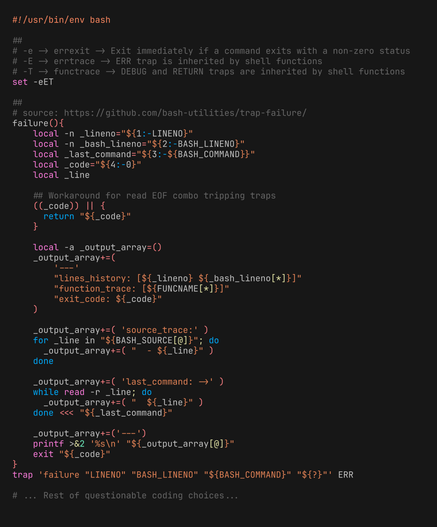
@nixCraft I like setting `errtrace` and `functrace` too because, no matter the times I regret writing big Bash scripts, I end up writing big Bash scripts x-)

Is so bad that instead of an intervention, I wrote a big Bash function for formatting stack-trace-like output when my questionable code produces errors

@nixCraft Ah, the global pipefail.
The indicator of a bash novice or slop-generated script...

Indiscriminate "set -euo pipefail" - especially in scripts that have no pipes whatsoever - is one of the best hints that somebody generated the script and did not understand it :)

https://mywiki.wooledge.org/BashPitfalls#pipefail

BashPitfalls - Greg's Wiki

@richlv @nixCraft FWIW I understand the downsides of `set -euo pipefail` but I start every script with it by default. Then I disable parts or get more sophisticated if I need to. The idea is that basically I'm changing the default behavior of bash, to be more like I usually want it to be.