
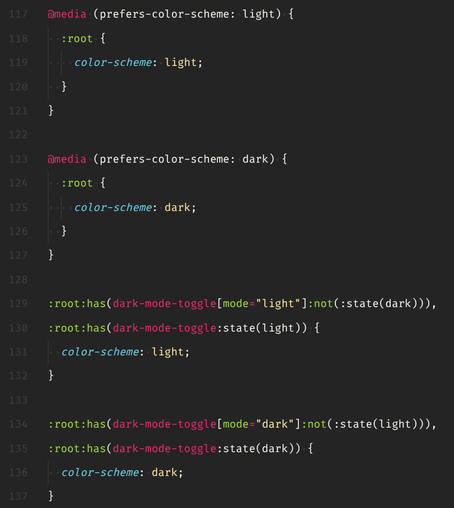
The hoops you jump through to battle FOUC when <dark-mode-toggle> is a #webcomponent with custom dark/light states... but all this async JS magic may need some time to initialize, so there's also a content attribute for the initial state, but that may in turn be overridden by user choice (and therefore one of the custom states) 🥴

#css #webdev

@sir_pepe Lots of discussion around this in https://github.com/GoogleChromeLabs/dark-mode-toggle#usage (Not sure if you saw this, your custom element seems to be named the same as the one from the repo.)

@tomayac First time I realize that Chrome has its own <dark-mode-toggle> 🙃

Looks like the vibe is very different from my thing, which wants to be the single source of truth first and an interactive widget second: https://www.npmjs.com/package/@sirpepe/dark-mode-toggle

All I REALLY want is to go ":root:has(dark-mode-toggle:state(light)) { /* changes */ }" and stop thinking about dark mode.

@sirpepe/dark-mode-toggle

A web component for switching between light and dark modes. Latest version: 0.1.3, last published: 3 months ago. Start using @sirpepe/dark-mode-toggle in your project by running `npm i @sirpepe/dark-mode-toggle`. There are no other projects in the npm registry using @sirpepe/dark-mode-toggle.

npm
@sir_pepe The objective of ours was mostly making the fighting against the browser (i.e., the theme override) be as performance-neutral as possible. Also to flexibly be switch and toggle at once.