 Simon B. Støvring
I’m working on a new Shortcuts-focused tool. It’s not like Scriptable, but it plays in the same space. I’m still wrapping my head around the idea, but I’m incredibly excited. Looking forward to sharing more and hearing if it makes sense to anyone but me 😄
A key part of this app involves generating both in-app UI and Shortcuts actions (nay, App Intents) from my Swift models. That’s why I’ve been diving deep into Swift macros over the past week.
I've been making great progress on this project today. There are still a number of key interactions that I need to implement before I can show off anything, but I'm slowly getting there 😀
I'm wasting so much time getting drag and drop working properly with SwiftUI for this project. I don't think the .draggable(...) APIs can do what I need, so I've dropped down to UIKit, but even then it's such a mess to get working properly with SwiftUI 😩
Using .draggable(...) is there a way to detect that a drag interaction has started and ended for a view?
I think I’ve managed to achieve the behavior I want using pure SwiftUI, which makes me weirdly happy. I might have made a compromise or two on the visuals in order to do it with pure SwiftUI, but that’s a trade-off I’m OK with for now.
This project forces me to build some of the most advanced UIs I've ever built, and I enjoy it so much.
* A text editor is also quite advanced, but not in the UI, really, it's more in the internals.
There are so many things to build as part of this project. I just spent a few hours building a custom font picker 😀
Just purchased the domain for what I think will be the name for this project at launch 🙊
If you’re the hacker type or living rent-free in my head, you might be able to dig up the tiny “Coming soon” page I put online for this project 😄
Having so much fun with this project! I spent last night and most of today optimizing the main UI for iPad and I think it’s turned out very slick. Might be the best iPad optimization I’ve ever done.
Spending a tremendous amount of time optimizing my app this week in order to avoid hitches during navigation. This is really tricky with a somewhat advanced SwiftUI app. I enjoyed it in the beginning, but I’m really struggling to pinpoint where I can do the remaining optimizations, so it’s starting to feel daunting.
Every of these hitches happen on some common and key navigation in my app and I'm fightning so hard to get rid of them, but… This SwiftUI code is getting the best of me 😢
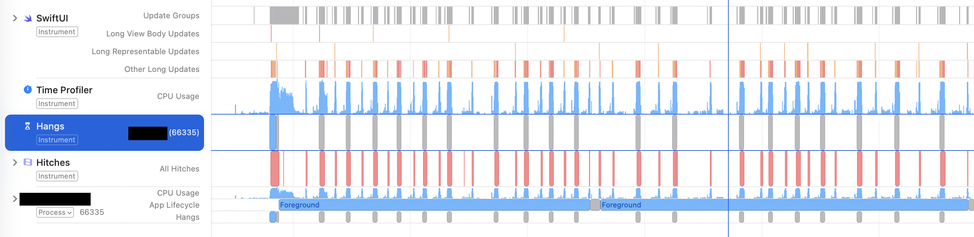
I'm starting to think that SwiftUI's TextField is a bit expensive on macOS. It seems that once I load ~10 text fields into a view, I'm noticing small hitches.
I've been profiling my app with the SwiftUI template in Instruments a lot over the past week.
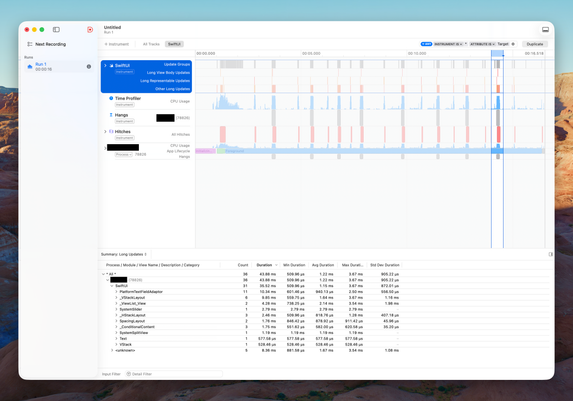
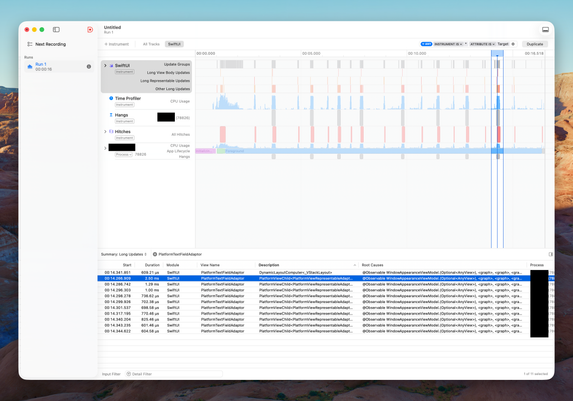
I'm at the point where none of the long view body updates relate to my code but mostly to SwiftUI internals.
Most of these updates are caused by @Observable WindowAppearanceModel, which isn't my code. I don't know how I'm supposed to address this.
Have anyone replicated Shortcuts’ transition that changes the zoom destination based on state?
If the shortcut is empty, it zooms back to the “+” button but if actions are added, it zooms into the new item.
I’ve tried naive approaches with matchedTransitionSource(…) and navigationTransition(.zoom(…)) but none seem to work.
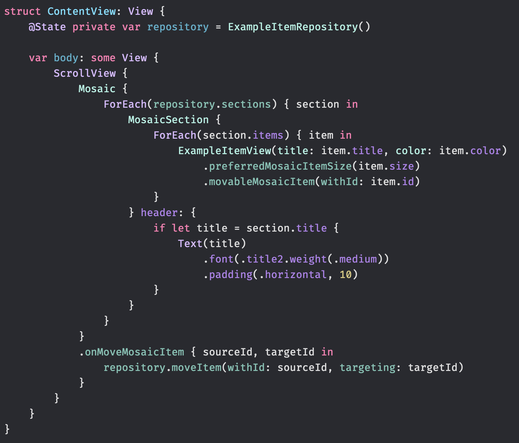
About to build a “mosaic” layout in SwiftUI where the size of the views will depend on the properties of the model they represent. Some views will fill the entire screen, and some will be sized to show two-by-two.
If this turns out well, this will be the first thing people see when they open my new app 😀🤞
Seems like the tricky part is figuring out how I can introduce a concept of sections when using SwiftUI’s Layout protocol to place views on the screen 🤔
I know how to do this with a UICollectionViewFlowLayout but I’d like to do it in SwiftUI.
.layoutValue(key:value:) might be the solution here.
Ended up not having much time to work on this layout yesterday but I've made some good progress today. This is more or less how I pictured it.
Project update: Documenting widget sizes for all devices running iOS 26. It's so boring. I just want to get back to coding.

Just came up with an entirely new way to use this app. I think that’d excite the (ultra) power users if I can pull it off 😄
"Scriptable without the script" is the best pitch I have for my new side project so far.
I need to do backend work for this project, so I’m twisting my head looking for ways to avoid doing backend work for this project.
This project allows me to build UI that I've had on my mind for 5 - 6 years. It feels so good to see it come to life and play around with it on my own devices.
For the first time since starting this project, it’s in a state where I can actually use it myself. There are still sooo many features I want to add, but it feels amazing to finally have the core flow working 😃
Getting here has taken longer than usual. Normally, I rush to get the core flow working end-to-end so I can verify everything, and then polish later.
But this project was different. From early prototypes, I knew the technical side would work. The real challenge was designing an interface that felt good enough that I’d actually want to use it. It slowed things down, but I’m glad I did it.
There’s still plenty left to refine (and lots of features to add 😅), but having something usable at this stage feels like a huge milestone.
Working on a simple SF Symbol picker for this side project.
Moved the category filter to the bottom of the screen so it’s within reach and tweaked the appearance slightly. It’s starting to feel the way I want it to.
Spending a few hours these Christmas days combining Swift macros, property wrappers, and result builders to build a powerful API that lets me generate large parts of the UI for my upcoming side project. Feels good to get this nerdy again 😄
This evening I nailed a really tricky design challenge in this side project that I’ve spent the past few days pondering. Feels good.
Spent a couple of hours today writing some of the weirdest SwiftUI I’ve ever written. In a small part of this side project, I need to use Mirror to traverse the children of a SwiftUI view hierarchy. Looking forward to show you why 😄
When installing a new productivity app for the first time, what onboarding experience do you prefer?
Add sample item to edit or delete
Start fresh with an empty state
Show results
Poll ended at .
As much as I dislike large parts of Liquid Glass and would go back to the iOS 18 UI in a heartbeat, I have to admit that Liquid Glass fits quite well with the app I’ve been working on intermittently since early June.
I’m so close to being able to show you the project I’ve been working on since early June (with breaks, for example, to build Festivitas). It has been eight months underway. I’m now using it daily. I hope some of you will too.
Still a few somewhat big features left before I can release this project. Payments is one of them.
I think this will be my first subscription app. My guess is it’ll require a non-negligible amount of changes and testing with every major iOS release, and to make that sustainable, subscriptions feel like the right model.
Looking forward to diving into the subscription APIs in StoreKit… though I’ve heard they can be a bit daunting 😅
Torn between going with Sign in with Apple, or chasing a secure no-signup way to associate push tokens with a user’s devices using CloudKit
(a la https://www.swiftjectivec.com/how-to-use-icloud-without-really-using-icloud/).
Part of me really doesn’t want any kind of account in the app, even if it’s optional or delayed. But I also want something that’s secure and maintainable… which is exactly what Sign in with Apple promises to be.
Trade-offs everywhere. Curious how others have approached this.

A “no account” solution based on CloudKit could look like this:
1. Device fetches S, a user-specific secret, from the user’s private CloudKit DB, creating it if missing.
2. Device authenticates with
HMAC_SHA256(S, token || deviceId || timestamp || nonce)
3. On first registration, the backend learns S and then groups devices by
userId = SHA256(S), verifying the HMAC and rejecting replays via timestamp and nonce.
This proves knowledge of S, and therefore access to the user’s private CloudKit DB.
I’m experimenting with CloudKit’s public database for user-specific data but it makes my brain itch that it’s called “public”.
I’m pretty sure I’m using it as intended though. Access is scoped, records are tied to the user’s iCloud account, and nothing is actually truly public.
If this holds up, it’s nice. I already sync data in the user’s private database with SwiftData, and this gives me a way to share auxiliary user-bound data with a backend service via CloudKit’s server-to-server support.
Now that brrr is submitted, I can slowly begin turning my attention back to the side project I've been workin on since June.
This is the second skiing trip I'm working on syncing with CloudKit. Apparently, I like to pair vacation with a good amount of self-torture.
 Tim Oliver
@simonbs how has your experience with CloudKit been so far? I was taking a look at CKSyncEngine today, but I’m still on the fence about making a production app with it.
@timoliver I built an app that syncs with CloudKit prior to CKSyncEngine. It was a pain. I’ll never do that again. Now I’ve built an app that syncs with SwiftData and its automatic CloudKit integration. That gives me fewer levers to customize things than I’d like. So I’ve started migrating to CKSyncEngine. It’s too early to say how that’ll work out.
@simonbs Oh nice! Good to know! Yeah I tried to build directly on CloudKit a while ago and gave up when I saw the shopping list of reasons it gives for when a sync operation fails.
I’ll give CKSyncEngine a proper try too then!
 John Payne
@simonbs scope creep alert! I was just thinking about some use cases, and how cool it would be if, when brrr received a notification it could optionally trigger a shortcut to run with the notification as input...
@john I haven’t tested it, but I think you can do this by setting `openURL` to a Shortcuts URL scheme when sending a notification with brrr.
You’d have to manually supply the arguments through the query parameters when sending the notification, so it’s not “use the notification as input” but rather “supply an explicit input”, which may be even better.
@simonbs that could work, but I was hoping for background execution (on mac at least).
 Adrian
@simonbs I think you covered this when you were originally tossing around the idea for brrr, but I've forgotten: what was it you wanted that wasn't already in other solutions, particularly Pushover?
 Morten Mosgaard
@simonbs I could see a big potential in the dating app grrr, fingers crossed it’s that side project!
Congrats on submitting.
 Iain McLaren
@simonbs not really what you are asking but I ask for an email address, send a totp 6 digit code to the user’s email address, and use that for auth (via the web, returning a jwt, etc).
It’s not 2fa, but it’s simple, doesn’t require storing user-provided passwords, and doesn’t rely on potentially changeable apple authentication mechanisms.
 Paulo Andrade
@simonbs users will have devices not signed in to iCloud. For those that are signed in, then writing device push tokens to a public table on iCloud (that only the creator and you can read) suffices.
The issue is with not signed in devices.
The issue is with not signed in devices.
@pfandrade I'm honestly not too concerned with people who aren't signed into iCloud. I believe that'll be a negligible group for my project.
@pfandrade My main concern is that I need to do a mapping in my service between CloudKit user record IDs and push tokens. Unless I properly secure this, anyone with access to the user record ID can register their own devices, making them receive private push notifications.
Therefore, I need to add some layer of security on top of this so a CloudKit user record ID isn't sufficient. Proving that's actually safe is tricky.
@simonbs let the app create the device token records on a public database, protect this table so only the creator and you have read access. Look at each row’s creator user id to know who it belongs to. Add another column with the user id itself if you need to search.
Seems secure enough for me.
Add logic to remove stale device tokens when APNS tells you so.
@simonbs by public database I mean CloudKit’s public database.
@pfandrade How can my backend service access this? It seems that something like CloudKit JS requires to authenticate as a user, or am I missing something?
@simonbs you can use CloudKit web services:
With an API key generated in the CloudKit dashboard. The user generating the API key is the one you must ensure has read permission to that push tokens table.
@pfandrade It concerns me that CloudKit's public database is described as being accessible to all users. I know they need means to access it, but it doesn't seem fit for storing user-specific secrets 🤔
@simonbs it’s accessible to all users *if* you allow it. Each record type can have its own permissions.
I’ve used this successfully for records only allowed users can write but everyone can read for example.
I’ve used this successfully for records only allowed users can write but everyone can read for example.
@pfandrade So are you telling me that the public database is not actually public per se? That’s a misconception of mine then 🫨
@simonbs yes. It’s public in the sense it *can* be accessed by anyone if you wish (as opposed to the private database). But you can make records types readable or writable according to any ACL you want.
@pfandrade This is really interesting to me. I didn’t know about this.
Sorry to pick your brain so much, but I can’t seem to find a way to give a server-to-server key s security role. Do you know if that’s possible or it can always access anything in the public database?
@simonbs the key is associated to the user that was logged in the CloudKit dashboard. All your operations using that key are as if that user were performing them. Just give the permissions/role to that user.
 Ma’moun
@simonbs Supabase has an elegant solution for that: https://supabase.com/docs/guides/auth/auth-anonymous. The beauty (especially if you’re using their auth already or planning to) is that the user can create an actual account at some point if they’re interested and get their data migrated automatically from the anonymous session.

@mamouneyya Yeah, there are a few popular devices that does this but I’m not that fond of building upon such services. They’re usually hard to move away from later.
 Nicolai Henriksen
@simonbs oh yes, daunting. Godspeed.