One of my break projects while my kids are in day camp today is building a small kiosk and dashboard for my office.

I am using my usual stack: Django, htmx, Tailwind, and a spare Raspberry Pi 4 that has been sitting on a shelf. I am connecting to it over Tailscale, which makes remote access painless.

I followed this Raspberry Pi kiosk mode tutorial and everything worked on the first try, which was a nice surprise:
https://www.raspberrypi.com/tutorials/how-to-use-a-raspberry-pi-in-kiosk-mode/

How to use a Raspberry Pi in kiosk mode - Raspberry Pi

Kiosk mode lets you boot to a web page or application without giving users access to anything else. It's the basis for all kinds of projects.

Raspberry Pi
The Raspberry Pi Imager also handled WiFi setup and installing my SSH public key, so most of the annoying setup steps were already done for me.

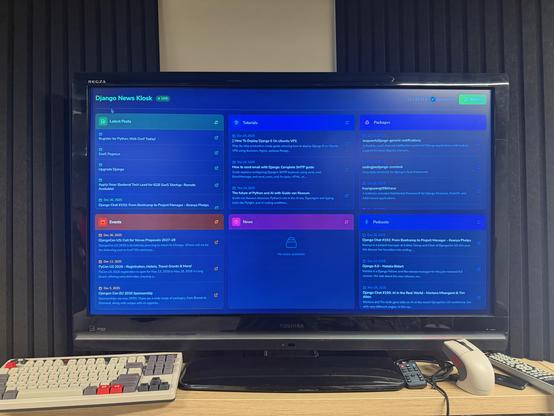
Here is my v1, which was connected to my Django News database and was a one-shot from my phone.

The final version is going to be less newsy but more alerts and stats about https://djangojobboard.com https://djangotv.com and more. 🍿

@webology Python Web Conf?!

Is it coming back?

@_chrismay it'd be cool if it did, but no. It's just one-shot data from an outdated category. 😬
@webology gotcha.
One more disappointment for this year.
😂
@webology this looks awesome! What's the keyboard that you have there?
8BitDo Retro 108 Mechanical Keyboard

@webology I've never quite had the use case for this myself, but have continued to be interested in the idea behind it and enjoy seeing various kiosk projects 😆
Are you using htmx for each card individually or more for the entire page?

@kfdm yes, each card is driven via htmx. I have a kiosk view and then a series of widget views that renders each card.

I copied and customized a dozen widgets/cards today over a half dozen websites.

I structured it this way to make it easy to work on each website's cards.

Then I have one kiosk view for my TV+RPi4 that puts it all together so I can customize it to work in a useful way.

I'll try to do a better write-up once I get images working on my website.