
RE: https://fosstodon.org/@kev/115768058881512667

The thing that makes it extremely hard to switch from macOS to a linux desktop is not just bias and app selection.

macOS is the only OS+app ecosystem with consistent shortcuts and behaviours, some of which can't be replicated on other platforms.
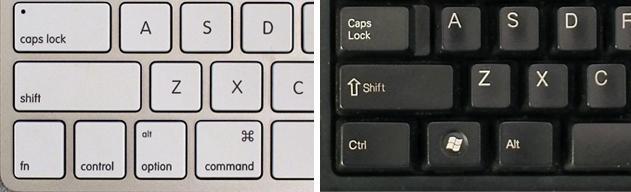
Keyboard shortcuts:
CMD+q => close the app (exception for things that have to always run eg. chat apps => closes to app indicator)

CMD+w => close the window ( the app stays running and keeps its state. This paradigm of an app with no windows doesn't exist on any other platform afaik )
CMD+h hides the app's window
CMD+m minimizes to the dock

Less common but still widely available:
CMD+, open preferences of the app
CMD+r reload the current view
CMD+o open the selected item
CMD+d dismiss a dialogue / don't save (affirmative action preselected, acknowledged by pressing enter)
CMD+i more info about an selected item

Every somewhat competent / native mac app has these functions mapped corretly.

For those that don't there's the native menu item shortcut reassign function in the macos keyboard settings ( similar to what KDE has, but there it only works for KDE apps ) or to do it even more comprehensively #BetterTouchTool ( https://folivora.ai/ ) a tool that has a feature set and UI searching for its equal.

On all non apple platforms I feel like developers just don't care to get shortcuts right or struggle because there are no real guidelines to follow.

Closing an app with Ctrl+q / Alt+F4 for example, every app handles it somewhat differently, some don't even bother to implement it.
Most laptops have their function keys mapped to system / media functions by default nowadays so that's surely not an issue.

Just mapping Ctrl to Alt and Alt to META won't work either, because
CMD (open apple) is *not* Ctrl and that's a feature,
see: https://en.wikipedia.org/wiki/Command_key

One huge benefit from that is that there's no conflict when using cli tools, copy&paste simply works as expected on any terminal emulator.