
RE: https://fosstodon.org/@kev/115768058881512667

The thing that makes it extremely hard to switch from macOS to a linux desktop is not just bias and app selection.

macOS is the only OS+app ecosystem with consistent shortcuts and behaviours, some of which can't be replicated on other platforms.

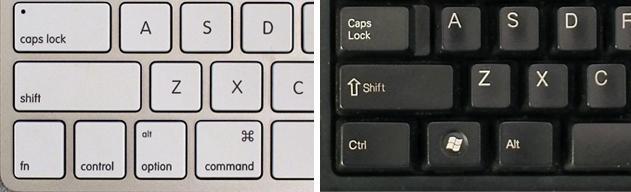
Keyboard shortcuts:
CMD+q => close the app (exception for things that have to always run eg. chat apps => closes to app indicator)

CMD+w => close the window ( the app stays running and keeps its state. This paradigm of an app with no windows doesn't exist on any other platform afaik )
CMD+h hides the app's window
CMD+m minimizes to the dock

Less common but still widely available:
CMD+, open preferences of the app
CMD+r reload the current view
CMD+o open the selected item
CMD+d dismiss a dialogue / don't save (affirmative action preselected, acknowledged by pressing enter)
CMD+i more info about an selected item

Every somewhat competent / native mac app has these functions mapped corretly.

For those that don't there's the native menu item shortcut reassign function in the macos keyboard settings ( similar to what KDE has, but there it only works for KDE apps ) or to do it even more comprehensively #BetterTouchTool ( https://folivora.ai/ ) a tool that has a feature set and UI searching for its equal.

On all non apple platforms I feel like developers just don't care to get shortcuts right or struggle because there are no real guidelines to follow.

Closing an app with Ctrl+q / Alt+F4 for example, every app handles it somewhat differently, some don't even bother to implement it.
Most laptops have their function keys mapped to system / media functions by default nowadays so that's surely not an issue.

File picker dialogues: drag and drop a file the file into it, the file gets selected not moved to the currently open directory.
It's a file picker dialoge not a cutdown file explorer window dammit!
( Collum file views are also deeply missed on most DEs, but the elementary linux file manager )

Global menu bar / action discoveribility:
all menu items are in the top menu and are even searchable.
On other platforms some apps maybe have a HUD / Command Palette if you're lucky but of course you access them with different shortcuts.

( #GNOME in it's quest to become a viable touchscreen interface has hidden all the options behind hamburger menus and I'll never forgive them for this. I have this percision pointing device, my desktop and its apps should make use of it. )

toshy ( https://github.com/RedBearAK/toshy ) makes linux (#KDE) somewhat bearable to use for me, but it's still a struggle and I've started
experimenting with keyd ( https://github.com/rvaiya/keyd?tab=readme-ov-file ).

tldr: On macOS you get used to features you can't get on linux and it's not just the app ecosystem.

GitHub - RedBearAK/Toshy: Keymapper config to make Linux keyboard shortcuts work like a 'Tosh! And more. (A Kinto alternative.)

Keymapper config to make Linux keyboard shortcuts work like a 'Tosh! And more. (A Kinto alternative.) - RedBearAK/Toshy

GitHub

Just mapping Ctrl to Alt and Alt to META won't work either, because
CMD (open apple) is *not* Ctrl and that's a feature,
see: https://en.wikipedia.org/wiki/Command_key

One huge benefit from that is that there's no conflict when using cli tools, copy&paste simply works as expected on any terminal emulator.