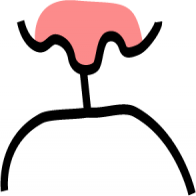
How UI degrades over time.

Top (Windows 95): great contrast, obvious shapes. Instantly readable.

Middle (Windows 11): shapes are still self-explanatory, but contrast is gone.

Bottom (Windows 11 Insiders): what am I even looking at? The only shape I can understand here is the Run button. Barely visible, though.

Then, on the left, there’s another something that says Run and has an icon. What is it? A window title? Another button? Why does it have to say Run twice?
... 1/3
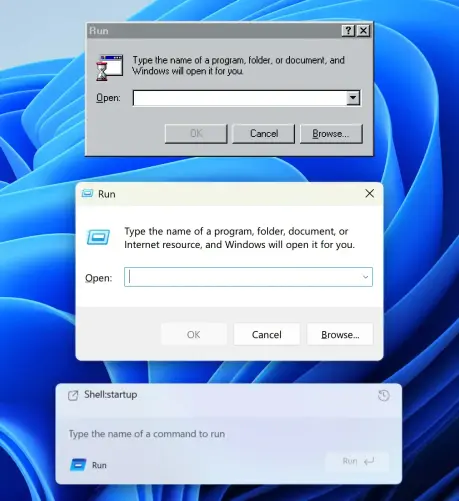
... Shell:startup looks like a header but from what I understand is actually your previous command. Also, why is it aligned so poorly? Text to icon, bottom padding?

Finally, the text input. Do you see it? I don’t. But it’s there. The only hint is a barely visible white (???) cursor before the placeholder. How do we know it’s a placeholder? We don’t.

The original Windows 95 interface is _functional_. It has a function and it ... 2/3

... executes it very well. It works for you, without trying to be clever or sophisticated. Also, it follows system conventions, which also helps you, the user.

I’m not sure whom the bottom interface helps. It’s a puzzle, an art object, but it doesn’t work for you. It’s not here to make your life easier.

Bottom image source: https://x.com/phantomofearth/status/1996660509027062148

#Windows #Affordance #Contrast #Run #Dialog #Microsoft 3/3

phantomofearth ☃️ (@phantomofearth) on X

Windows 11 is getting a modern Run dialog! Build 26534 ships with bits for it, here's a first look:

X (formerly Twitter)

@grumpy_website
Usability/UX is hard. And Microsoft... well, I think every third or fourth decision they make is good, the rest is bad.

I mean... Start menu button in the middle? Why was there more than one person who thought that was a good idea?

And yes, I know. You copied it from macOS after Apple copied it from CDE.
Are you going to copy Liquid Gl... too?

If you want unreadable text, I can show you some places in Entra where the idea that a dark mode would ever be available was clearly too abstract for the developer working on it.

@wakame @grumpy_website There is a rather strong reason why a "Start" button ought not to be in the lower left corner of the screen (or in any fixed position).

The reason is that there are USB attack devices - usually disguised as very common, seen everywhere, flash thumb drives.

In the attack the thumb drive identifies itself as not only storage but also as a keyboard and mouse. Many operating systems would silently accept that claim. So the attack device would swing the fake mouse pointer to the lower left and generate a fake click, then the attack device would use its fake keyboard to open a command window and take type stuff into that window to take over the machine.

@karlauerbach @wakame @grumpy_website I'm not so sure that's a rather strong reason. Computers have many, many attack vectors.

@Amoshias @wakame @grumpy_website The USB attack via a flash drive claiming Human Interface Device abilities is quite common and is often the means to inject seriously dangerous code into boxes.

This is one reason why many companies (and military organizations) fill USB ports on computers with hot-glue to prevent their use.

I've also noticed that the latest round of operating systems now ask whether to allow additional USB devices plugged-in after boot-up time.

Take a look at devices like this "Rubber Ducky" (there's others, like the HackyPi on Amazon.)

https://shop.hak5.org/products/usb-rubber-ducky

USB Rubber Ducky

@karlauerbach @Amoshias @grumpy_website

True. But in this case, it would be easier to emulate the keyboard and simply send the shortcuts for opening Run etc. to Windows.

Deactivating the USB ports via software is also possible and can often be configured with fancy enterprise antivirus (I mean "Endpoint Security").

The "classic" method for USB attacks is still "leaving sticks lying around in the parking lot". Personally, I like the "getting a USB mouse as a business gift" via regular mail.
(This mouse then also registers as a keyboard and does Rubber Ducky stuff.)