 TootSweet
Any idea what might be going on with this print?
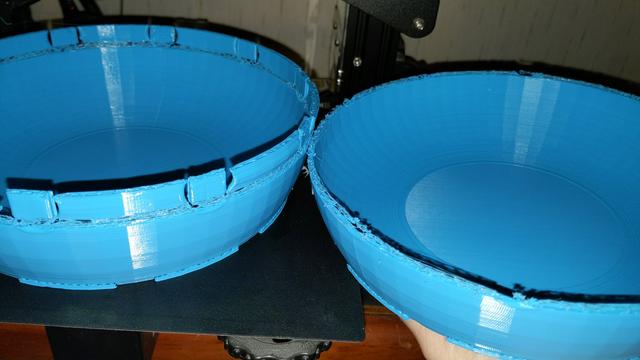
It’s definitely being under extruded. As to what’s causing that, my first guess would have been a clogged nozzle… but if it’s happening not-at-random, it’s probably not that.
is there a way to see a log of hot end temps across the prior prints? it could be that something is causing the the machine to speed up putting out more plastic and the hot end struggling to keep up, though I’m just spitballing here.
Either your slicer is failing: try shifting the object a little or rotating it and slicing it again.
Or your Z axis has something happening at that spot. Try cleaning and lubing it and see what happens when you jog through that spot a couple times.
I had a case that looked like that, because the nozzle was scraping the previous layer of the print.
I think that for some reason the layers below were physically taller than in softwas and the additive effect of that stacked and reached critical failure at a certain height. No enclosure/heating chamber btw. It was always the same height for that model, but then a smaller model like a benchie would have no issues on that height. I guess because the filament was warmer due to the smaller loops, so more mendible or less expanded somehow, idk.
I dried my filament so it stopped making bubbles and ran some filament specific calibration and also I changed the extrusion to be a bit lower. Then the issue was gone.

A 'cold pull' is a technique that allows you to clean your printer’s nozzle and hotend from any material that may be stuck or burnt inside. You can also use it to clean your hotend during your usual maintenance routine. If you are using Nozzle X, do…
Error persists on entire layer where a new retraction pattern is used, therefore it is very unlikely to be filament humidity or a gcode issue, but filament settings.
What is your retraction length and speed? Do a cold pull to rule out debris. Reduce your retraction until stringing occures, observe if the error repeats. Temperature could be playing a role, but if your layer adhesion is up to expectations, I wouldn’t change. Also observe your nozzle and make sure it’s taught, I’ve been surprised how fast some of my brass nozzles have worn out even with non-abrasives, and causes a similar symptom of randomhish failures, especially if loose.
 FuglyDuck
 Lasherz
 MissJinx
 Synapse