 stevefaeembra
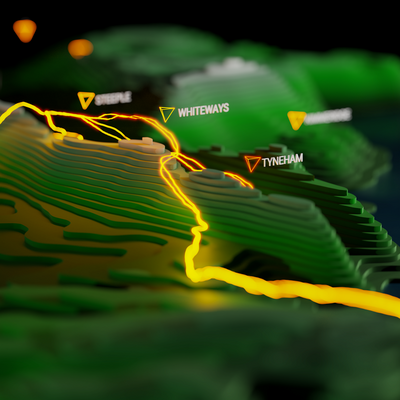
Trick to hidden face removal - do as curves in geometry nodes, then extrude vertically.
The contour lines are rendered in neon, and the vertical extrusions in matt black.
This keeps face counts way down, compared to using a landscape mesh 2/2
Trick to hidden face removal - do as curves in geometry nodes, then extrude vertically.
The contour lines are rendered in neon, and the vertical extrusions in matt black.
This keeps face counts way down, compared to using a landscape mesh 2/2
@beyondwatts I think that works well!
You tried Blender geometry nodes recently? Not tried it with polygons yet, but CSV node makes working with line features like contours a lot easier. I never really got the hang of Python scripting for Blender :/
Remember seeing some of your animations on 30 day map challenge, you taking part this year?
@stevefaeembra This reminds me of a behind the scenes thing I saw about a movie whose name escapes me from that time period.
What appeared to be a computer wireframe was actually something like glow in the dark or fluorescent tape on the edges of a physical city model that had been painted black.
@stevefaeembra Oh wow the Jonny Quest theme song from my childhood embedded in a GIF, Oh wait.

@stevefaeembra I think it needs this as a background theme and we’re set for adventure.
 beyondwatts
 JP
JP InsertUser
 Gary
Gary 
 Jonathan Hartley
 Alex Willmer
 Irenes (many)
 Toasterson (Till Wegmüller)
 Bence Varga
 rolandog
 Dunks
Dunks Tom Chadwin
 sb arms & legs
 Marco González Luengo
 Liam Mason