 Felicitas Pojtinger 🌅
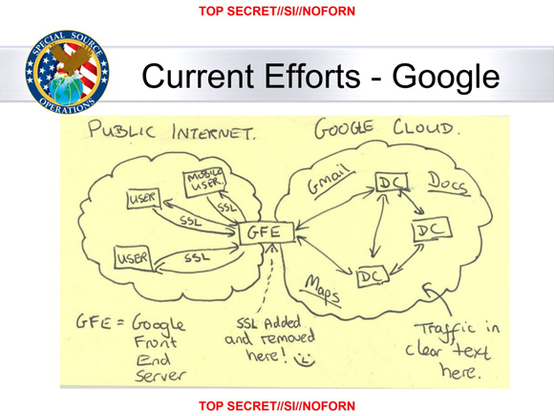
Whenever you see someone recommend Cloudflare or something else that decrypts and re-encrypts TLS for something, esp. for something related to open social media or media storage etc., reply with this picture from the Snowden leaks
I'm begging you. Please tell me what else to do.
I run copy-paste-quality pfsense with a single personal domain.
@dnavinci I've had good luck using yggdrasil (https://yggdrasil-network.github.io/) rather than DNS to access media remotely. it does require the client machine to also be on yggdrasil, but that's doable even without root if you can run your own software or apps
DNS is renting because you have to keep paying for domains or you lose them, just like renting anything else. the "buying" terminology is just marketing
@dnavinci @migratory One edge server running Wireguard & nginx. One LAN computer running same, connecting via Wireguard to edge server. DNS entries that resolve publicly to edge IP, resolve on LAN to internal IP.
Configuration and automation ensues; not too intense.
@dnavinci @migratory Sorry if I made it sound trivial, I was trying to quickly regurgitate my approach 😅 But depending on what you host there are some docker-based workflows that simplify some parts e.g. certificates. My Wireguard and nginx setup was mostly hand-built though, and it wasn't too complicated to configure those. There are a few moving parts, but I didn't find it too overwhelming.
I'm in the middle of switching to a Pangolin based approach. I had previously only allowed clients on the Wireguard network into the services but only allowing IPs from Wireguard, but to allow for sharing content with external (to my home) users I think Pangolin will give more flexibility. This mostly affects the edge server configuration, not much has to change internally.
If you do go with a certbot approach to certificates, I'd recommend using DNS validation from the start, as I think it offers more flexibility for the rest of the setup.
@nickspacek
Thanks for turning me on to pangolin. That will make this really easy!
By DNS validation you mean DCV? Not something I've given much thought. I assume this is easy in pangolin?
I've been waffling between what you said and just tailscale.
My threat model doesn't really include the NSA.
Mostly I want to host my music server, but also give my friends my minecraft.myhostname.com for when we play.
@migratory
@dnavinci @migratory Most (all?) Of my current use-cases are HTTP-based. Pangolin supports TCP proxying too but I have no experience so I can't speak to it.
By DNS validation with ACME/LetsEncrypt the common approaches to validate that you "own" the domain are HTTP, where the handshake asks you to create a specific file/contents on a web server, vs the ACME DNS handshake that asks you to create a TXT record with specific contents. When the ACME confirms one of the above approaches, it issues you the SSL certificate for the domain! Then you can serve your site over HTTPS.
That's not important for Minecraft servers though. In that case, Pangolin would probably do the trick (maybe a bit heavy), or Tailscale (still heavy), or Hamachi (is that still around??), or for a long while I just used a reverse SSH tunnel which is dead simple.
@dnavinci @migratory Right, I couldn't remember before but there's a app built on SSH for maintaining the reverse proxy connection called AutoSSH. I think it is in most Linux Distro package managers now.
I found this post about setting it up to start automatically with systemd. Could be handy!
https://pesin.space/posts/2020-10-16-autossh-systemd/
It runs inside the LAN and connects over SSH to your jumpbox, which has some convenient DNS entry pointing at it. When it establishes the SSH connection it also opens a port on the jumpbox where packets are tunneled over the SSH connection to a target port inside your LAN, which can be on the server initiating the SSH connection, or on some other host if you want!
 medium rare bird
 Gianmarco Gargiulo
 DNAvinci
 Nick Spacek