 Quinn Nelson
This single-step Apple Shortcut is a GAME CHANGER. No more going to Settings -> Apps -> and then finding the app.
Just swipe from Control Center, run the shortcut, and you’re automatically redirected!
This single-step Apple Shortcut is a GAME CHANGER. No more going to Settings -> Apps -> and then finding the app.
Just swipe from Control Center, run the shortcut, and you’re automatically redirected!
Step 1: install shortcut
Step 2: “Add a control” in Control Center, “Run Shortcut,” and select the newly installed shortcut
Step 3: Profit!
Download here: https://snazzy.fm/eP
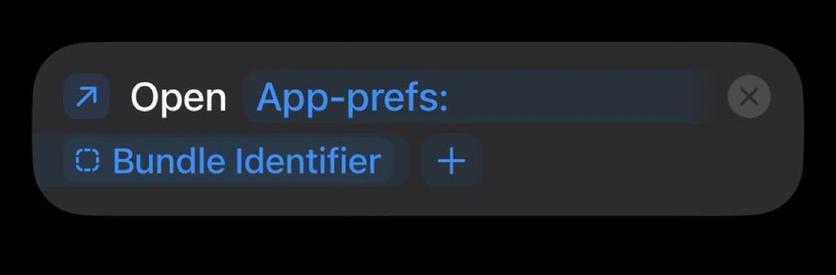
Or add manually:
@snazzyq Cool!
Weirdly, mine didn’t work (opened the top-level App Settings) until I opened it in Shortcuts and changed the icon. ¯\_(ツ)_/¯ But it works now!
@snazzyq
Brilliant, thank you. If it’s any help to anyone I’ve add a tweak to make it work in the camera app too
https://www.icloud.com/shortcuts/a3cddcc7d4f9460f8daea762d975f704
 Graham Harper
 ytse77
 curtosis
 Fahfoofnik
 Gus
Gus Steven Arenberg
 Von
Von mrplow
 Mieszko Ślusarczyk
 Lee
Lee foxmean