Hey, #Inkscape and/or #Fritzing gurus. A documented use of Inkscape is to create a custom outline for a printed circuit board that can then be imported into Fritzing: https://www.instructables.com/How-to-Make-Custom-PCB-Shapes-with-Inkscape-and-Fr/

This requires manually creating a file with two sublayers with specific settings, which is tedious and error-prone if you aren't a frequent flyer with Inkscape. How hard would it be to script something to do this automatically - take one SVG with the outline, and output one with the right layers?

How to Make Custom PCB Shapes (with Inkscape and Fritzing)

How to Make Custom PCB Shapes (with Inkscape and Fritzing): If you are a beginner and need a PCB with custom shape... and need it in the shortest time as possible... OR if you don't want to spent a lot of time learning how to work with advanced softwares, because you make eventually a board or other... this …
Instructables

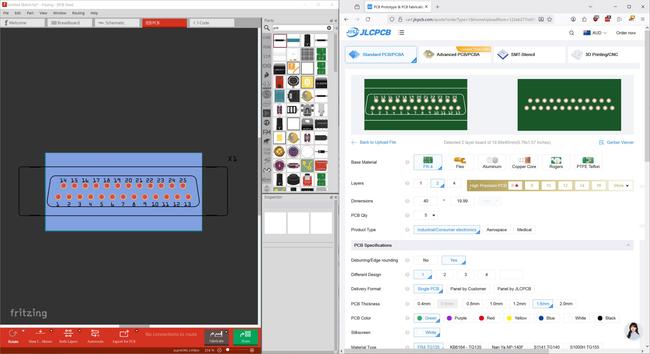
First experiment to check I understand what's going on: changing some basic parameters in an SVG file already set up to make a PCB cutout.

Every tutorial written about making custom PCB shapes for Fritzing tells you to make the board fill green and the outline white - as far as I can tell, this is because the person who wrote the first one wanted to look at green in Fritzing. Your PCB manufacturer doesn't care what colour the SVG was, it's just turned into CNC movement commands anyway.

All I've done to get this result is to draw that exact shape in #Rhino3D, use the SaveAsSVG plugin to export it, manually copy the d="..." string to both the "board" and "silkscreen" sections in the PCB-ready SVG.

...With one extra step - I altered the "viewBox", "height" and "width" fields to get it to display fully in Fritzing - otherwise it cropped it to the same 40x20 rectangle from the first test. JLC probably doesn't care about those values, so setting them liberally might be a solution.

No dice with the lazy option. Removing height and width stop Fritzing from parsing the SVG. Viewbox will pan and crop the geometry, and height and width scale whatever's there.

Those variables must be handled - manually or programmatically.

Another big assumption/assertion in the tutorial linked above is that you have to set the simplifcation threshold, otherwise "the shape will be distorted and the manufacturer will not be able to produce the PCB". This will be to do with producing an SVG with overly complex curves (or rather, an overabundance of points forming curves) - same reason a really huge shapefile will crash a GIS package.

That limit will vary from PCB maker to maker - but I didn't hit it with this curve-filleted shape.

One last funny check - two more tests, removing the silkscreen layer and the board layer from the SVG entirely.

Fritzing gave me an error when I tried feeding it the one with no board outline - and was a bit confused when presented with the one that ONLY had the board outline in it, but that successfully loaded and created a pack of gerber files, and JLC appears to have successfully parsed and quoted that one. So maybe technically you only need the one correctly named board layer in there.

Okay, I think I understand the whys and wherefores of that process now - Fritzing is fine if there's no silkscreen with the board outline, it just adds whatever you put on the silkscreen layer to whatever you have already and exports it all together. The tutorial will give you a drawn-on border in the silkscreen exactly around the board outline, which doesn't appear on the bottom of the board because it's only adding one silkscreen layer.

Concluding thoughts from day 1 of messing with PCB SVGs:

It's possible to set up a pre-made SVG file containing the right metadata to be a PCB shape you can import into Fritzing, and update it by copying just the coordinates and updated dimensions into that file. It's faster than doing it from scratch every time you need to try a slightly different board shape or outline.

It can just be the board outline, you don't need the silkscreen layer.

Next step is to stress-test what I have already - more complex shapes, more curves, etc.

I also want to see how internal cutouts appear in an SVG file - Fritzing can do round holes of any size, but a square cutout or something more complex will likely require different handling.

For the moment though? I reckon I can easily set up a template PCB SVG file, create new board outlines in Rhino, export, and copy/paste details into the template faster than I can do all the fiddly Inkscape stuff.

Oh for Pete's sake. It turns out that if you just import any SVG with a fully enclosed outline into Fritzing, and ignore the warning about it not containing any silkscreen layers, it'll work fine as a PCB outline and the right shape gets exported just fine in the gerbers.

I wish I'd tried that months or years ago instead of stumbling on a tutorial and thinking I absolutely had to go through a dozen steps including tweaking layers and raw XML to get a board outline.

@timixretroplays The same exists in programming. Someone dubbed it “programming by superstition.” E.g. the first tutorial for a web framework shows you how to declare a service in the service container and call from your controller. Calls it JobOfferService. Beginners call their services SomethingService. They become proficient in the framework and write new tutorials wherethey call their services SomethingService. Soon, everyone believes you have to call your services like this. >>
@oscherler it's not just programming, either. When new people join my org, I tell them that the first few months are the most valuable for them to poke at things and ask why they're done a certain way - before they're around for long enough to just accept things the way they are. I specifically welcome them to question and poke holes in the things I'm showing them in training, because nobody who's drilled a task a hundred times will think on their own to try something different on the 101st go.
@timixretroplays One day, you have an existing class you’d like to use as a service, but it’s called SomethingManager, so you wrap it in a class called SomethingService. That’s completely unnecessary, and adds complexity, but you never saw it done differently, so you have no idea.
@timixretroplays I've done the manual steps in Inkscape once - seems like the XML munging you're describing shouldn't be too painful. Happy to pair on it? Would it be an Inkscape script?
@apocraphilia I'm at step zero of this - I've done some programming in the past but not something like writing a script for Inkscape. I guess that's a possible solution, but a script for a command-line tool for XML editing or even some monolithic bit of code that parses and scrapes for the salient tags and copies stuff around would be a minimum viable thing for me. Probably #1 or #2 there would be smarter as every program is going to create an SVG slightly differently.