 Simon B. Støvring
It's time to spend a bit of time making sure Runestone works on iOS 26. The New File dialog was completely broken on iOS 26 but it has been repaired! ⚒️✅
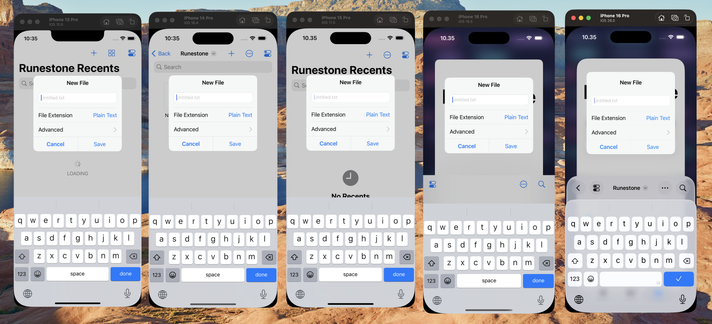
As you can imagine, the Liquid Glass redesign also completely butchered Runestone's navigation bar. That's fixed now.
Instead of embracing Liquid Glass's transparent navigation bar, I'm bringing the blurred background to iOS 26. I think it's a great design for a text editor and the best way to focus on the text.
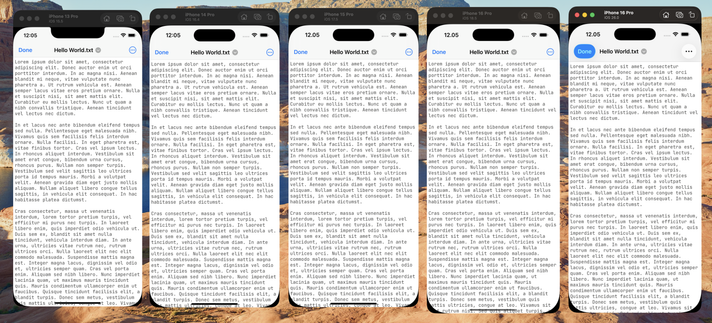
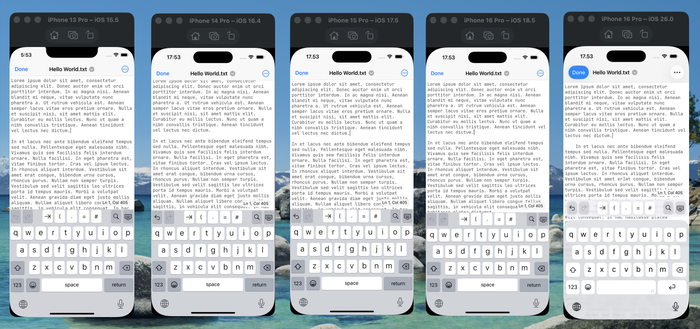
Trying out the new scroll edge blur effect in Runestone, and while it actually looks pretty slick, I don’t understand:
1. Why it doesn’t blur the line numbers when they’re below the navigation bar.
2. Why it blurs the left side of the screen when I’ve set `edge = .top` on UIScrollEdgeElementContainerInteraction.
I can’t seem to find a solution, so this probably won’t make it into Runestone at this time 😕
@vpsteinmann I tried setting leftEdgeEffect.isHidden = true but it's still being blurred. I really don't get it 🤷♂️
My line numbers are children of the scroll view but I’ll verify their relationship with those private types.
My current theory is that a content inset may interfere with the effect, causing it to show up unexpectedly or not show up at all.
 Adrian Schönig
 Furnace Creek Software
 Sören Gade
 Magnus
 Vince
Vince Konrad Kołakowski
 Michael Edlund