About Xcode 26 and "Generate String Catalog Symbols" setting.

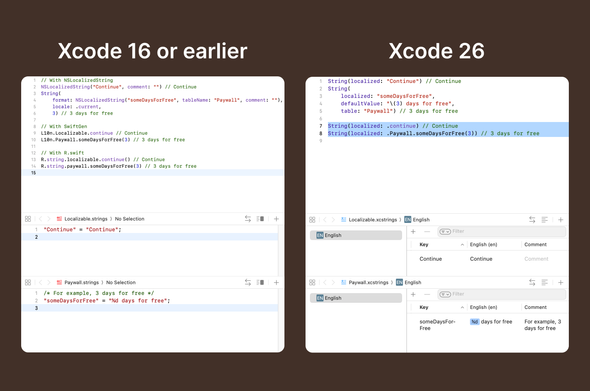
In Xcode 26, Apple added the ability to generate symbols for localized strings. It works almost in the same way as the tools we've been using for 10 years - Rswift and SwiftGen. To use this feature, we need to enable the build setting "Generate String Catalog Symbols" and migrate from Strings to String Catalogs (if this wasn't done before).

WWDC link - https://developer.apple.com/videos/play/wwdc2025/225/?time=820
#xcode #swift #localization

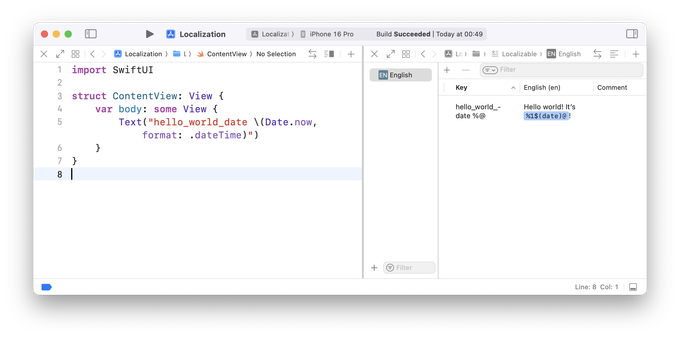
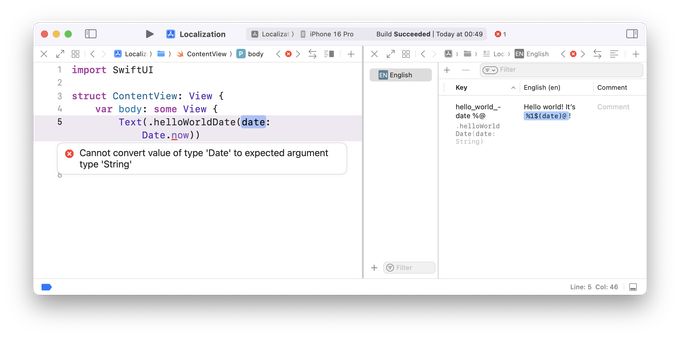
@romanli Mh, I've found this a bit frustrating, because at least in SwiftUI, the string based localization is a bit more powerful. For example, the LocalizedStringKey type in SwiftUI allows String interpolations for all kinds of types as long as you apply a FormatStyle. That capability is just lost when I convert to String Catalog Symbols. And what's worse: The code that Xcode generates doesn't even compile. It only works for very simple cases.
@kaybutter Agree.
But Date.now.formatted(.dateTime) maybe?
@romanli Yea, but that ignores the time zone and locale from the SwiftUI environment.
@romanli I would love to use it, but as long as the generated symbols cannot be made public, it won‘t be able to replace my shared strings in framework targets 🥲
@kaiengelhardt Yes. Unfortunately the generated symbols are internal. The same goes for image and color assets. I hope it will change in the future.