 Nathan Manceaux-Panot
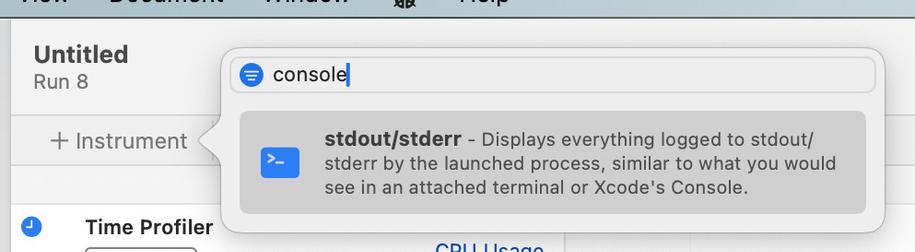
I'm only now learning that you *can* see console output while profiling an app with Instruments. It's an instrument you have to add. Wish I'd known sooner!
@florian @Cykelero the timings from the stdout instrument are not reliable. But I wasn’t aware of a specific perf impact of writing to stdout (not saying it doesn’t exist), that doesn’t exist for OSLog.
Note that OSLog also has a perf impact and depending on what you are measuring and how much you log it can be significant as well.
What do you base your statement on?
I do agree that you should use OSLog, but the main reasons for me would be better structure (easier to filter and display in a good way in tools like instruments) and better privacy.
@pmdj @florian @Cykelero re OSLog performance and comparing it to memcpy: yeah mostly, except that when Instruments records the data it switches to a streaming mode. This means you don’t loose data as easily but significantly impacts performance as the writer now needs to wait for the reader and that’s an XPC call.
At least it was the case a year or so ago, might have changed.
So when Instruments records in Immediate or Deferred mode (not in Windowed mode) it forces the Logging system (including signposts) into this streaming mode.
Now, for most developers looking at performance this is not an issue as they don’t necessarily care about microsecond differences and as long as they don’t have a large number of logs/signposts. But it might be relevant if you do low-level perf optimizations.
(Still not saying that stdout is an alternative. 😅 just pointing out the limitations of OSLog/OSSignpost + Instruments in the default recording setup)
@Cykelero @designatednerd great to see someone used it. 😄
I’d be interested to know what you use it for. Instruments always had the display of stdout, but a couple of years ago (3 or 4?) we transitioned it from „always on by default in a separate view“ to „it’s an instrument now“ for better UX and performance, since the assumption was that most people don’t use it.
@cocoafrog I often reach for print() to get a sense of what my code is doing (e.g. is it reaching that line?). Signposts are slightly slower to type (since you need an OSSignposter) but probably could replace most of my uses.
Today though, I really wanted to know which file changes were triggering my file system watcher! So, the stdout instrument was perfect for printing their path.
(obviously, right after adding the instrument I stopped being able to reproduce the issue haha. classic.)
@Cykelero Are you aware there are also File-specific instruments? :)
Sounds like it might not be what you are looking for in this case, but thought I’d suggest it. ;)
 Florian Pircher
 Joachim
 Phil Dennis-Jordan
 Joachim Bondo