🚴‍♂️ [1/3] Another update from the #Bikerouter world!

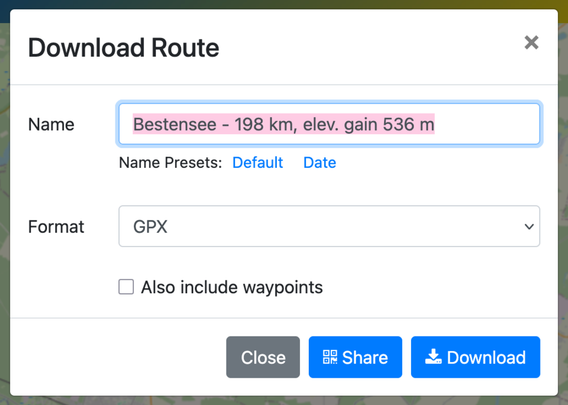
I've redesigned the download dialog (formerly "Export") for a more streamlined and intuitive experience. Here's what's new:

- Dropdown Menu: Format options have been moved to a dropdown, reducing visual clutter.
- Filename Templates: Default filename now includes route details like start/end points and distance (as known), with the option to use the current date for easy sorting on your GPS device.

[2/3]

- Preferences Memory: The site now remembers your last used settings to save you time.
- Improved Layout: Elements are now in a clear grid with better spacing.
- Updated Wording: "Export" is now clearly labeled as "Download."
- Quick QR Access: Jump directly to the QR code sharing from the dialog.

[3/3] These updates aim to enhance efficiency and user experience. Check out the new dialog in the image and let me know what you think. I hope it significantly improves your daily routing tasks, just as it has for me! 🌟

#Bikerouter #BRouterWeb

https://bikerouter.de/

bikerouter.de

▶ Der wahrscheinlich beste Fahrrad-Routenplaner der Welt! Kostenlos und datenschutzfreundlich. Gravel, Rennrad, MTB, City, Long Distance, Trekking uvm.

Marcus Jaschen

@bikerouter Great!

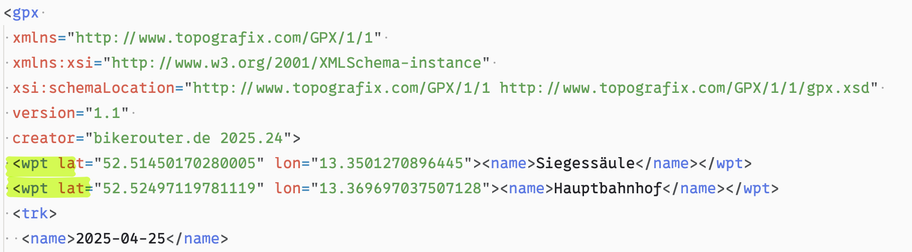
What are waypoints, do we want these included?

@RodMckay The "Waypoints" refer to the Start, Destination, and Via-Points of your planned route. While they're likely unnecessary in the exported file, I chose to keep them to avoid any post-deployment complaints. I'm sure that there're people using this feature and have good reasons for that. Better safe than sorry! 😊
@bikerouter @RodMckay
Actually, what about those POIs - will they be exported to the file? Thanks a lot for a great tool
@flow POIs are exported into GPX, KML and GeoJSON files.