It is 2025!! And the era of me complaining about Ubuntu is OVER!! From now on Andi complains about DEBIAN

Installer was only irritating during the partition step https://mastodon.social/@mcc/113760952350910787

Off the bat: It did not detect or correct for the 1.5x DPI of the laptop. Will someone please tell linux distributions that Lenovo has been shipping hidpi screens primarily for ten years and some of us have less-than-good eyesight. I would really love it if I could someday read my grub menu.

*Clicks "activities"*
*Types "xeyes"*
*"Searching…" appears*
*No results*
*Types "terminal"*
*Types "xeyes" in terminal*

Signs of trouble:
- Whatever the fuck that was
- gnome-terminal is black on white, which I actually prefer, except no way is it going to configure ansi colors correctly
- I'm running Wayland :( :( :( hidpi problems going from BAD to WORSE in 3, 2, 1…

DEBIAN… WHAT IS THIS :(

So there's this thing where everyone pushes Thinkpads for Linux and Lenovo LOVES, FUCKING LOVES, putting 1080p screens in a laptop so you wind up running them at 1.5x hidpi. I had a Yoga like this in like, 2015. Linux distros still treat this like an exotic configuration.

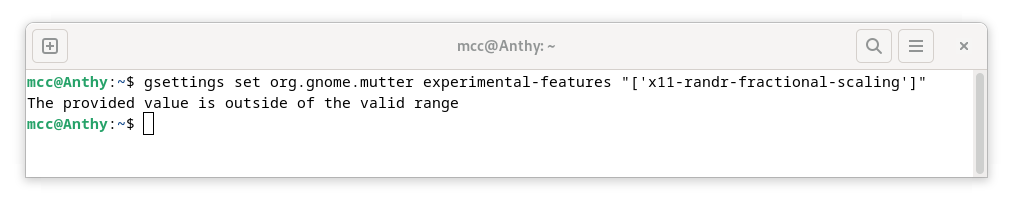
Google sends me to Debian forums which send me to the arch wiki which say to run "gsettings set org.gnome.mutter experimental-features "['x11-randr-fractional-scaling']". Great.

...Debian... what IS this
A point I've been trying to get to, with all three of Android, Linux and Windows, is a point where rather than "logging in" to some cloud syncy thing I have a text file somewhere containing exactly the steps that gets the system just how I like it. And then I just blow away my OS. Repeatedly. And indifferently. Because I can set a new one up in an hour. I've achieved this zen state with Android. I'm close to it with GNOME Linux, but there's a *couple* missing steps in my text file still.

I've switched to Debian and tried to recreate my Ubuntu setup. I hit a hard wall: The combination of (Debian Stable) x (GNOME) x (X11) will not give me fractional scaling, a must have. Swap (X11) for (Wayland) and I get it, but (GNOME) x (Wayland) x (Quartus IDE) is a no-go.

What about (Debian Testing/Trixie) x (GNOME) x (X11)? [EDIT: We looked into it… the patch isn't there either. https://101010.pl/@nabijaczleweli/113761518557209347 ]

наб (@[email protected])

@[email protected] it isn't (as devised by https://tracker.debian.org/pkg/mutter -> versioned links => dget -ux https://deb.debian.org/debian/pool/main/m/mutter/mutter_47.3-2.dsc => grep -r x11-randr-fractional-scaling) if that's the only thing you need in this you can backport this to bookworm mutter quite easily probably

101010.pl
The upshot of the above two posts is that, on the logic that I'm trying to live ON THE EDGE and have a laptop I can just fry every so often, and it is easier to fry it right now than it would be at any other time, that I am just gonna try KDE Plasma. I love the way GNOME looks, but I gotta admit it was giving me constant, awful problems.
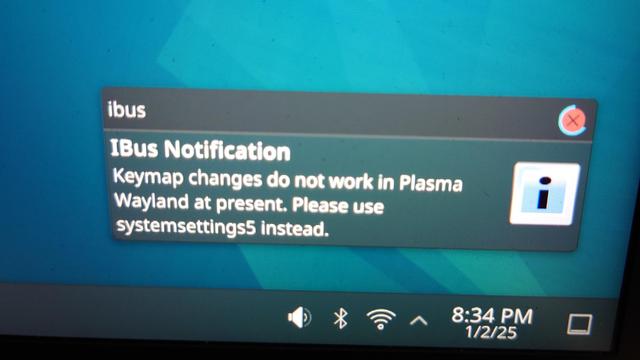
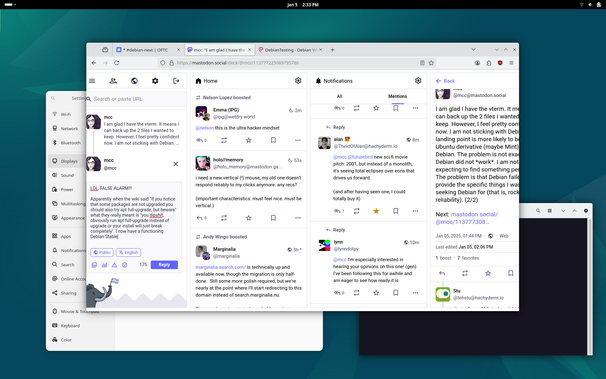
So. I install KDE Plasma. The IRC assures me I don't need to re enter the installer, I can just install kde via apt. I do that and log in to KDE (Wayland). Here is the first thing I see. I have touched *nothing* on this computer yet, except to reverse scroll direction. Bad sign.
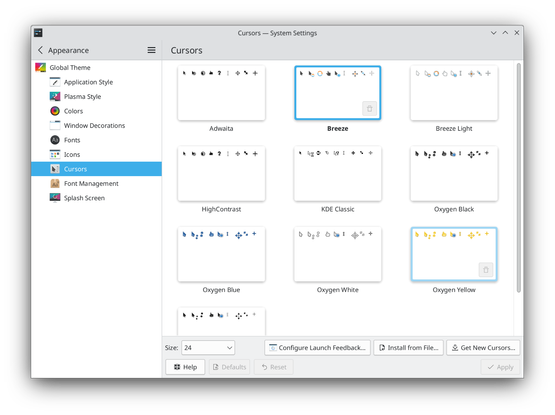
So the first thing I notice upon installing KDE is that my cursor is very ugly. I go in the settings. There's a nice pane with lots of different cursor sets to choose from. This is great! I double click on one. Nothing happens. I notice an "Apply" button. It's grayed out. I select a different cursor set. "Apply" re-enables. I click "Apply". Nothing happens. At no point in this interaction do the cursors change at all. Bad sign.

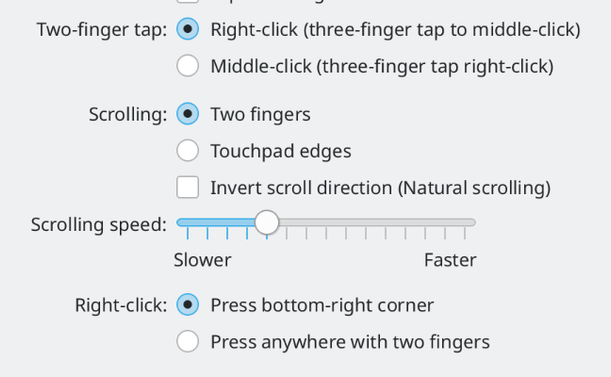
The second thing I notice is that when I click, if the click happens to be in the middle bottom of the touchpad, it pastes whatever the last text I selected in any application was. Not from the regular clipboard. The old X11 clipboard I guess. I'd forgotten how weird that thing was.

The secret to this turns out to be that in the scrollpad bar, it asks about the right-click behavior in two places. "Right click in bottom right" also enables a secret mystery middle click. But it doesn't *say* this

I gave up on KDE. It's ugly and I wasn't even able to make it all the way through my configuration process.

Now I'm in Cinnamon. It's still ugly, but a bit less. Ran through my configuration sequence without trouble. Scroll wheel acceleration rate feels weird and I can't tell if I'm imagining it; "disable touchpad while typing" seems to work worse than GNOME/KDE. This definitely looks, and feels, like A Linux Distribution and I don't mean that as a compliment, but really, I could maybe use this

Hey, Mint users. When I take a screenshot in GNOME, it copies the screenshot both to the clipboard and also to ~/Pictures/Screenshots. When I take a screenshot via the shortcut in Cinnamon, it only puts it in ~. Does anyone know how to make it send it to the clipboard also/instead?
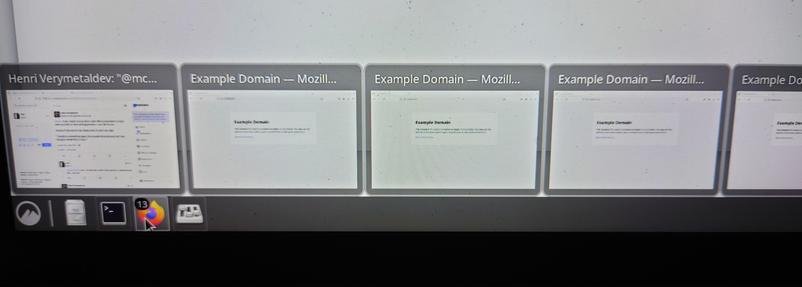
Also, here's my biggest blocker with Cinnamon so far. There's a bar along the bottom of the screen. If I mouse over Firefox, it shows all the Firefox windows. Nice, I like this. But say I open LOTS of Firefox windows. Too many to fit on the screen. It just… goes off the right of the screen? And I can't scroll it? I cannot reach the rightmost windows at all? Is this surprising?
It appears this last thing is an issue with Debian, or possibly with Debian Bookworm. That's okay actually, I have ways of dealing with this.

So here's my current problem. I have attached an external USB drive. The name, in /media/mcc, is a 24-digit GUID. I would like it to be something shorter, such as "chuchu"*. I believe in Ubuntu I could do this by right clicking the drive in GNOME and saying "Rename". The Debian IRC asserts:

1. That Debian doesn't have this feature;
2. That it does have it, but I need to be a GNOME "privileged user". They can't explain what this means.

How do I do this?

* My laptop's name is "Anthy".

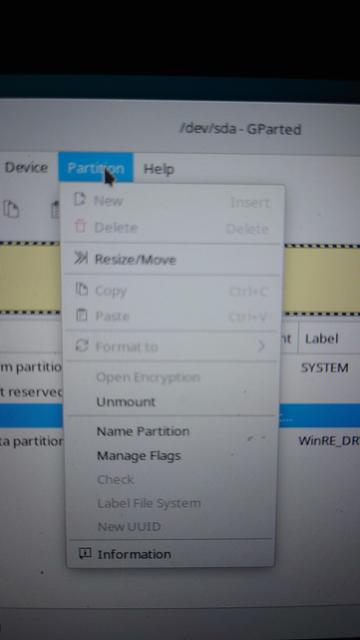
The "Rename" button is actually present in GNOME Nautilus on Debian, but it's grayed out. I tried going into gparted and naming the partition, but it didn't have any effect.

Tried to restart and it took over a minute :/ Got to the "The system will reboot now!" and then it just like…hung there…for a minute… and then suddenly moved on.

Gotta admit, the problems I'm having with Ubuntu were very Microsoft-y (platform lockin, inexplicable design decisions getting in my way) but the problems I'm having with Debian are VERY Linux 2003 (can't scroll in X, text too small and I can't change it, hang on reboot, hard drive is named 24 alphanumeric digits and I can't rename it)

Slowly sinking in that Ubuntu wasn't that bad, I was just frustrated with GNOME breaking all the time and I hated "Snaps". And Linux Mint is literally Ubuntu with GNOME removed and Snaps replaced with FlatPak (which I like). Maybe… I … should just… use… Mint.
Like, I still don't like Cinnamon as much as I liked GNOME. But I also don't hate Cinnamon as much as I hate GNOME. So m… maybe that's a win

By the way, I fixed my disk renaming problem, tho it wasted me well over an hour. The trick was to ignore "partition name" and use "partition label". To do this I had to go into "gnome-disks" and use a hidden menu, accessed by clicking an icon of a triangle inside of a square. Frustratingly, there was also a menu item in gparted for "label file system", but it was grayed out. I don't know why.

I think I might not actually be using a desktop operating system.

Okay.

I am not happy with my new OS. Cinnamon is not quite nice enough.

However, it is *acceptable*. I have my XCompose and Firefox set up how I like them. I've realized I can just mount my old hard drive, ram rustup/cargo from my old home directory into my PATH, drop into my old project directories and just… run stuff. I think I still intend to wipe and try another distro, but for now, I can just Use My Computer. So perhaps I will just enjoy the ability to do that for a day or so.

After two days of using Debian Bookworm [stable] with Cinnamon, and actually being relatively satisfied (less satisfied than I was with Ubuntu, but also less *irritated* by Random Ubuntu Bugs), I decided to upgrade to trixie [testing] as a stop before trying Pop!_OS. I followed:

https://wiki.debian.org/DebianTesting#How_to_upgrade_to_Debian_.28next-stable.29_Testing

See:

https://mastodon.social/@mcc/113777028363772833

After rebooting, my laptop simply blinks an underscore symbol in the upper left corner. Forever. No error message.

I *can* get to a vterm. But no gdm3/X

(1/2)

DebianTesting - Debian Wiki

I am glad I have the vterm. It means I can back up the 2 files I wanted to keep. However, I feel pretty confident now. I am not sticking with Debian. My landing point is more likely to be an Ubuntu derivative (maybe Mint) than a Debian. The problem is not exactly that Debian did not *work*. I am not expecting to find something perfect. The problem is that Debian failed to provide the specific things I was seeking Debian for (that is, rock solid reliability). (2/2)

Next: https://mastodon.social/@mcc/113777308577495918

LOL, FALSE ALARM!!!

Apparently when the wiki said "If you notice that some packages are not upgraded you should also try apt full-upgrade, but beware" what they really meant is "you dipshit, obviously run apt full-upgrade instead of upgrade or your install will just break completely". I now have a functioning Debian Stable

So I only *really* used debian before from like 2000-2001, since then it's mostly been Ubuntu. So maybe I should have known the difference between upgrade and full-upgrade. But I'm reeling a little bit. This is literally

ME: Debian, did you clean your room?

DEBIAN: Yes, mom.

ME: ...

ME: Did you clean ALL of your room?

DEBIAN: ...YES, MOM *loud sound of stomping back to room to clean it*

After upgrading from Debian Stable to Testing, whatever magical system that under both Ubuntu and Stable made it so when I plug a usb drive into my laptop it mounts at /media/mcc/drivename is no longer working. I can manually mount the drive with `mount /dev/sdNN /mnt/drivename` but that is a pain. The suggestion from the debian-next IRC is "debug it".

What is the name of the mystery system that puts mounted drives in /media/username without me having to do anything? What do I grep dmesg for?

Currently scanning a file named /etc/udisks2/mount_options.conf.example trying to figure out if anything at all in it matters. It is all gibberish. Do I want this? How do I know if I want this? This is starting to feel suspiciously like the downsides of arch without any of the benefits
@mcc sudo did you clean all of your room
@Norgg @mcc sudo did you clean all of your room --force
@mcc in a way, isn't full upgrade for changing version, which is what going from bookworm to trixie is?
@gkrnours I don't know. On ubuntu, a version upgrade is done with `apt dist-upgrade`.

@mcc @gkrnours not by the end user at least (maybe under the hood?).

To do a version upgrade, you are expected to use `do-release-upgrade` on Ubuntu.

@mcc @gkrnours dist-upgrade is the old name - it got changed to full-upgrade because people (reasonably) misunderstood it to mean upgrade the distro (to the next major release) and avoided it, instead of just meaning "block anything that would delete a package even if it's an obvious replacement case". (This is equally true of debian and ubuntu, though the usual "the future is here but not evenly distributed" caveats apply.)
@mcc @gkrnours (so yeah, full-upgrade is what you generally want as a human running a command; in *theory* plain "upgrade" is safer to run unattended/automatically but in practice, as you've seen, that's not as true as one would hope.)
@mcc It's good to know that some things haven't changed since 1999.
@mcc btw. I'm using budgie desktop, the main reason: works rather good on ultra wide screens.
@mcc Ubuntu + gnome/ cinnamon/ whatever is my goto. Mint is nice too.

@mcc that about sums up my feelings. The kind of UI design effort that went into macOS and current Windows simply has not been put into any Linux UI. Sometimes, in fact, we're seeing regressions.

You know, I think the plan 9 UI was ported to Linux at some point; you might give that a try.

https://asyncial.github.io/plan-9-linux/

Plan 9 -> Linux

Plan 9 from Bell Labs is one of the more interesting operating systems out there. I’ve always found it interesting to find software, that is in some way inspired by Plan 9 on other operating systems. So, to document what I find on this, I decided to make a list of Plan 9 inspired Linux programs. Ports This category gets the straight-up ports of Plan9 programs to Linux/Unix out of the way, before going further.

@mcc I think I've read all the side threads here. Your journey's are always interesting to follow for me. Please *DO* enjoy some time just using the computer! Disclaimer: my setup is mostly Wayland due to refresh rates being better for my projector, which tends to angle me towards more recent distro releases.

Congrats on ditching snaps! Was the idea to go to Debian that it was stable/familiar to Ubuntu? Maybe I'm in the minority, but Debian stable is just too old for what you seem to want to do. Are non-LTS Ubuntu or Fedora's upgrade cycles too frequent for your workflow? Either would give you more recent versions of both DEs, and Fedora would give you more "vanilla" GNOME than Ubuntu would.

The ‘x11-randr-fractional-scaling' flag all seems from ~2ish yrs ago posts that I see, but I can't tell if this is needed in GNOME 47+ which is what you'd see in non-LTS Ubuntu or Fedora. GNOME 47 finally seems to fix the chromium/electron/x11 fuzzy rendering in Wayland, so I may give it another go. Fedora is very Wayland forward if that's a problem for the Quartus IDE you mentioned (seems like java from the Arch Wiki, which makes me think it'd be fine for Wayland).

I can understand you giving up on KDE, especially the Plasma 5 that would be in Debian 12, and coming from GNOME/Cinnamon's simplicity. It is possible to make it less ugly! My .02 would be for you to try either GNOME or Plasma 6 versions of Fedora (even the live environments) and see if you get more of the “it just works" feel. Still should have wide software compatibility to install what you need like Ubuntu/Debian. I think you ask more of your environment than I do, as I only do light programming these days and play games through Proton.

I’ve personally been thinking about some atomic spins of Fedora being great for recoverability, but 1Password is a part of my workflow and it just behaves oddly on those setups. The ability to instantly rollback might appeal to you in Silverblue, and it's heavy Flatpak focused to boot.

@lwndow Thanks!

I picked Debian/Ubuntu because honestly I've just been using Debian/Ubuntu so long and it's comfortable to me. Also honestly, I'm more than happy with Ubuntu on server, it just makes weird decisions on desktop. I thought Debian might be Ubuntu with less weird decisions.

A thing I didn't know when I made the above post is Debian Stable has significant improvements to fractional scaling in Mutter, so maybe I run a pass testing with that. (EDIT: Oh wait, you said that.)

@lwndow x11-randr-fractional-scaling is a patch created by Ubuntu, and to my knowledge no distros contain it other than the Ubuntus plus Arch. (Arch accepted the patch, Debian rejected it.)
@lwndow Rollbacks are something I'd like to have, but it sounds like sci fi. I probably should have just said screw it and used BTRFS or BRTFS or whatever it's called when I formatted this time.

@mcc BTRFS is good (think _butter_ and you'll get the order right), and it's snapshotting is great, but the philosophy behind what Fedora is doing with atomic and the Universal Blue folks are doing on top of it is a different level.

https://fedoraproject.org/atomic-desktops/silverblue/
https://projectbluefin.io/
https://docs.projectbluefin.io/bluefin-dx/
https://docs.projectbluefin.io/administration#switching-between-streams

Fedora Silverblue

An atomic variant looks, feels, and behaves just like a regular desktop operating system, but your updates are delivered as full images of a working system. This makes every installation identical to every other, and it will never change while in use. What's more, Silverblue will always keep an older version of the system around for you to boot back into, should you need to, allowing you to try new programs, desktops, or even complete version upgrades fearlessly! <br /><br /> The atomic design makes a Silverblue system more stable, less prone to bugs, and easier to test and develop. Applications are installed via Flatpak completely independent of the base system, and CLI tools can utilize the power of containerization with Toolbox. <br /><br/> Silverblue comes with the popular GNOME desktop and follows the standard 13 month release-cycle, making the experience very similar to that of Fedora Workstation.

@mcc @lwndow
Timeshift (paired with Btrfs) makes computer takes a snapshot everytime some critical system components gets updated. It's really cool.

@mcc Only other place I saw this patch while reading after your original thread was someone adapted it for Fedora 37/GNOME 43 (F41 is current with GNOME 47): https://github.com/th1nhhdk/fedora-gnome-xorg-fractional-scaling

Completely relatable on either Debian/Ubuntu’s comfortability. I also started with Debian and moved to Ubuntu early on when it was clear that they were taking desktop experience more seriously (early 2000s). In that era work used RHEL/Centos on the servers, and so I _had_ to be comfortable with that too and was an old RHCE.

I like your classification of Ubuntu making odd choices on the desktop (I agree). I couldn't agree with the snap direction and so I moved on (even though the latest non-LTS does improve their speed *greatly*, so if that was one of your beefs…). For a Debian desktop, I only ever ran testing vs stable for the newer packages. That's still a decent option too for you as Trixie has a more vanilla GNOME 47 / Plasma 6. Debian has been a server OS to me for years due to the desire to have modern mesa/vulkan drivers.

Curious if you've tried non-LTS Ubuntu in your journey? I don't love Ubuntu's opinionated GNOME, but the recency might solve some of the trouble you had.

GitHub - th1nhhdk/fedora-gnome-xorg-fractional-scaling: Xorg fractional scaling on Fedora Linux 37 and GNOME 43, patches taken from https://github.com/puxplaying/mutter-x11-scaling and https://github.com/puxplaying/gnome-control-center-x11-scaling

Xorg fractional scaling on Fedora Linux 37 and GNOME 43, patches taken from https://github.com/puxplaying/mutter-x11-scaling and https://github.com/puxplaying/gnome-control-center-x11-scaling - th1...

GitHub
@mcc This is reaching Douglas Adams levels of obfuscation 😵‍💫
@mcc Probably because someone might change the disk label, so it won't mount on restart and takes a minute to time-out. I expect Ubuntu does dark magic round the back of the bike-shed and changes that too. A typical Simple vs Easy trade-off.
@mcc I keep hoping that one day Xfce will be the best solution to my "which desktop environment should I use" problem, but so far there's always been something.
@xgranade I don't like how it looks :( I'm very picky about margins on things.
@mcc A very fair thing to be picky about!
@xgranade I have this horrible combination of attributes where I have very strong aesthetic tastes, but I don't have correspondingly strong aesthetic skills, so I can identify I don't like a thing but I am not good enough at CSS (or whatever) to fix it :(
@mcc That is truly a curse. I kind of have the same thing for fonts... my opinions on fonts are strong enough that by all rights, I should just make my own, but I have zero applicable skills.
@mcc Depending on when you liked GNOME, you might be interested in MATE, which is a GNOME 2 fork, or Xfce, which is in that same general style

@neia Two days ago, I was using GNOME, and I really liked it. I liked how it looked, and I liked how it felt. But I hated:

- That whenever I brushed my finger against the screen, however briefly, it would enter a "tablet mode" where there is a keyboard on screen and the mouse disappears, and you can't turn this off.
- That searching shows you subfolders, and you can't tell it to not do this.
- That my extensions (including dash-to-panel, which I demand) break every two months when GNOME updates

@neia MATE looks like "old GNOME" (debian has this as "legacy GNOME". The problem is it has the two start bars. I don't want two start bars. I want them combined into one start bar, like the GNOME dash-to-panel extension offers. But the GNOME dash-to-panel extension doesn't work with laptop touchpads (https://github.com/home-sweet-gnome/dash-to-panel/issues/2055). And it also breaks every time GNOME updates, because it is an extension.
"Show Window Previews on Hover" bar is jerky, difficult to control when scrolling with touchpad · Issue #2055 · home-sweet-gnome/dash-to-panel

Dash-to-panel has a feature for hovering over an application and seeing its windows (Settings->Behavior->Hover->"Show window previews on hover" / Gear next to "Show window previews on hover"). It i...

GitHub
@mcc @neia Ubuntu MATE lets you choose a theme, many of which don't feature the two start bars. There's a Windows-like theme, a sort-of-MacOS-like theme, an Ubuntu Unity-like theme, among others.
@cholling @neia Hm. Well maybe I should try it then
@cholling @mcc Regardless which theme you use, you can add and remove panels. You have to have at least one, but if you want seven panels at the top of the screen and three on the left, you can do that with whichever theme you want.
@neia @cholling thanks. I think you said something about this before but deleted it before I could thank you? (Or I just lost it, my mentions are flooded right now)
@mcc Have you taken a look at MATE instead of Cinnamon or GNOME?
@Whovian9369 Honestly, all I wanted was GNOME 3, with the dash-to-panel extension, but it doesn't kick me in the stomach every ten minutes (for the last two months, every time I close and reopen my laptop lid, I have had two start bars, one at the bottom and one on the left).
@mcc That's more than completely fair, and good luck in your search!
@mcc I'm new to Linux, but in my brief time trying Debian, I got the sense that it was Like That by design.
@mcc eject the disk and reattach. The /media/username/UUID path is auto-generated and auto-mounted by gvfs (iirc?).

@mcc I searched for nautilus in https://packages.debian.org/ and found this package that may fix the privileged user error and Ubuntu may install by default.

I don't have a graphical Debian install to check if this does the thing but maybe?

Debian -- Packages

@danmac Hm. I installed this, but I actually can't tell what it changed
@mcc apparently it adds Open as Administrator and Edit as Administrator right click menu.
@mcc Okay I have Nautilus and a USB stick. It's Fedora but I'll see if I can find anything. My Nautilus also has Rename greyed out so at least we aren't starting at "It works on my computer" 😃.

@mcc Looks like the rename thing might be a red herring? Maybe there is always a Rename option for items in the left nav and it's greyed out for things that can't be renamed?

I could change the name of my FAT32 in GNOMEs "Disks" app by going to Edit Filesystem and changing the name. That did also change it in the mount folder (mine is /run/media/danmac/BLAH)

Lastly I did the same with a partitioned USB stick by right clicking the actual Partition and Edit Filesystem.

Technically GParted should have done the same thing though. HTH

@danmac it's fixed. don't worry about it
@mcc Looks like we got the same result. Was a nice distraction trying to figure it out though.
@danmac Yeah, sorry, there was a thread you can't see because I was posting screenshots I didn't feel opsec-comfortable sharing so I set it to "mentioned users only"