 Finn Voorhees
Today I made a Final Cut Pro plugin that renders SwiftUI views on top of your video, with an environment value for the current render time.
I'm not sure why.
Today I made a Final Cut Pro plugin that renders SwiftUI views on top of your video, with an environment value for the current render time.
I'm not sure why.
Super easy to animate things with SwiftUI.
There's all kinds of cool things you could do with this, like add support for keyframes, allow blending with the underlying video, and add more things to the environment, but I'm not sure if anyone in the world would find this actually useful.
🆓 SwiftUIFX is now open source!
Create a SwiftUI view in a Swift package, then add it to Final Cut Pro and render it in your timeline.
Use environment values for the current timeline time to drive SwiftUI animations, preview your view in Xcode while developing, and recompile straight from Final Cut Pro whenever you make a change.
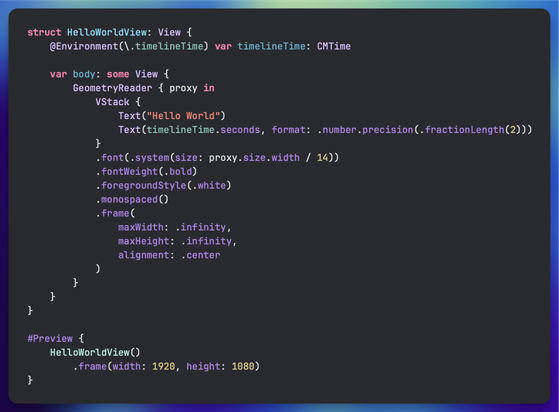
@chris That's the last thing I need to figure out, I'm having trouble getting the dylib and the plugin to use the same environment value keys: https://github.com/finnvoor/SwiftUIFX/pull/1
Hoping to have it working soon, in the demo I was just passing renderTime in one of the system environment keys.
@finnvoorhees Awesomesauce. I always wondered how to host Swift UI View's render surface in another place.
Thanks for giving back to the community. You rock!

 Sam Stephenson
 Sören Gade
 Simon B. Støvring
 Charlie Fish
 Rafa
Rafa Chris Eidhof
 Pietro Gambatesa
 Gödel Escher Spock🦿