
In today's update (2024.8.1):

- Manage Storage
- Bug fixes, including 24-hour-auto-delete mode
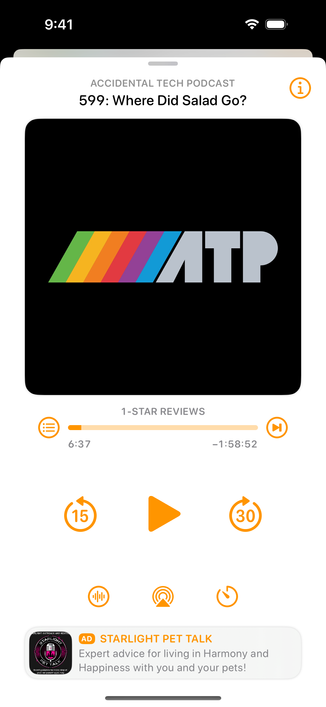
- Seek back/forward buttons on the miniplayer

And by popular demand, the third button on the bottom of now-playing is now the Sleep Timer! (Sleep-timer custom intervals are also better now.)

The "i" button is now in the upper-right. (Tapping the artwork also still brings up info mode.)

I hear your feedback and am experimenting with other options for mode-switching the playback screen. Stay tuned.

@overcastfm Is there a reason that these updates are not being posted in the Announcements space on the app. Many of your users do not use Mastodon or read the update notes in the app store.
@Geoffairey I’d wager because Marco treats notifications as ‘sacred’ in the kind of spectrum of views people have on them
@ehler Not as a pop up Notification, Sorry, the Announcements section
@Geoffairey on that’s actually a super good idea, forgot that was there. Perfect thing to use it for.

@ehler @Geoffairey It does seem a bit odd to have it allow multiple items while it just has the one major update from 7/16.

What’s the threshold for anything to be included there if new features & fixes aren’t being mentioned (or a roadmap update)? Having it just be that one item for the foreseeable future seems under-utilized.

I see that current item ideally in a pinned area at top (for now) while the rest show releases and/or roadmap from latest to oldest.

@ehler @Geoffairey While lower priority compared to features/fixes, it could ease concerns people have when they might not think to look where that info is now (or don’t want to go looking outside of the app for that info.)

Adding a “new” pip/indicator to the settings icon (a-la the new downloads icon) & the announcements item in settings to point people to an unread announcement could be helpful, too (bonus if nitpicky details has a toggle for that indicator.)

@ehler @Geoffairey I’m thinking having it show the new item when opening the app (while good for major announcements like this new major version update [those using the pinned section I mentioned]) would be overkill for smaller updates/details so the indicator seemed like a happy-medium so people know there’s something new (while able to turn it off for those that don’t like seeing unread indicators & don’t want to look at every single announcement.) Some ideas.