
In today's update (2024.8.1):

- Manage Storage
- Bug fixes, including 24-hour-auto-delete mode
- Seek back/forward buttons on the miniplayer

And by popular demand, the third button on the bottom of now-playing is now the Sleep Timer! (Sleep-timer custom intervals are also better now.)

The "i" button is now in the upper-right. (Tapping the artwork also still brings up info mode.)

I hear your feedback and am experimenting with other options for mode-switching the playback screen. Stay tuned.
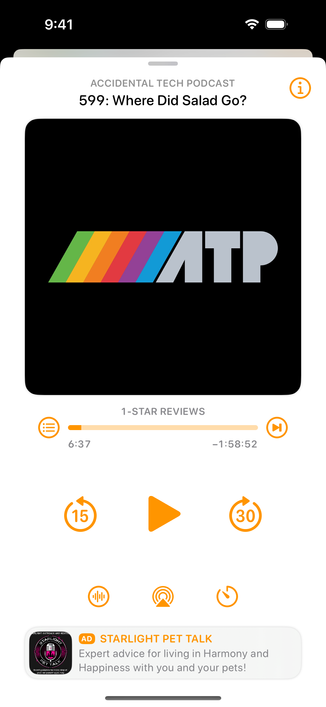
@overcastfm I can't see the difference between all those small round buttons without reading glasses. When I'm out in the streets, I don't have glasses on, and then those are all just blurry small round circles to me.

I also find the new (i) position unreachable on a Max phone, and "tap the artwork" workaround barely discoverable. All of "go to podcast", shownotes, mark played, delete, share are hidden behind that button. Feels like it deserves the prime position the sleep timer now has.

@maikm @overcastfm Increasing the text size for Overcast (via control center, you may need to enable this in Settings first) will increase the button sizes as well. Not an ideal solution if you find all text throughout the app perfectly readable at the current size, but it is an option
@odin @overcastfm Thanks, tried that, but then everything else gets too big. I'm also already at 110% size globally.