
In today's update (2024.8.1):

- Manage Storage
- Bug fixes, including 24-hour-auto-delete mode
- Seek back/forward buttons on the miniplayer

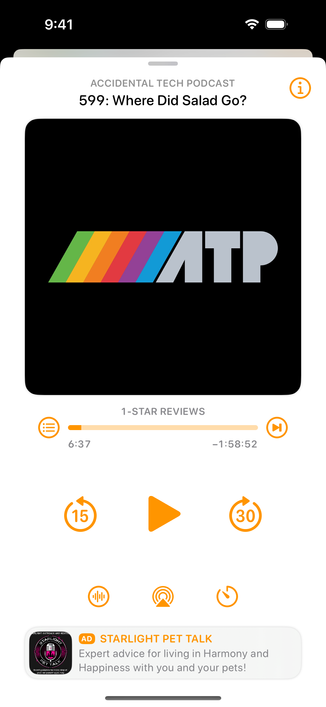
And by popular demand, the third button on the bottom of now-playing is now the Sleep Timer! (Sleep-timer custom intervals are also better now.)

The "i" button is now in the upper-right. (Tapping the artwork also still brings up info mode.)

I hear your feedback and am experimenting with other options for mode-switching the playback screen. Stay tuned.

@overcastfm @marcoarment Crap... I use my phone with the left hand and upper-right is the worst. While at the same time I never use the sleep timer :(
@lolopb Tap the artwork.
@richard5mith Yes, that way it's fine but you can't go back to the artwork without tapping the “i”

@lolopb Good point.

What goes up, what goes down, and how it’s dismissed is what makes it all feel so disorienting.

@richard5mith well, the previous place for the “i" was right but it's been dislodged by vocal fans of sleep timer 😬

@lolopb It was right from an easy to hit at the bottom of screen POV, but it still caused the panel to come from the top while it sat next to a button that made a panel appear from the bottom.

A setting to pick the bottom bar options would solve your issue.

@richard5mith sure but I get why Marco had to react quickly and make a decision as it seems the lack of the sleeper button directly on the screen was a huge issue for many.

Wait and see