
Yup, it's true. Firefox 128 includes new adtech features that are turned on by default and announced with very little fanfare, so most people might not even know they're there.  

Well, this is me telling you they're there. You might want to go ahead and take a minute to opt out.

Here's the little helpful explainer from Mozilla about how it all works:

https://support.mozilla.org/en-US/kb/privacy-preserving-attribution

My read seems to be: Mozilla says website surveillance is generally bad and should be defended against. Cool. No notes. Firefox actually has a lot of nice anti-tracking and privacy features there and that's the main reason why I like Firefox.

But, and I swear I'm not even joking a little bit here, Mozilla goes on to say that advertisers might be happier if Firefox itself just tracked you directly and sent activity reports back to them.

Doesn't that sound great?

Now, to Mozilla's credit, they claim to anonymize the activity reports. And you can still meaningfully opt out of the whole system.

But WTF, mate?! I use Firefox *because* it fights against adtech. Or at least it used to. Now, Mozilla just lets adtech right in the front door and hopes you won't notice?  

Well, we noticed. Mozilla is damage and we need to route around it.

UPDATE: The about:config setting for this is `dom.private-attribution.submission.enabled`. It's a bool. Set it to false to turn it off.
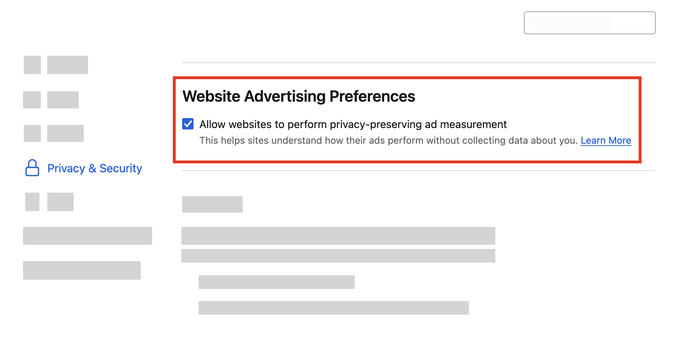
Privacy-Preserving Attribution | Firefox Help

Firefox 128 introduces privacy-preserving attribution, allowing advertisers to measure campaign performance while protecting user privacy.

@cuchaz obligatory librewolf mention. Removes all of the "what the fuck are you doing Mozilla" anti-features and keeps the useful ones that actually enhance privacy. https://librewolf.net/
LibreWolf Browser

A custom version of Firefox, focused on privacy, security and freedom.

@prettygood @cuchaz Quick question.
I'm currently using firefox and have quite a few bookmarks and extensions, how difficult would it be to import those into librewolf?
@flesh @cuchaz if you're using the Firefox Account, then its zero effort. Librewolf lets you use the Firefox account and sync all your stuff the same way you would now. Even if you're not using the Account feature, you can just export the bookmark and re-import them via normal means. The browser is functionally the same, there are just some undesirable parts removed and some default settings changed. https://librewolf.net/docs/features/
LibreWolf Browser

A custom version of Firefox, focused on privacy, security and freedom.

@cuchaz @prettygood @flesh for me importing bookmarks from an html file didn’t work, I had to import them from a json file for it to work. A bug people should maybe be aware of

@prettygood @flesh @cuchaz you can export Firefox bookmarks to a json file by clicking on the three bars menu in the upper right corner of Firefox, going to bookmarks, clicking on manage bookmarks (in the bottom of the bookmarks menu), clicking on import and backup, and selecting backup (rather than export to html, which is what I previously tried but importing that didn’t work).

You can import that file in librewolf using the import browser data setting under general in the settings (or clicking the thing in the upper right corner that appears on fresh installs asking you to import bookmarks, clicking on the dropdown menu (which might say another browser you have installed by default, for some reason you can’t directly select Firefox), clicking on bookmarks from html file, and then in the menu to select a file that opens up clicking on the dropdown menu in the lower right corner of the menu (above open and cancel) which should say html file by default and selecting json file. You should now be able to find the json file you created earlier and open it.

@prettygood @flesh @cuchaz made the explanation a bit more detailed in case others having that problem stumble across this. It really is a bit unnecessarily confusing, both how to make your bookmarks export a json file, and how to import a json file.
@flesh @cuchaz @prettygood I spent way too long today trying to get this to work/finding out how, and almost gave up on librewolf after the html file import didn’t work on second try, so I hope I could’ve made that a bit more easy (and less frustrating and time consuming) for others