Alright, Maybe I take it back.

I believe disabling z-hop helped, but using #orcaslicer I cannot figure out why I'm getting little bumps on the threads.

#3dprinting community, any ideas?

This isn't any kind of axial wobble, doesn't matter if I print fast or slow, cooling high or low (though I don't know why low would be good), arc fitting, precise walls/height, at 0.3 height or 0.1 happens, print temps high or low (this is PLA so, #easymode), wall print order, etc. All of it doesn't change this and the rest of the part itself is perfectly smooth. This only affects this NPT threaded portion.

I plan on using a die (as in a tap & die) for final assembly but I would still rather know WHY it's happening.
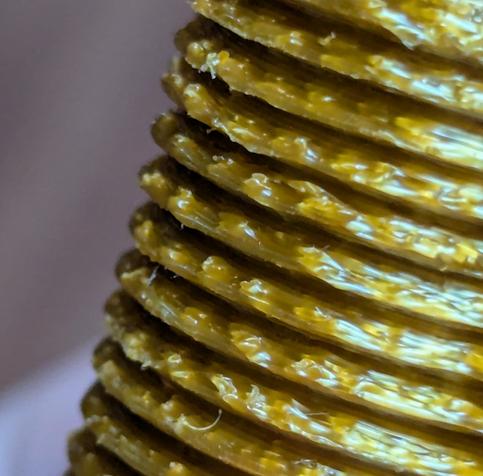

@jmw It's possible that your filament is damp - it looks like steam bubbles. Do you hear a popping sound during printing?

@cybervegan
We are certainly at the high point of our yearly humidity here but I live in the dessert. I leave PLA out for months without issue.

To answer your question however; No popping/steaming visible and if it were steam; That would be an issue on the outer walls everywhere, right? Not just the threads?

@jmw Yes, you wouldn't expect it to be just in one place. What do those areas look like in your slicer? One thing with threads is the *overhang* combined with the layer stack being significantly skewed each increment. I'm now wondering if it might be an artifact of the way the slicer is trying to deal with that situation?

@cybervegan That's my leading theory at the moment since it's (literally) an edge case. However, I tried supports and got the same artifacts. I just can't quite put into words why it's doing what it's doing. Curling, under/over-extruding, etc. makes sense, but 'zits' are a bit strange. Unfortunately FDM being FDM I don't have another way to print this. I could try splitting it but it's hollow part so 🤷‍♂️

I tried Cura but it's been a LONG time since I used it, and it tried to 'correct' the threads somehow, and made them thread-like.

It's not a fix but maybe I'll crank the extrusion down and see if that fixes it. Maybe this is a small part/over-extrusion problem.

@silvenga The photos from the slicer itself are included in the last post. I see nothing in the gcode/slicer that indicates a cause.

I've tried aligned, shortest, etc. No change on any of that. All of the sides roughly look the same, and even with it crawling along at 50mm/s and 100% fan at 195C the artifacts were still present. No blobbing on the nozzle, I clean it between prints.

@jmw @cybervegan hmm... How dialed is your retraction/preasure advance? Could cause fluctuations in extrusion.

@silvenga @cybervegan

I'd say 'it's not' really. There's no pressure advance in play (DD w/PLA).

I dialed it in enough to prevent stringing, and otherwise have done squat with it, but I don't believe there are retractions in those locations. (see photos from previous, previous toot)

@jmw @cybervegan if retraction is too high you may see over/underextrusion as the drive loses control of the filament (eg retracting so much the filament "breaks away" from the molten plastic in the nozzle). Similar with incorrect preasure advance - I've seen PA impact perimeters 10-20 mm from the detraction point - it almost looks delayed.
@silvenga @cybervegan
While true, using direct drive my retraction is 0.4mm, not quite applicable.

@jmw @cybervegan yeah, just rubber ducking here. I know orca slicer's default retraction is quite high - for some reason I'm remembering 2mm? I know prusa slicer defaults to 0.8mm - which can be too high for some pla. (all DD)

Ocra has a really fast PA calibration - might be worth just doing it. I really wish prusa slicer would add filament overrides for PA, Orca makes it trivial. Prusa hard codes PA into the gcode, blah.

@silvenga @cybervegan

I have PA disabled in the printer as the testing I had done with it previously showed no benefits at such small values. I think the OOB retraction in Orca was only 0.8 or 0.6.